
If you are looking for software to use, go to Huajun Software Park! software release AI product list

Hello, if there is a need for software inclusion, please package the software and attach the software name, software introduction, software-related screenshots, software icon, soft copy, business license (if you do not have a business license, please provide the front and back of the corresponding developer ID card and a photo of yourself holding the ID card), and send it to email http://softwaredownload4.com/sbdm/user/login

Close >>

Send to email:news@onlinedown.net

Close >>

Location: Home pageAndroid softwareApplicationMobile audio and video Korean drama TV

99.05%

0.95%
QR code

Scan the QR code to access the mobile version

Permissions: View

The following important permissions need to be called
uses-permission:'android.permission.ACCESS_NETWORK_STATE', allows the program to obtain network information status, such as whether the current network connection is valid
uses-permission:'android.permission.ACCESS_WIFI_STATE', allows the program to obtain the current WiFi access status and WLAN hotspot information
uses-permission:'android.permission.WRITE_EXTERNAL_STORAGE', allows the program to write to external storage, such as writing files on the SD card
uses-permission:'android.permission.READ_EXTERNAL_STORAGE', the program can read files in the device's external storage space (built-in SDcard and external SDCard)
uses-permission:'android.permission.READ_MEDIA_IMAGES'
uses-permission:'android.permission.READ_MEDIA_VIDEO'
uses-permission:'android.permission.INTERNET', allows the program to access the network connection, which may generate GPRS traffic
uses-permission:'android.permission.VIBRATE', allows the program to vibrate
uses-permission:'android.permission.CHANGE_WIFI_STATE', allows the program to change the WiFi state
uses-permission:'android.permission.CHANGE_NETWORK_STATE', allows the program to change the network status, such as whether it is connected to the Internet
uses-permission:'android.permission.CAMERA', allows the program to access the camera to take pictures
uses-permission:'android.permission.SYSTEM_ALERT_WINDOW', allows the program to display the system window
uses-permission:'android.permission.BROADCAST_PACKAGE_ADDED'
uses-permission:'android.permission.BROADCAST_PACKAGE_CHANGED'
uses-permission:'android.permission.BROADCAST_PACKAGE_INSTALL'
uses-permission:'android.permission.BROADCAST_PACKAGE_REPLACED'
uses-permission:'android.permission.POST_NOTIFICATIONS'
uses-permission:'com.xyhj.hanju.permission.JPUSH_MESSAGE'
uses-permission:'android.permission.VIBRATE', allows the program to vibrate
uses-permission:'android.permission.POST_NOTIFICATIONS'
uses-permission:'com.huawei.android.launcher.permission.CHANGE_BADGE '
uses-permission:'com.hihonor.android.launcher.permission.CHANGE_BADGE'
uses-permission:'com.vivo.notification.permission.BADGE_ICON'
uses-permission:'android.permission.REQUEST_INSTALL_PACKAGES', allows access to installed applications from unknown sources
uses-permission:'com.android.launcher.permission.READ_SETTINGS'
uses-permission:'android.permission.FLASHLIGHT', allows access to flash
uses-permission:'android.permission.DISABLE_KEYGUARD', allows the program to disable the keyboard lock
uses-permission:'android.permission.READ_SETTINGS'
uses-permission:'android.permission.MODIFY_AUDIO_SETTINGS', allows the program to modify the sound setting information
uses-permission:'org.simalliance.openmobileapi.SMARTCARD'
uses-permission:'android.permission.READ_MEDIA_AUDIO'
uses-permission:'com.xyhj.hanju.andpermission.bridge'
uses-permission:'android.permission.READ_LOGS', allows the program to read the system's underlying logs
uses-permission:'android.permission.GET_TASKS', allows the program to obtain task information
uses-permission:'com.xyhj.hanju.heytap.msp.mobad.BROADCAST_PERMISSION'
uses-permission:'android.permission.WAKE_LOCK', allows the background process to still run after the phone screen is turned off
uses-permission:'android.permission.FOREGROUND_SERVICE'
uses-permission:'com.xyhj.hanju.permission.MIPUSH_RECEIVE'
uses-permission:'com.coloros.mcs.permission.RECIEVE_MCS_MESSAGE'
uses-permission:'com.heytap.mcs.permission.RECIEVE_MCS_MESSAGE'
uses-permission:'com.asus.msa.SupplementaryDID.ACCESS'
uses-permission:'freemme.permission.msa'
uses-permission:'freemme.permission.msa.SECURITY_ACCESS'
uses-permission:'oplus.permission.settings.LAUNCH_FOR_EXPORT'
uses-permission:'com.vivo.identifier.permission.OAID_STATE_DIALOG'
uses-permission:'com.miui.systemAdSolution.adSwitch.PROVIDER'
uses-permission:'com.xyhj.hanju.openadsdk.permission.TT_PANGOLIN'
uses-permission:'android.permissio.WRITE_EXTERNAL_STORAGE'
uses-permission:'com.xyhj.hanju.permission.KW_SDK_BROADCAST'
uses-permission:'android.permission.SYSTEM_OVERLAY_WINDOW'
uses-permission:'com.google.android.gms.permission.AD_ID'
uses-permission:'com.huawei.android.launcher.permission.CHANGE_BADGE'

Korean Drama TV 1.6.4

Special area
Software size:69.3MB
software language:Simplified Chinese
Software rating:
Software type:Domestic software
Software licensing:shareware
Update time:2025-10-23
Application platform:Android
Software classification:Mobile audio and video
version:1.6.4
Registration number:Chongqing ICP No. 19002559-9A
Software vendor:Chongqing Xiawen Technology Co., Ltd.

Software introduction Related topics FAQ Download address

Recommended for you:- korean drama tv

Basic introduction
Korean drama TV segment first LOGO
      Korean Drama TV official appIt is a mobile application that focuses on providing online viewing services for Korean TV series. It integrates "massive resources + immersive experience + cross-screen interaction" and covers multiple terminal devices such as mobile phones, tablets, and TVs. Whether it's the latest popular dramas or those classic Korean dramas,Korean drama TV appAll can be provided. Korean drama TV does not allow users to easily find the dramas they want to watch, and provides a high-definition viewing experience. It provides "ad-free, high-definition quality, and simultaneous updates" viewing services for Korean drama fans around the world, and at the same time builds a communication community for drama fans.

Korean drama TV screenshots


    Korean drama TV official app introduction


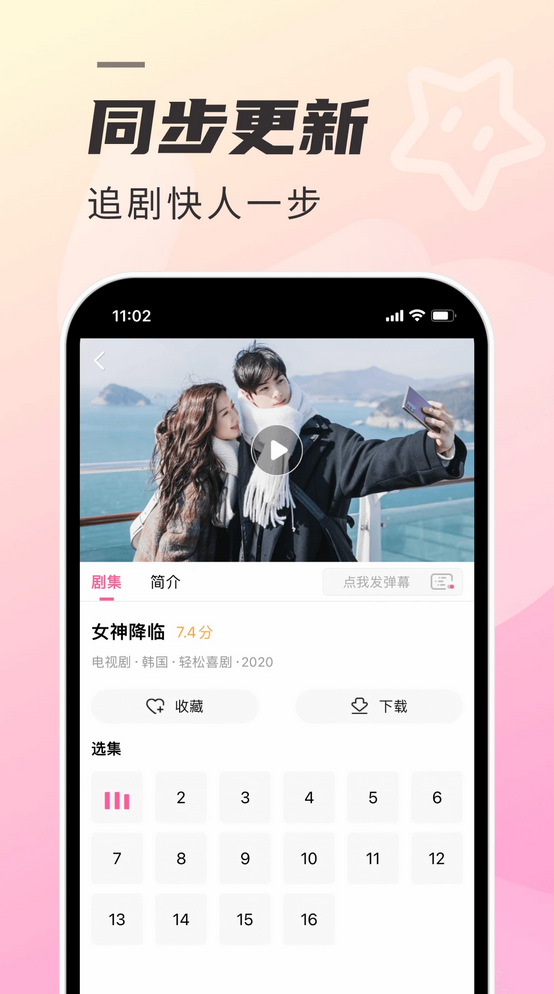
    real time updates

​ ​ ​​​​​​​​​​​​​​​​​​​​​​​​​​​​​​​​​​​​​​​​​​​​​​​​​​​​​​​​    Out out of the Korean drama TV app, the real-time update function is undoubtedly one of its most popular features. This allows users to seize every opportunity to watch dramas in a timely manner even in their busy lives.

    HD playback

The ultimate visual experience Korean drama TV app supports multiple resolution options, including but not limited to 480P, 720P, 1080P and even 4K. Users can choose the most suitable playback quality according to their network conditions and needs.

    Intelligent recommendations

​​ ​Accurately matching your tastes, the Korean drama TV app provides users with personalized movie viewing recommendations through its intelligent recommendation system.
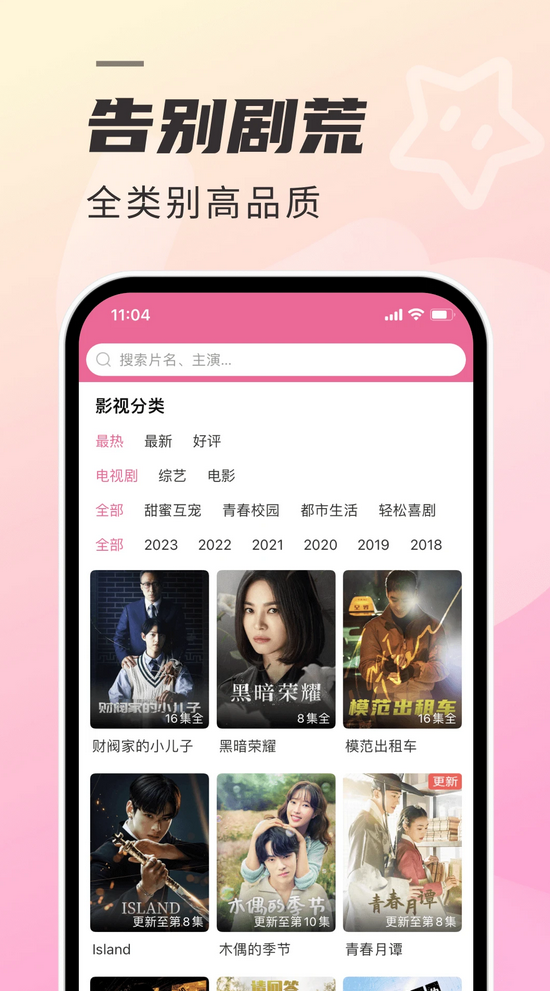
Korean drama TV screenshots

    multi-language subtitles

Breaking language barriers Korean drama TV’s multi-language subtitle feature supports subtitle options in multiple languages, including but not limited to English, Chinese, Japanese, Spanish, etc., covering major languages around the world.

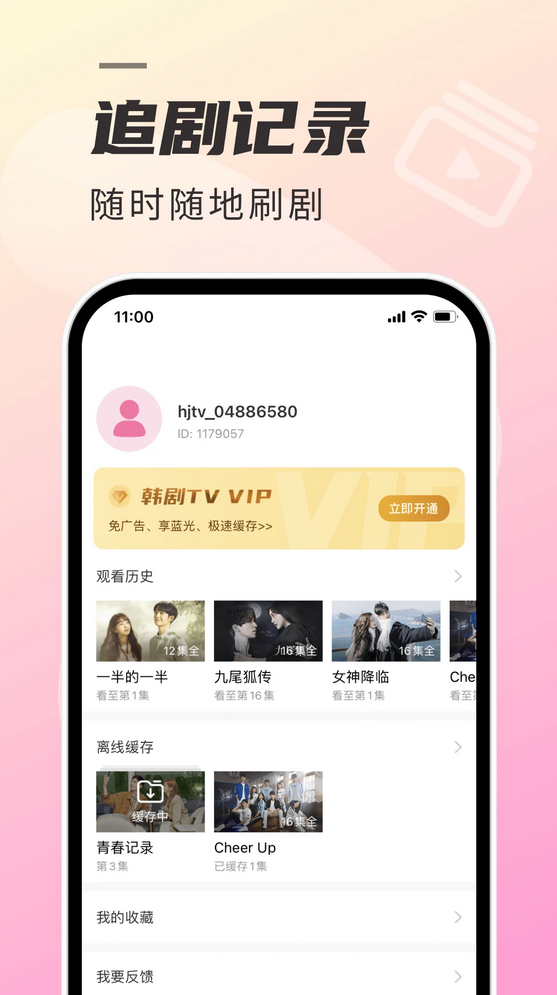
    Offline download

​​Watch Korean dramas anytime, anywhere The TV app provides an offline download function, allowing users to download and save their favorite Korean dramas in advance to their mobile phones, so that they can watch them at any time without being connected to the Internet, which greatly increases the convenience and flexibility of watching movies.

    Korean drama TV features


      Full scene resource coverage

It contains more than 100,000 hours of content, covering Korean dramas, Korean variety shows, movies and celebrity special topics, and updates popular dramas simultaneously with local TV stations.

The library of classic and old dramas is fully covered, and new dramas can be updated as quickly as possible with Chinese subtitles available online within 2 hours of local broadcast.

      Technical experience upgrade

It supports 4K ultra-clear image quality and HDR dynamic enhancement. In 2025, a new "AI image quality repair" function will be added, which can intelligently optimize early 480P drama series to 1080P.

                                                             Original "multi-terminal seamless playback" technology, which automatically synchronizes playback progress and image quality settings when users switch from mobile phones to TVs.
Korean drama TV screenshots

      Intelligent interactive system

The "Drama Watching Manager" function based on deep learning can automatically record viewing progress and generate a personalized drama watching calendar.

The barrage interactive system supports real-time translation, allowing users to communicate with drama fans from other countries in their native language.

      Cross-screen ecology

      手机端与电视端深度联动:手机搜索内容可一键投屏至电视,电视端扫码登录后同步收藏列表。

The TV version has specially optimized the large-screen UI, added a "family viewing mode", and supports multi-person voice control and separate account viewing records.
Korean drama TV screenshots


    How to put Korean drama TV on TV


      Equipment preparation

Make sure your phone and smart TV/TV box are connected to the same Wi-Fi network (this is the basic condition for successful screen casting).

The TV needs to support screen casting function (such as built-in DLNA, AirPlay or Miracast protocol), or through third-party devices (such as Chromecast, Apple TV, etc.) are implemented.

      Operation process

Step 1: Open the Korean Drama TV app on your phone, select the episode you want to watch and enter the playback interface.

Step 2: Click the "TV Cast Button" in the upper right corner of the playback interface (usually displayed as a TV icon or cast symbol).

Step 3: The app automatically searches for available devices under the same Wi-Fi and selects your TV name in the list.

Step 4: Some devices require a verification code (for example, a Samsung TV may require a PIN code). After confirmation, the screen casting can be successful.

    Korean drama TV update log:


Developer GG said there are really no bugs this time~

Huajun editor recommends:

Korean Drama TV is a software that does not require learning to use. It is a very simple tool. Users in need can download and use it in the Huajun Software Park. You are guaranteed to be satisfied. In addition, there are many similar software of the same type available for download, such as:Y2002Music,American drama bird,AZ Screen Recorder,LeTV Video 2021,Kugou Music 2021Wait.


Related topics

  • korean drama tv

    korean drama tv

  • Korean drama TV special collection

    Korean drama TV special collection

FAQ