





 You may like






Software features
Unified management of multiple devices
It supports the management of Ruijie's multiple routers, switches and other network equipment. Users can centrally manage all equipment through one platform, simplifying the operation process.
Intelligent network optimization
Provides one-click optimization function, automatically detects network problems and adjusts parameters, improves network speed and stability, and solves problems such as network freezes and delays.
Children's online protection
The built-in parental control function supports limiting the Internet time and access content of children's devices, helping parents create a healthy network environment.
Scenario-based network configuration
It provides game acceleration, video acceleration, smart home and other scene modes. Users can quickly switch according to needs to optimize the network experience in specific scenarios.
Device access control
Real-time monitoring of devices connected to the network, and support for blocking unfamiliar devices with one click to prevent network surfing and ensure home network security.
Visualize network topology
Using a graphical interface to display the home network topology, users can intuitively understand the device connection status and quickly locate network problems.
Professional-grade network diagnostics
Provides tools such as network speed measurement, signal strength detection, and frequency band analysis to help users deeply understand network conditions and accurately solve network problems.
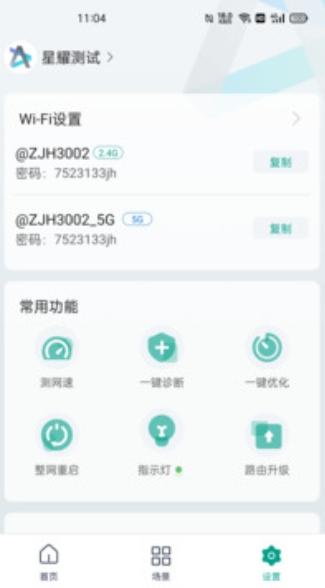
Software function
Device management
View the list of connected devices, including device name, IP address, MAC address and other information.
Perform operations such as speed limiting, disconnecting the device, and modifying the remark name on the device.
Support device access approval to prevent unfamiliar devices from accessing the network without authorization.
network monitoring
Real-time display of network speed, traffic usage, and device online status.
Provide historical network data statistics to help users analyze network usage trends.
WiFi management
Modify WiFi name, password, and set hidden SSID.
Adjust WiFi frequency band (2.4GHz/5GHz) and channel width to optimize signal coverage.
Supports WiFi timing switch to save energy consumption.
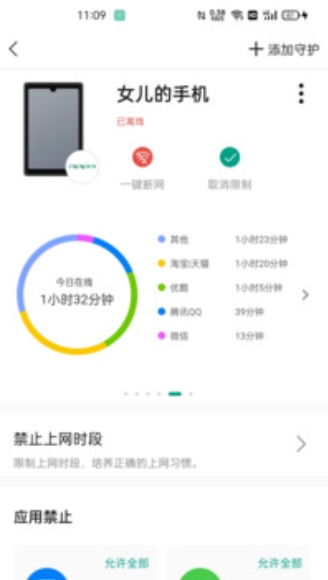
Parental controls
Set the Internet time period for children's devices, such as disabling the Internet during study time.
Filter bad websites and restrict access to specific apps.
Check the Internet history of children's devices to understand their Internet behavior.
guest network
Set up guest WiFi separately and isolate it from the main network to ensure home network security.
Customize guest network name, password and expiration date.
Firmware upgrade
Check and upgrade your router firmware with one click to get the latest features and security patches.
Remote management
Supports remote management of home network through mobile APP, and controls network status anytime and anywhere.
FAQ
Unable to connect to router
Problem description: The APP cannot find the router or the connection fails.
Solution:
Make sure your phone and router are on the same LAN.
Check whether the "remote management" function is enabled on the router (if remote connection is required).
Try restarting the router and mobile APP.
WiFi signal is weak or unstable
Problem description: WiFi signal is poor in some areas and frequently dropped.
Solution:
Use the "WiFi Optimization" function of the APP to adjust the channel and frequency band.
Try changing the location of the router to avoid signal blockage.
If your router is older, consider upgrading to a newer device that supports WiFi 6.
Ruijie Xingyao update log:
Sweep the bug out and carry it out to the end
Optimize user feedback issues and improve detailed experience
Huajun editor recommends:
Ruijie Xingyao has always been a common network communication method for most netizens. Its dominance in the minds of netizens is obvious. It is strongly recommended that users download Ruijie Xingyao and use it. Come to the Huajun Software Park to download it. In addition, there areEnterprise WeChat,Canon Camera Connect,Crazy Dial,Classmate Record,IP sea mobile phone IP changing softwareAvailable for download.



























Your comment needs to be reviewed before it can be displayed