
If you are looking for software to use, go to Huajun Software Park! software release AI product list

Hello, if there is a need for software inclusion, please package the software and attach the software name, software introduction, software-related screenshots, software icon, soft copy, business license (if you do not have a business license, please provide the front and back of the corresponding developer ID card and a photo of yourself holding the ID card), and send it to email http://softwaredownload4.com/sbdm/user/login

Close >>

Send to email:news@onlinedown.net

Close >>

Location: Home pagePC softwareSystem softwaredata recovery Huilong WORD file recovery software
Huilong WORD file recovery software

Huilong WORD file recovery software 1.72

QR code
  • Software licensing: Trial software
  • Software size: 0.54MB
  • Software rating:
  • Software type: Domestic software
  • Update time: 2024-12-23
  • Application platform: Winxp/vista/win7/2000
  • Software language: Simplified Chinese
  • Edition: 1.72

Software introduction Related topics FAQ Download address

Basic introduction
Huilong WORD file recovery software segment first LOGO
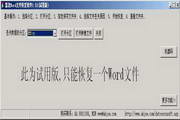
Huilong Word file recovery software is a special data recovery tool that is specially used to recover Word files lost due to accidental deletion, formatting, file system errors, partition inability to open, etc. It supports hard disks, CDs, U disks, MP3s, digital cameras, mobile phones, various memory cards and other storage media. Supports various partition formats such as FAT, FAT32, exFAT, NTFS, CDFS, etc., but cannot recover files compressed and stored in NTFS partitions, nor can it recover encrypted files. Scan the entire disk to find document data and never miss any recoverable Word file.

This software supports the recovery of various versions of Microsoft Word documents, including the docx file format of Office 2007, and also supports the recovery of Kingsoft WPS text documents. The success rate of file recovery is very high.

Huilong Word file recovery software will not write data to the source partition during the file recovery process, so it can be guaranteed that the source data will not be damaged again and can be used with confidence. The software also supports the recovery of Word files from disk image files, which facilitates off-site data recovery. The software itself also has the function of creating disk image files.

Tip: Do not download the software to the drive letter where the data is to be recovered, and do not decompress the file to the drive letter where the data is to be recovered, otherwise the source data may be destroyed again. If the camera is directly connected to the computer for data recovery, please ensure that the battery power is sufficient to avoid running out of power during the recovery process and having to scan again next time.
Related topics

  • zip file recovery software

    zip file recovery software

  • Huilong Photo Recovery Software Special Topic

    Huilong Photo Recovery Software Special Topic

FAQ

Huilong WORD file recovery software

Huilong WORD file recovery software 1.72

Close