

If you are looking for software to use, go to Huajun Software Park! software release AI product list

Hello, if there is a need for software inclusion, please package the software and attach the software name, software introduction, software-related screenshots, software icon, soft copy, business license (if you do not have a business license, please provide the front and back of the corresponding developer ID card and a photo of yourself holding the ID card), and send it to email http://softwaredownload4.com/sbdm/user/login

Close >>

Send to email:news@onlinedown.net

Close >>

Flush iFinD

Flush iFinD Green Version v1.10.12.315.001

QR code
  • Software licensing: shareware
  • Software size: 122.85MB
  • Software rating:
  • Software type: Domestic software
  • Update time: 2025-03-10
  • Application platform: win7 and above
  • Software language: Simplified Chinese
  • Edition: Green version v1.10.12.315.001

Download the service agreement at the bottom of the page

Software introduction Related topics FAQ Download address

Recommended for you:- Flush iFinD Flush

Basic introduction
Flush iFinD segment first LOGO
      Flush iFinDThe green version is a professional and powerful software. Flush iFinD Green Edition covers multiple types of data such as stocks, funds, bonds, indices, commodities, bank financial management, trusts and macro industries, and continuously pushes announcements, information data and research reports throughout the day.


Flush iFinDSoftware function

Data

Authoritative source and comprehensive coverage

Data is accurate and updated in a timely manner

Information

Research Report Announcement Synchronous Easy Search

News hot spots 7x24 uninterrupted

Tools

Intelligent stock selection Excel plug-in

Public opinion monitoring focuses on 24 hours

Services

Door-to-door installation with dedicated explanation

After-sales service, quick response

How to use Flush iFinD

Step 1: Set the selection range - set the selection range by selecting the section
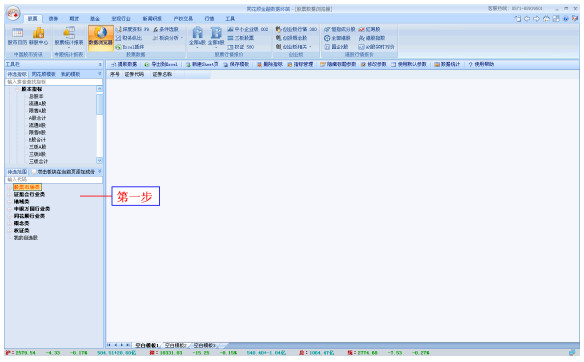
Flush iFinD screenshot

Step 2: Select indicators

Flush iFinD screenshot

Step 3: Set indicator parameters - determine the parameters of the selected indicator
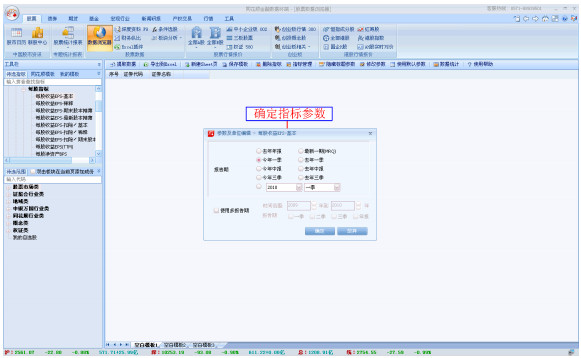
Flush iFinD screenshot

Step 4: Extract data - click the "Extract Data" button to obtain the corresponding data report
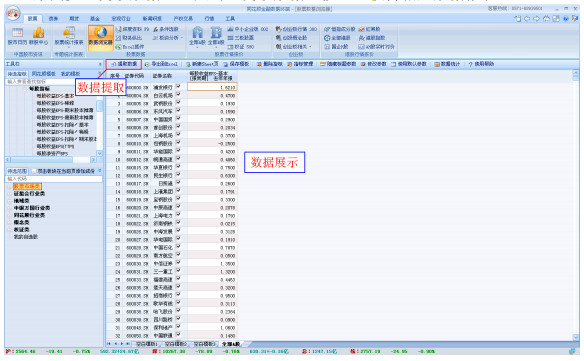
Flush iFinD screenshot

Flush iFinD update log

1. Fixed other bugs;

2. Optimized software compatibility.

Huajun editor recommends:

It is one of the best among stock trading software. It has won unanimous praise from users for its comprehensive functions and simple operation. Come and download it and give it a try. The editor has also prepared for youSouthwest Securities Golden Idea Wealth Management Terminal,Shanxi Securities Huitong Qifu Analysis Trading System,Shenwan Hongyuan Financial Terminal,JD Finance PC version,Huafu Securities Great Wisdom Professional Edition

FAQ

Flush iFinD

Flush iFinD Green Version v1.10.12.315.001

Close

