






NetEase Cloud Music Software Functions
【Tens of Ten Millions of Songs Library】, a full range of Chinese, European, American, Japanese and Korean music, electronic music, ACG, ancient styles and other music types, covering a wide range of new songs by popular singers such as Eason Chan, Joker Xue, JJ Lin, Faye Wong, Li Ronghao, Deng Ziqi etc.
【Personalized Recommendation】, a well-received algorithm, automatically recommends new songs that you are interested in, and understands you better than you do;
【Ultra-clear sound quality】, amazing CD sound quality, first ultra-clear sound;
【Wonderful Playlists】, with a library of over 2.1 billion playlists, can meet your music listening needs in various scenarios such as running, studying, working, and gatherings;
[Fun Music Review], a unique music review atmosphere in the music APP, the comments are very lively, more than 800 million people listen to the songs together and write reviews together, interesting jokes, stories, emotions... you can’t stop reading the music reviews;
【Yuncun Community】, a music community where villagers create, express, communicate and discuss, a new cloud village where you can not only listen, but also watch and play;
【Celebrity Settlement】Thousands of major celebrities, professional musicians, and well-known DJs have settled in;
【Anchor Radio】, music stories, talk shows, emotional topics, good programs can be easily shared.
【Professional Interpretation】Thousands of celebrity interviews, radio programs, and professional musicians will interpret weekly global music trends for you every week;
NetEase Cloud Music Software Features
- A vast music library and a unique algorithm, it is easy to come across those songs you have never heard but also like. [Personalized recommendations] and [Private FM] know you better than you do;
- Stunning [320K sound quality], you can immerse yourself in the wonderful music levels at any time;
- The first domestic music APP with "playlist" as the core structure, a comprehensive and high-quality "playlist" library, and batch processing It’s easier to listen to great music; create a “playlist” easily in one step, making music sharing easy and fun;
- A powerful [music review] atmosphere, the same song, through other people's comments, you can experience the story, experience the same feelings, and find resonance in the comments.
- Users upload [Anchor Radio], music stories, talk shows, emotional topics, everyone can express themselves easily.
- More than a thousand big-name celebrities, professional musicians, and DJs are stationed here, and professional private "playlists" and music recommendations are available to highlight the style; professional music editors provide novel and unique weekly special comments, making listening to music more interesting;
- A huge music library team, a 365*24 customer service team with quick feedback, a product team that listens to a thousand users every day, and a market operation team provide all users with the most considerate services and products day and night.
Download NetEase Cloud Music and have a wonderful music experience immediately!
NetEase Cloud Music installation steps
1. Search for NetEase Cloud Music in the Apple App Store, then find this software and click to get it.
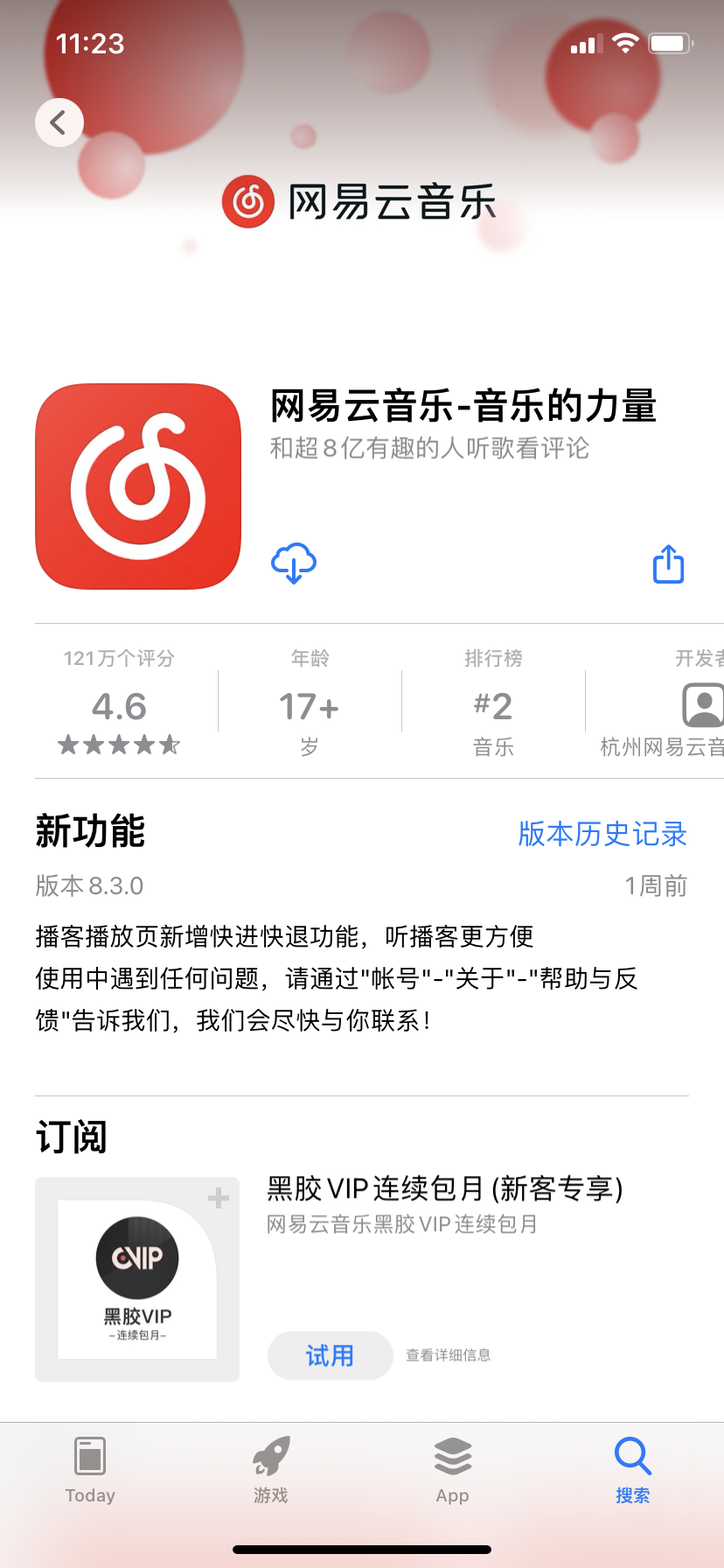
2. NetEase Cloud Music APP is being downloaded.
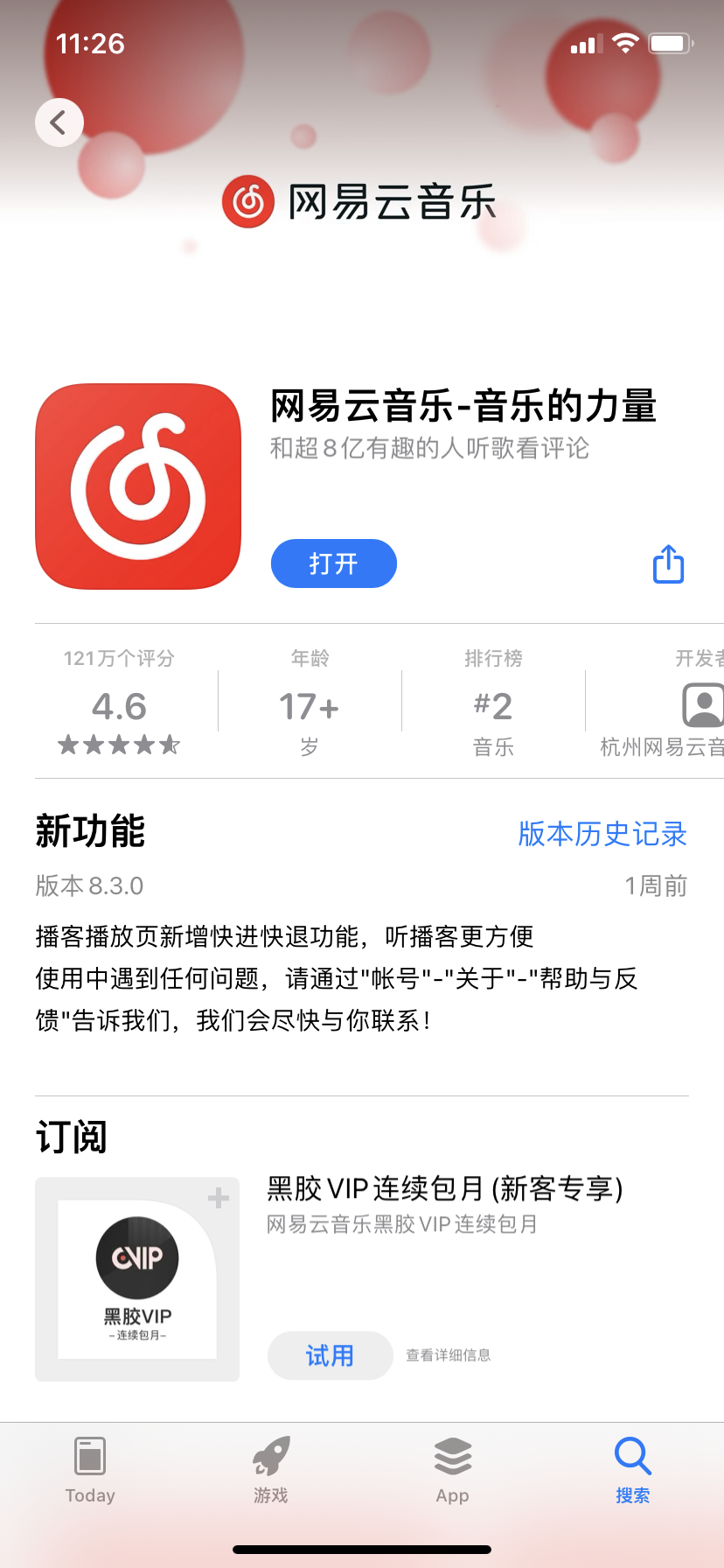
3. At this time, the installation of NetEase Cloud Music APP is completed, click to open it and you can use it.
How to use NetEase Cloud Music
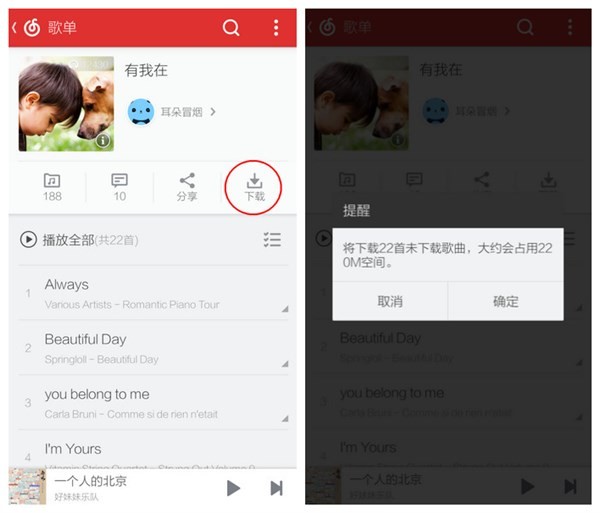
The first type of song list download
Did you see the four options in the second column of the playlist page? The download icon on the right is the button to download the playlist. After selecting it, you will be prompted whether to download the entire playlist. Of course, it will also tell you the number of songs and the total size of the playlist.
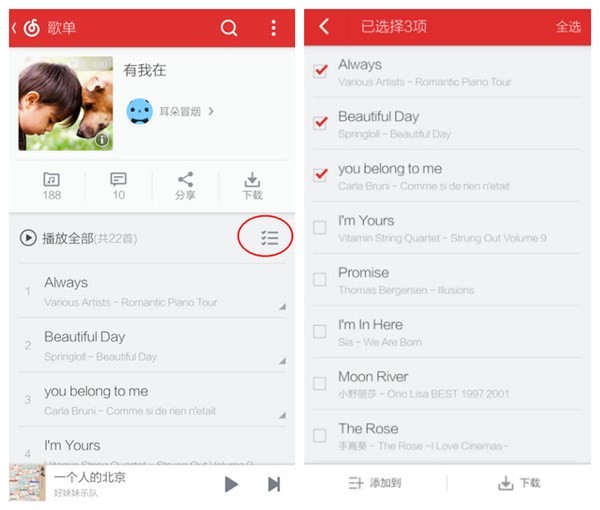
The second type of batch download
At the end of Play All in the third column of the playlist, there is a multi-select option. By selecting this, you can download the songs in the playlist in batches, and you can also add songs in batches.
The third type of single download
There is a symbol in the lower right corner behind each single, which is the small gray triangle! Select and the operations for the single will appear, including the download option.
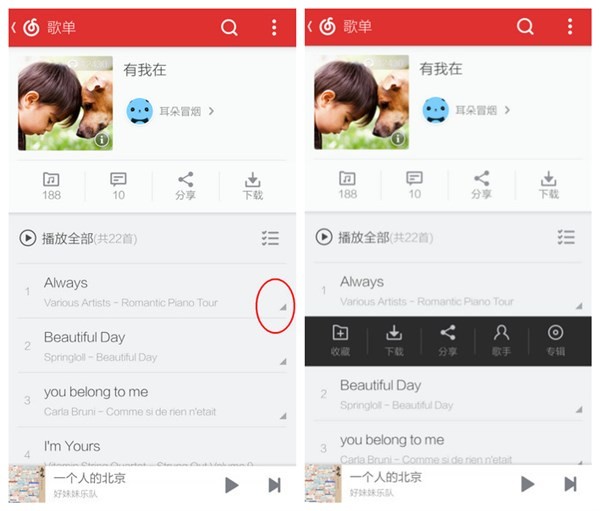
The fourth type of trial download
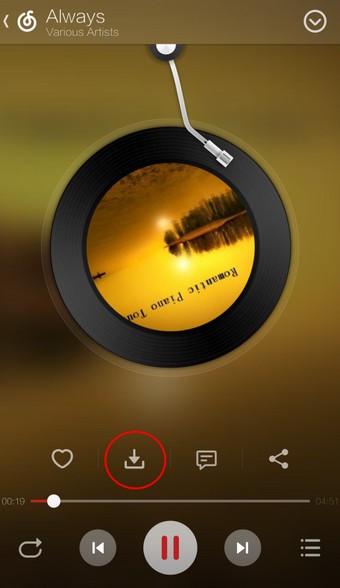
If you are not in a hurry, friends will choose to listen to it first to see if it suits their taste before deciding to download it. Then after choosing to play, in the playback interface, if you think it sounds good, you can click the second "Download" button among the four options under "Album"!
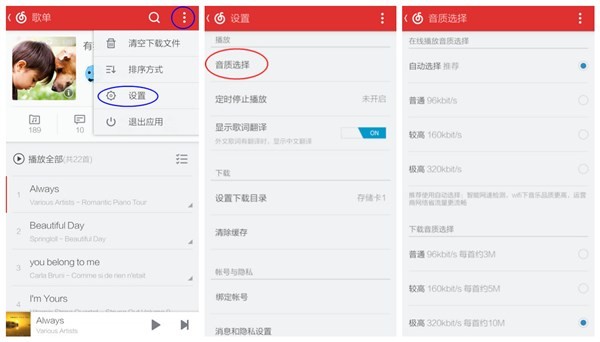
In addition, as mentioned earlier, NetEase Cloud Music provides high-quality online playback and downloading. If you want to automatically download high-quality music when downloading, you can find the sound quality selection settings in the settings in the upper right corner of the first- and second-level pages of NetEase Cloud Music.
NetEase Cloud Music FAQ
Question: How do I scan the QR code to log into the PC version of NetEase Cloud Music?
Answer: The first step is to open NetEase Cloud Music on our mobile phone and click the list icon on the upper left
The second step is to open the sidebar of NetEase Cloud Music and click Scan
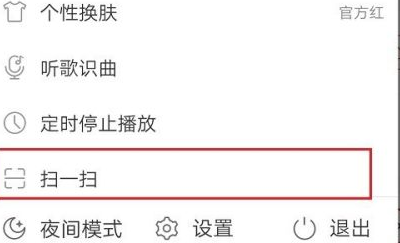
The third step is to scan the QR code after entering the interface.
The fourth step is that when we use the computer version of NetEase Cloud Music, we can use our mobile phone to scan the QR code to log in without entering the account password.
Question: How to uninstall NetEase Cloud Music?
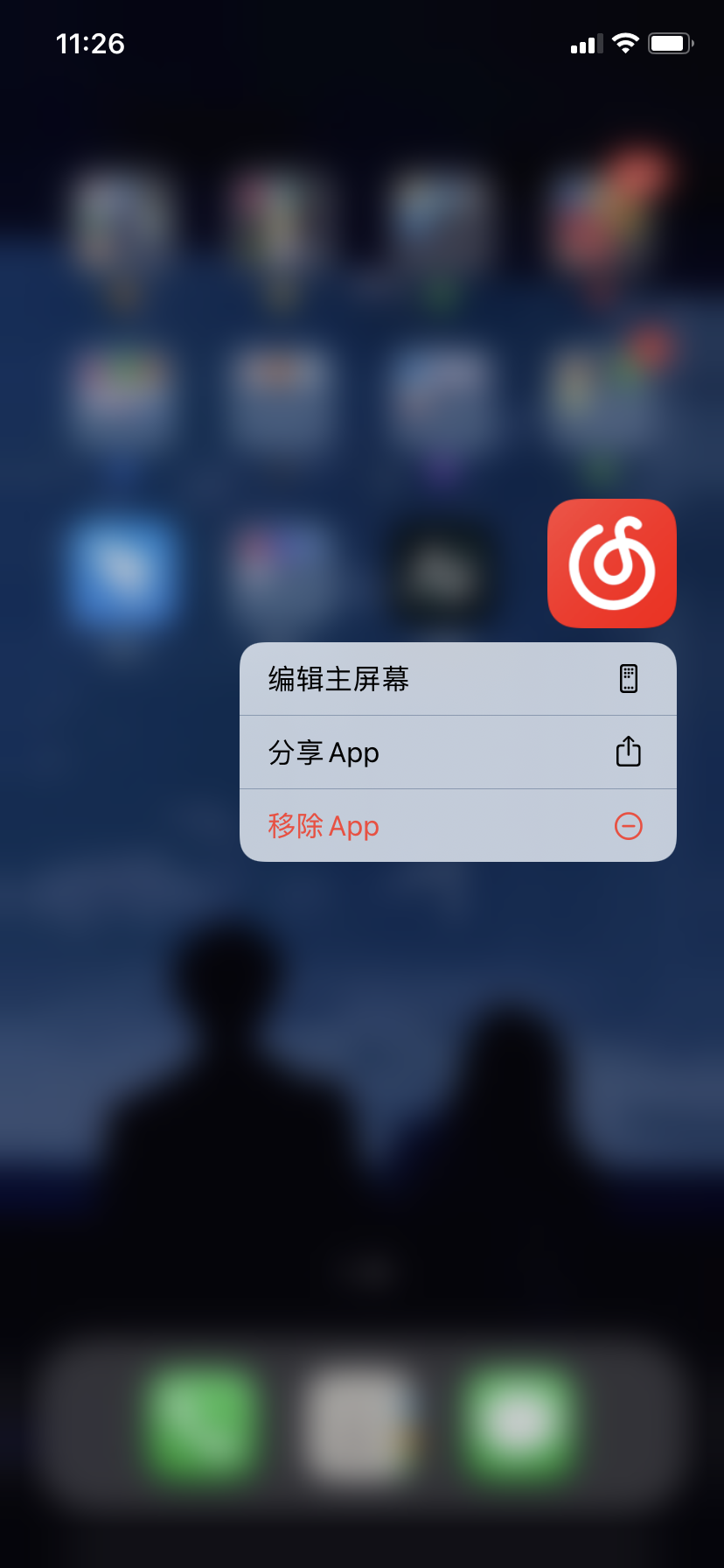
Answer: 1. We need to long press the NetEase Cloud Music logo on the mobile phone screen, the options will pop up, and click Remove APP.
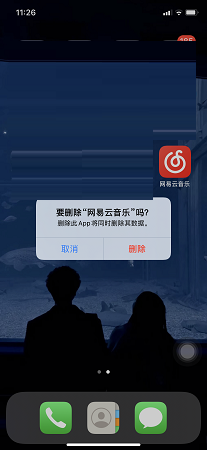
2. Then we need to click Delete APP to delete it!
Comparison of similar software
QQ MusicThe iPhone version is a free mobile music listening software launched for iPhone users in mainland China. It has the richest genuine music library in the industry, a personal music collection function associated with a QQ account, and a considerate operating experience, creating the most perfect iPhone music listening experience for fruit fans.
polka dot musicThe iOS version is a music playing platform launched by Kuwo. The official version of the Polka Dot Music app has a music library of 30 million, each song has a unique video background, and it can also make AI personalized recommendations based on the user's listening preferences. The Wave Point Music app has professional eq balance adjustment and one-click search of the entire music library, bringing you a more intimate audio-visual experience.
NetEase Cloud Music update log:
The artist's homepage has added the "My Collection of This Artist's Works" function to help you listen to the songs and albums of popular musicians more conveniently.
"Personal tags support customization" The personal tags on the homepage are now completely customizable by you. Come and set it yourself and display the tags you want to display!
"New Song Radar" will be the first to listen to new songs from musicians you often listen to and follow.
"Vinyl Page Little Light Bulb" The little light bulb function at the bottom of the play page is online. It is the end of the song shortage and discovers new ways to resemble good songs.
"New iPad Adaptation Launched" is pure and ad-free, with a completely new playback experience. The iPad fully synchronizes high-quality sound, player styles, membership rights, listening together and other mobile features to enjoy a large-screen immersive music experience.
== Content layout, continuous expansion ==
Phenomenal IP will ignite summer again, and "New Rap 2025" is back again!
Justin Bieber's seventh studio album "SWAG" dropped without warning!
JJ Lin & A-Lin's soulful and resonant work "Hold Me Tight During the Lunar Eclipse" is now available.
After returning after about 3 years and 8 months, TWICE's fourth regular album "THIS IS FOR" is officially released.
Huajun editor recommends:
Don’t miss it when you pass by. If you miss NetEase Cloud Music, you will never experience such a good service again. This site also recommends to youIs there any chart?,Douban FM,Figure,NetEase Cloud Music,GoldWave

























Useful
Useful
Useful