
-
CAD drawing encryption software SmartLock_B-type lock
- Size: 66.72M
- Language: Simplified Chinese
- Category: CAD software
- System: Win







SmartLock_B-type lock is a high-strength encryption tool specially designed for AutoCAD drawings. Its core principle is to convert drawing files into dynamic memory virtual screen impressions (i.e. "impression encryption") when AutoCAD is running, to achieve a protection effect that can only be viewed and modified. The encrypted file only stores graphic display data, and the original graphic entity structure is completely destroyed and cannot be restored even by developers, eliminating the possibility of reverse cracking from the bottom up. Friends who like CAD drawing encryption software SmartLock_B-type lock come to Huajun Software Park to download and experience it!
CAD drawing encryption software SmartLock_B-type lock software highlights
Protection of design results: Prevent competitors from obtaining drawings through illegal means. Even if the files are copied, they cannot be used or modified.
Distribution to partners: When providing drawings to customers or partners, viewing is allowed but modification is prohibited to avoid engineering errors caused by misoperation.
Internal permission control: Within the enterprise, set differentiated permissions for different departments or positions (such as only allowing measurement but prohibiting printing) to prevent core data from being leaked.
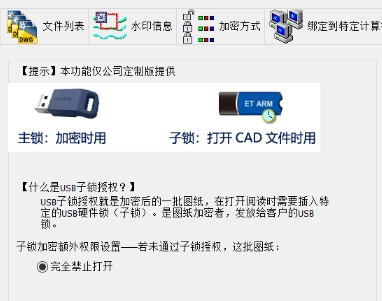
CAD drawing encryption software SmartLock_B-type lock software features
Irreversible encryption technology
Impression encryption: After encryption, only the graphics display information is retained in the file, and the original DWG data structure is completely reconstructed, forming an unparsable virtual impression. Technically, the graphics cannot be restored by any means.
Anti-cracking design: Even if the encryption algorithm is disclosed, crackers still need to go deep into AutoCAD kernel programming, the development cycle takes more than half a year, and the cracked files are still unusable.
Anti-tamper and anti-theft pictures
It is forbidden to explode (decompose): When you try to explode graphics using popular online decomposition tools, all graphics will disappear completely.
Capture and insertion are prohibited: Key points (such as endpoints and midpoints) of encrypted drawings cannot be captured, nor can they be inserted into other files. Even if they are redrawn, it is difficult to copy them accurately.
Random scale interference: If you try to measure a drawing, the drawing will automatically change scale randomly, causing the measurement results to be completely distorted.
High fidelity and compatibility
Zero loss of the image: The color, line type, precise position, etc. of the encrypted image are exactly the same as the original image, ensuring that the design details are not lost.
Plug-in-free access: Encrypted files can be opened directly with AutoCAD without installing additional plug-ins, simplifying the distribution process.
Batch processing capability: Supports encryption of multiple files or entire folders at the same time. The encryption speed is equivalent to opening files in AutoCAD, greatly improving efficiency.
Extended security features
Print interference technology: When printing encrypted files, the output is pure black or garbled characters to prevent the content of the drawing from being leaked through printing.
Layer lock: Irreversibly lock specific layers to prevent key design layers from being modified.
CAD drawing encryption software SmartLock_B-type lock software FAQs
Encrypted drawings cannot be displayed on other computers
To open encrypted drawings on other computers, you need to ensure that the corresponding software environment is installed. Although no additional plug-ins are required to open encrypted drawings with SmartLock_B-type locks, sometimes they may not be displayed correctly due to incompatible AutoCAD versions or differences in system environments.
If it cannot be displayed on other computers, you can try to update the AutoCAD version or check the system environment settings.
The drawings are incomplete or garbled
This may be caused by the drawing containing a font file that does not exist or is not recognized on the other computer.
As a workaround, make sure the font files used in the drawing are installed correctly before encrypting, or select the automatic font replacement option when encrypting.
CAD drawing encryption software SmartLock_B-type lock software update log
【V10.0新功能】:全新ObjectARX内核。
Kernel encryption mode, encryption speed is increased by 50 times.
been added to the security mode are added to facilitate the encryption of large quantities of drawings. Encryption is guaranteed to be completed continuously when unattended.
增加选择文件夹加密,其内部各层文件夹内的DWG文件均自动选中。 The folder structure of the saved encrypted files is also kept in its original form.
Increase printing interference: Increase printing interference technology, printing will be pure black or a mess.
Adding layer lock with the layer lock that cannot be unlocked.
Huajun editor recommends:
CAD drawing encryption software SmartLock_B-type lock, the software is a very practical software. After continuous optimization, the functions are very good. It is highly recommended for users who need the download experience. In addition, we also recommend everyone to use Photo BlowUp, .NET, Cloud Machine Manager, etc. Come and download it.
Version: v10.45 | Update time: 2025-12-05
Similar recommendations






Latest updates





How to delete history in Video Pioneer? -How to delete history records by Video Pioneer
How to set the skin for Video Pioneer? -How to set skin for Video Pioneer
How to upgrade software in 360 Software Manager? -How to upgrade software in 360 Software Manager
How to draw a lottery in 360 Software Butler - How to draw a lottery in 360 Software Butler
CAD drawing encryption software SmartLock_B-type lock review
-
1st floor Huajun netizen 2016-11-20 11:28:41The overall feeling of CAD drawing encryption software SmartLock_B is good and I am quite satisfied with it. The installation and operation are very smooth! It went very smoothly following the installation step-by-step guide!
-
2nd floor Huajun netizen 2017-06-03 10:07:25CAD drawing encryption software SmartLock_B is not bad. It downloads very quickly. I give you a good review!
-
3rd floor Huajun netizen 2019-10-29 21:16:59CAD drawing encryption software SmartLock_B hopes to get better and better, come on!
Recommended products





- Diablo game tool collection
- Group purchasing software collection area
- p2p seed search artifact download-P2P seed search artifact special topic
- adobe software encyclopedia - adobe full range of software downloads - adobe software downloads
- Safe Internet Encyclopedia
- Browser PC version download-browser download collection
- Diablo 3 game collection
- Anxin Quote Software
- Which Key Wizard software is better? Key Wizard software collection




