
-
Flowchart creation software (XMind) Mac version
- Size: 197.71M
- Language: Simplified Chinese
- Category: media tools
- System: Mac OS X







The latest version of the flowchart creation software (XMind) for Mac is a mind mapping tool that many users use at work. The official version of the flowchart creation software (XMind) for Mac is scalable, cross-platform, stable and performant, truly helping users improve productivity and promote effective communication and collaboration. Moreover, the Mac version of the flowchart creation software (XMind) also has the characteristics of easy to use, fast, beautiful and rich, and can be shared for writing.

Things to note:
inmacWhen downloading and installing software, you will generally encounter the following three error situations. Now the editor of Huajun will give you the answers. If you encounter errors, please read them carefully:
1."...The software is corrupted and cannot be opened. You should move it to the Trash"
2."Can't open...software because it comes from an unidentified developer"
3."Can't open...software becauseAppleUnable to check if it contains malware"
When encountering the above three situations, we should:
1. First set:Open any source
2, most software settings can be downloaded and installed normally after opening any source; a small number of softwareiosRestrictions on unsigned application permissions require the execution of command line code to bypass application signature authentication. Therefore it is necessary to:Execute command bypassiosnotarizationGatekeeper.
3. If none of the above operations can solve the problem, then you need to:closeSIPSystem integrity protection.
Flowchart creation software (XMind) Mac version software functions
1. User interface upgrade
The user interface upgrade is the biggest change ever. Toolbar with new large icons, clearer window styles and properties view, redesigned tab bar, and improved icon and clip art library.
2. Home control panel
Every time you open XMind, you can see a new homepage control panel. Through the panel, you can choose the map structure, choose a beautiful theme style, and open recently used files to create a mind map.
3.Gantt chart
In the "Gantt Chart" view, you can directly add/modify task information, including start/end dates, assignees, priority, and progress.
4.Information card
XMind provides an intuitive and unique way to display detailed information. Each topic's information card allows you to show or hide tags, notes, hyperlinks and tasks.
5. Comments
You can send XMind files to colleagues or friends to ask for their opinions, so that they can comment on your mind map instead of modifying the map directly.
6. Annotation
Annotations are a great way to insert additional text. In XMind, annotations are not only a shape, but also a real attachment to the topic. It can also reproduce its own subtopics.
7. Export/print map outline
In text, PDF or MS Export the mind map outline in Word file format to get a broad mind map overview for subsequent use. This saves time and increases productivity. By printing the outline, the mind map becomes a tree-like diagram of a series of ideas.
Flowchart creation software (XMind) Mac version software features
【1】Make work more efficient
白领、商务人士、互联网er等,用于每天头脑风暴、整理思路、工作计划,形成安排必备的高效率办公软件,让你事半功倍。
●Meeting shorthand
During the meeting, meeting minutes are quickly generated, which is beautiful and fast, allowing participants to quickly understand the content of the meeting discussion and follow up on the progress of the meeting discussion items at any time. It also adds a lot of color to various work reports and PPTs.
Resume
Use the timeline format to better sort out your personal resume, making it clear, beautiful, and upscale;
●Project management
Monitor project progress anytime and anywhere to ensure project execution
●Collaboration and sharing
By sharing the original file with WeChat QQ friends, friends can improve ideas, details, share, browse and edit mind maps
[2] Make learning easier
Suitable for school students and teachers, it is suitable for organizing notes, preparing lessons, semester plans and memorizing vocabulary, etc. While making a beautiful mind map, you also organize your own study and lesson preparation plans. Dramatically transform the way you learn, teach and create in the classroom.
●Teacher preparing lessons
Using mind mapping to prepare lessons is vivid and vivid, the class content is clear and comprehensive, and the lesson preparation content is sufficient, including props, so students can be confident. Improve the quality of teaching.
●Review notes
When organizing study notes, use mind maps to express them in a more organized manner, connect the knowledge contents in an orderly manner, and have a sense of the picture and the overall situation in your mind, saying goodbye to the burden of complex and fragmented memory.
【3】Inspiration capture
No matter what the occasion, you can easily record inspiration and ideas, capture the details and ideas you pay attention to, seize market opportunities, and break through difficulties.
【4】Make life easier
Shopping list: Make shopping an easy and pleasant thing, without having to remember fragmentary things, meet the needs of life, and contribute to the happiness of the family.
●Travel planning: No need to travel with a group, be pressed for time or sleep poorly, easily arrange your own travel, and take photos to record what you see and hear along the way.
●Learning plan: Use the map to easily arrange your child's education plan, allowing father and mother to share educational responsibilities, so that your child's education is guaranteed.
Family member relationship analysis, children’s growth records: Maps can be used to clarify the relationships among family friends, record children’s growth, and establish personal growth plans.
Instructions for use of flowchart creation software (XMind) Mac version
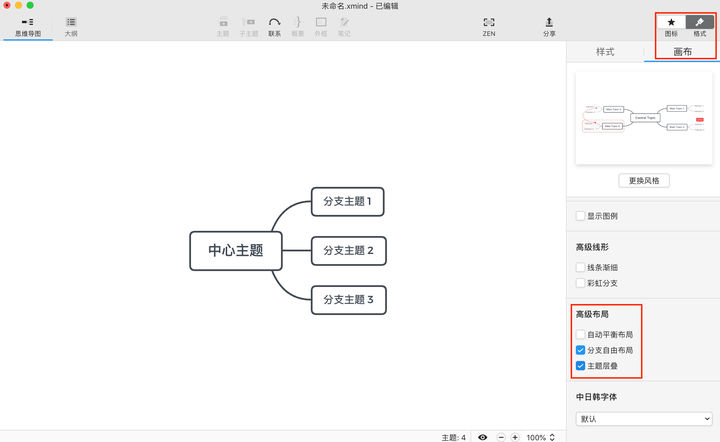
01 Turn on "Branch Free Layout" and "Theme Cascading"
In order to be able to drag topics freely and avoid sticking between topics, and to make the free topics obedient when drawing the flow chart, the first very necessary step is to create the XMind: ZEN Turn on "Branch Free Layout" and "Theme Cascading" in the advanced layout in the canvas bar.
02 Use the "Free Theme" or "Contact" function to add a process
After creating a new map, start drawing the flow chart. When adding a process, the normal operation method is to double-click the blank space to add a "free topic" and add "contacts" between topics.
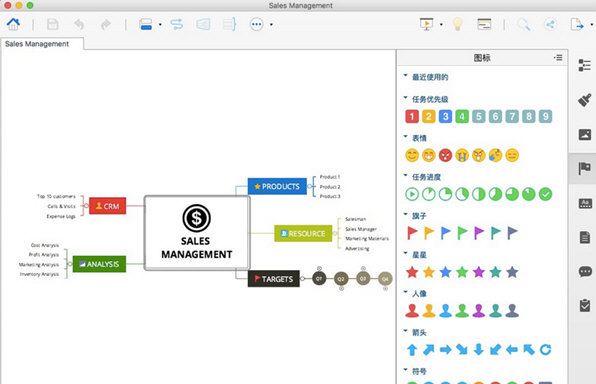
But a more convenient way is to directly use the "Contact" function to add a free theme. Select the topic, click "Contact" in the toolbar, and then click on the blank space to add a "Free Topic". If you are proficient in shortcut keys, you can also use shortcut key combinations directly Command+Shift+L/Control+Shift+L and click in an empty space to add.

During the process of adding a process, you can enter text while selecting the topic and enter text directly or click the space bar to start text input. Repeat the above steps until the drawing of the process is completed.
03 Align the free theme and change the style of "Contact"
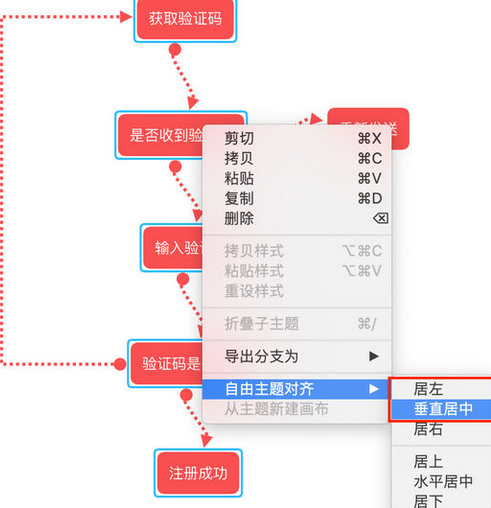
After the process drawing is completed, we have drawn a rough flow chart, but the curved "connections" and unaligned "free themes" look a bit awkward. At this time, you can press and hold Command/Control and multi-select the "free themes" you want to align, and right-click to bring up the alignment options.

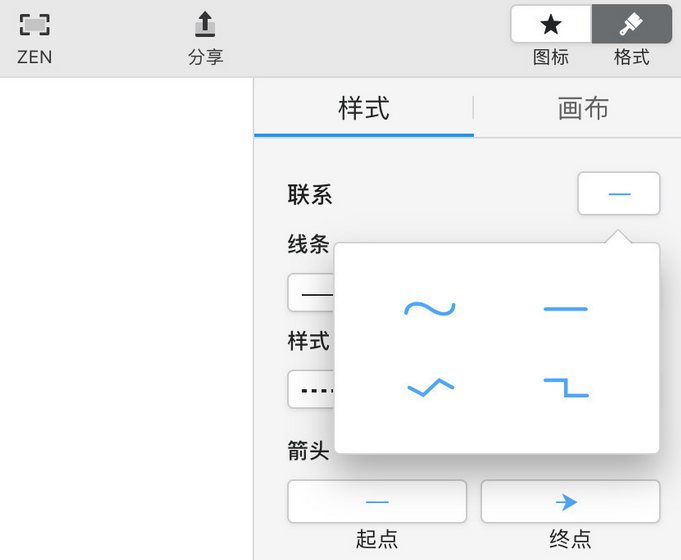
Hold down Command/Control and multi-select the "Contacts" you want to adjust. You can batch modify them in the format panel, and you can modify them to straight lines or Z-shaped lines.
04 Add comments/judgments to the connection
Judgment of right and wrong is a very important part of the flow chart. This step can be added during the process of drawing the process, or it can be added after adjusting the "Contact".
It’s very simple to add text to “Contact”, just click “Contact” and type the text.
05 Modify the theme shape and line style
If the flowchart you draw has certain requirements for the shape of the theme, such as a diamond shape for judgment, you can select the theme and change the shape of the theme in the style. If you are interested in the color of the theme fill and the color of the contact lines, you can also change it in the style.
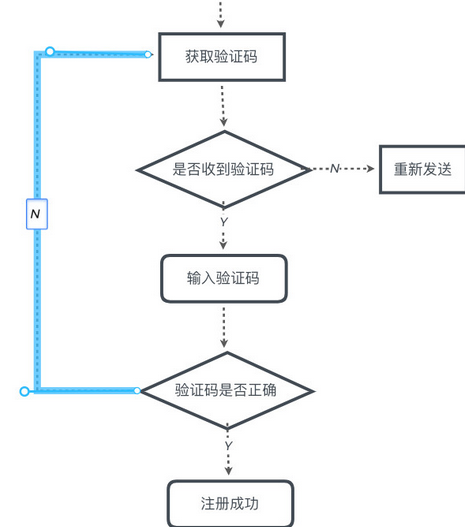
At this time, a simple flow chart is drawn. Once you master the drawing skills, it is actually very simple.
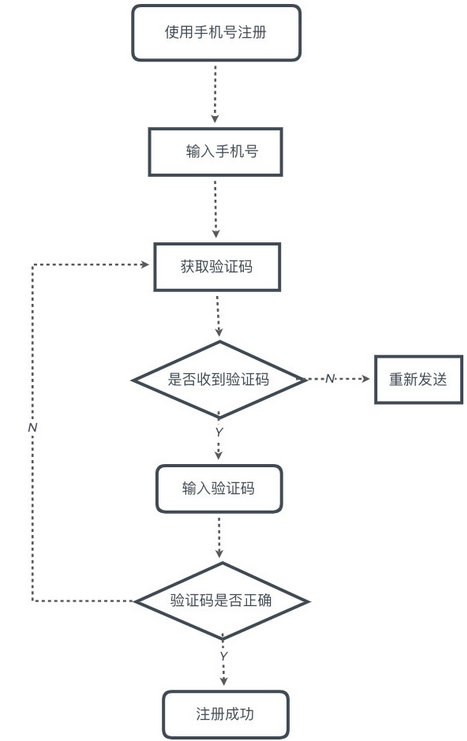
Flowchart creation software (XMind) Mac version update log
1. Fixed several bugs;
2. Optimize details;
Huajun editor recommends:
The Mac version of flowchart creation software (XMind) has always been the most commonly used software by most netizens. Huajun Software Park also has Yimeibao, Baidu Input Method For Mac, CrossOver Pro For Mac, etc., which are also very popular software among netizens. You can download it from Huajun Software Park!
Version: 3.5.3 latest version | Update time: 2024-12-25
Similar recommendations





Latest updates



How to add background music in python-How to add background music in python
How to configure environment variables in python - How to configure environment variables in python
How to run python - How to run python
How to create a project in python - How to create a project in python
How to make a blue sky background with scratch-How to make a blue sky background with scratch
How to create a linked list in scratch-How to create a linked list in scratch
How to add local programs to scratch-How to add local programs to scratch
How to input Chinese in scratch-How to input Chinese in scratch
How to fire bullets in scratch-How to fire bullets in scratch
Flowchart creation software (XMind) Mac version review
-
1st floor Huajun netizen 2022-02-25 23:14:28Flowchart creation software (XMind) Mac version software is very easy to use, the download speed is very fast, and it is very convenient!
-
2nd floor Huajun netizen 2022-03-23 20:36:53The Mac version of flowchart creation software (XMind) is awesome! 100 million likes! ! !
-
3rd floor Huajun netizen 2022-02-27 14:39:11The Mac version of the flowchart creation software (XMind) feels good overall, and I am quite satisfied with it. The installation and operation are very smooth! Followed the installation step-by-step instructions and it went very smoothly!
Recommended products








- Diablo game tool collection
- Group purchasing software collection area
- p2p seed search artifact download-P2P seed search artifact special topic
- adobe software encyclopedia - adobe full range of software downloads - adobe software downloads
- Safe Internet Encyclopedia
- Browser PC version download-browser download collection
- Diablo 3 game collection
- Anxin Quote Software
- Which Key Wizard software is better? Key Wizard software collection




