
-
Canon PIXMA G2810 driver
- Size: 77.99M
- Language: Simplified Chinese
- Category: hardware tools
- System:winall






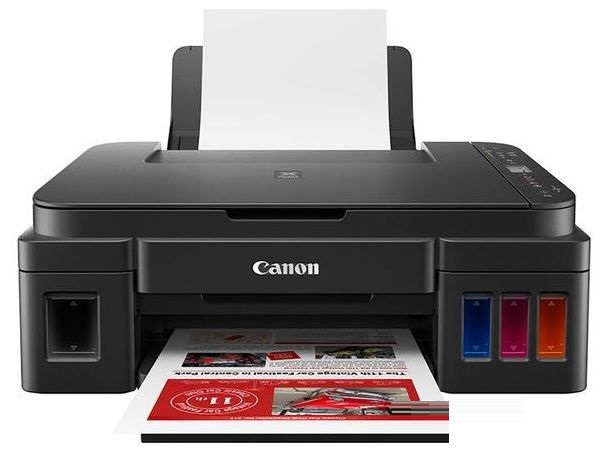
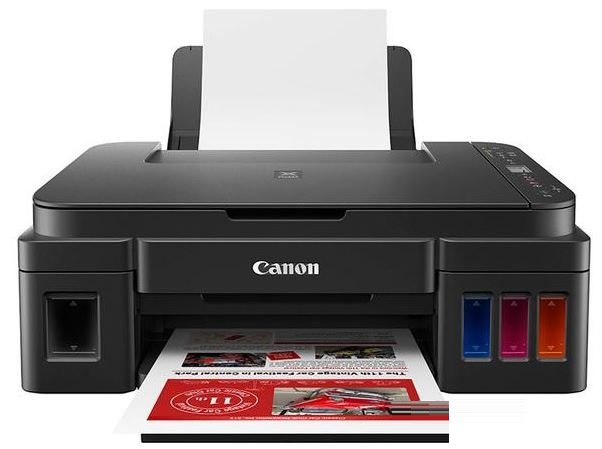
The official version of the Canon PIXMA G2810 driver is a multi-functional commercial all-in-one machine launched by Canon, Canon PIXMA G2810 The integrated ink cartridge used in the official version of the driver has multiple functions such as printing, copying, and scanning. Unfortunately, it does not support network printing. It has the characteristics of high printing resolution, excellent copying efficiency, and a wide range of compatible paper!
Software features
Cross-platform compatibility:
High volume ink system:
Using new bottled inks, black ink GI-890BK (135ml) can print about 6,000 pages, and color ink GI-890C/M/Y (70ml each) can print about 7,000 pages, significantly reducing printing costs.
FINE printhead technology:
Uses four-color black (GI-890BK) pigment ink and color (GI-890C/M/Y) dye ink to ensure clear and sharp text, and supports borderless photo printing.
Energy-saving and silent design:
Built-in "silent mode" can reduce noise when printing and paper feeding, and supports automatic activation or deactivation in time intervals set according to user needs.
The printer can automatically wake up through USB connection when in sleep mode, and automatically enter sleep mode after use to save energy.
Integrated ink tank design:
The ink cartridge is built inside the machine, which is beautiful and space-saving. It also allows users to visually observe the remaining ink status.
Software function
Print function:
Supports borderless printing in A4, LTR, 4"×6", 5"×7", 8"×10" and other paper sizes.
The printing speed of A4 black and white documents is about 8.8ipm, the printing speed of color documents is about 5.0ipm, and the printing time of 4"×6" photos is about 60 seconds.
Multiple print quality modes are provided, allowing users to balance speed and quality according to their needs.
Copy function:
The color document copy speed is about 1.7ipm (sESAT/single-sided), and the first page copy time is about 32 seconds (sFCOT/single-sided).
Supports multi-page copying of 1-20 pages, and is compatible with a variety of paper types such as plain paper and professional photo paper.
Scan function:
Flatbed scanning, optical resolution 600×1200dpi, color scanning speed about 19 seconds (A4, 300dpi, reflective manuscript).
Supports saving scanned files in a variety of formats, and can be edited and processed directly through the computer.
Smart web printing:
Using the Easy-WebPrint EX function, you can freely cut and intercept web page content, arrange personalized layouts, add text and pictures, and achieve printing effects that save paper and ink.
Photo management and creative printing:
There are about 100 built-in templates of different styles, supporting the creation of personalized posters and promotional pages.
Provides photo splicing printing function to break through the limitations of printing format and create creative posters at a lower cost.
Log in to Creative Park and you can download a variety of printing materials for free, such as cards, paper models, scrapbooks, calendars, etc.
Canon PIXMA G2810 driverFeature introduction
Product type: Inkjet multi-function all-in-one machine
Product functions: print/copy/scan
Resolution: 4800x1200dpi
Print page: A4
Print speed: black and white 8.8ipm; color 5.0ipm
Ink cartridge: black GI-890BK, color GI-890C/M/Y
Interface: USB2.0
Canon PIXMA G2810 driverParameter introduction
Basic information
Product positioning: Multi-function commercial all-in-one machine
Product type Inkjet multi-function all-in-one machine
Covered functions Print/Copy/Scan
Maximum processing format A4
Consumable type Integrated ink cartridge
Consumable capacity Black ink GI-890BK (135ml): 6000 pages, color ink GI-890C/M/Y (70ml each): 7000 pages
Network function does not support network printing
Print function
Black and white printing speed document, ESAT/single-sided: about 8.8ipm
Color printing speed document, ESAT/single-sided: about 5ipm
Other print speeds: 4"×6" photo (PP-201/borderless): about 60 seconds
Nozzle configuration Number of nozzles: 1472 nozzles in total (PGBK: 320 nozzles, C/M/Y: 384 nozzles each)
Other printing performance Printing width: up to 203.2mm (8 inches), borderless printing up to 216mm (8.5 inches)
Borderless printing: 0mm top/bottom/right/left margins (Supported paper sizes: A4, LTR, 4"×6", 5"×7", 8"×10", square "5×5", card)
Bordered printing: top margin 3mm, bottom margin 5mm, left/right margin 3.4mm each (LTR/LGL: left 6.4mm, right 6.3mm)
Recommended printing area: top margin 31.2mm, bottom margin 32.5mm
Copy function
Copy speed Color document: sESAT/single-sided: about 1.7ipm, sFCOT/single-sided: about 32 seconds
Other copying features Maximum document size: A4/LTR
Compatible paper: Size: A4/LTR; Type: Plain paper, Professional Matte Photo Paper (LU-101), Canon Océ Red Label Paper (WOP111), Canon Office Color Paper (SAT213)
Copy image quality (plain paper): Fast, standard
Multi-page copy (black and white/color): 1-20 pages
Scan function
Scan controller standard configuration
Scan type Flatbed
Scanning element CIS
Scanning speed color (A4, 300dpi, reflective draft): about 19 seconds
Optical resolution 600×1200dpi
Scanning size Flatbed: 216×297mm (A4/LTR)
Color depth Grayscale: 16-bit/8-bit
Color: 48-bit/24-bit (16-bit/8-bit each for RGB)
Other scanning performance: Linear scanning speed: grayscale: 1.5 milliseconds/line (300dpi), color: 3.5 milliseconds/line (300dpi)
Media specifications
Media type Plain Paper, Premium Glossy Photo Paper II, Professional Matte Photo Paper, Sub-Glossy Photo Paper, Matte Photo Paper, Envelopes, Glossy Photo Paper, Premium Glossy Photo Paper, Photo Stickers, Canon Océ Red Label Paper, Canon Océ Office Color Paper
Media size A4, A5, B5, LTR, LGL, 4"×6", 5"×7", 8"×10", envelope (DL, COM10), square (5"×5"), card (91×55mm), custom (width 55-215.9mm, length 89-676mm)
Media weight rear tray: plain paper: 64-105g/㎡, Canon specialty paper: up to about 275g/㎡ (Advanced Glossy Photo Paper II PP-201)
Paper feeder capacity Rear tray (maximum number):
Plain paper: A4, A5, B5, LTR=100, LGL=10; Premium Glossy Photo Paper II (PP-201): A4, LTR=10, 4"×6"=20, 5"×7", 8"×10"=10, Square (5"×5")=20; Professional Luster Photo Paper (LU -101): A4, LTR=10; Semi-glossy Photo Paper (SG-201): A4, LTR=10, 4"×6"=20, 5"×7", 8"×10"=10; Matte Photo Paper (MP-101): A4, LTR=10, 4"×6"=20; Envelope: European DL/US Com. #10=10; Glossy Photo Paper (GP-508): A4=10, 4"×6"=20; Premium Glossy Photo Paper (PP-208): A4, 4"×6"=10; Photo Stickers: PS-80 8. PS-308R, PS-208, PS-108=1; Canon Océ red label paper (WOP111): A4=100; Canon Océ office color paper (SAT213): A4=80
Output capacity A4, LTR=50, LGL=10
Canon PIXMA G2810 driverInstallation tutorial
1. Connect Canon G2810 to the computer
2. Double-click "mpp_-win-g2010-1_00-ea34_2.exe" to start the driver installation
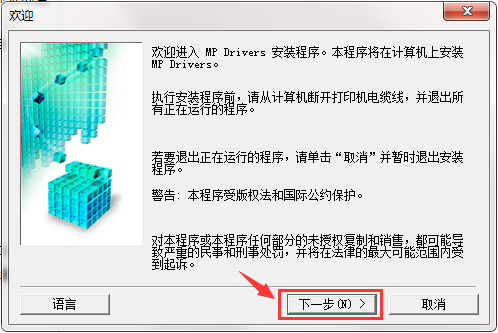
3. Next, select the region where the all-in-one machine will be used.
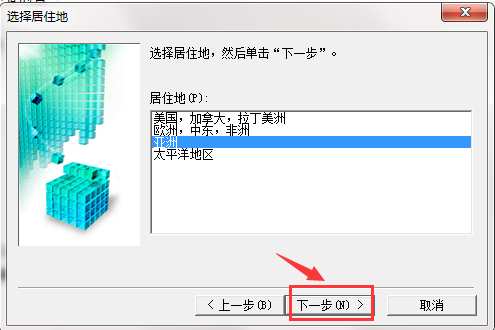
4. Continue to the next step and the driver protocol appears, click Yes
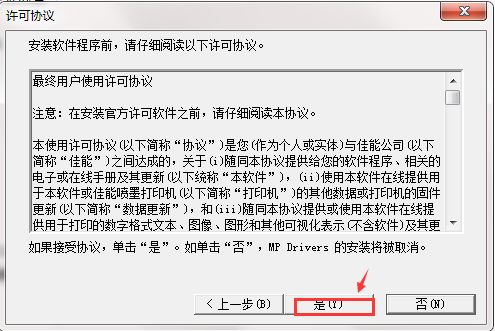
5. Then the driver installation will begin.
FAQ
Printing speed is slow
Problem description: The print task executes slowly, much slower than expected.
Possible reasons:
Printer setting problems, such as too high print quality and improper print mode selection.
Computer performance issues such as high processor load and insufficient memory.
Solution:
Adjust the balance between print speed and print quality in the driver.
Close unnecessary background programs to free up computer resources.
Canon PIXMA G2810 driver update log
1. The pace of optimization never stops!
2. More little surprises are waiting for you to discover~
Huajun editor recommends:
This site has also prepared a variety of related software for you, such as: Samsung Xpress M2029 printer driver, batch manager, cloud machine manager, etc. You need to go to the editor of Huajun Software Park to satisfy you!
Version: 1.0 official version | Update time: 2025-11-18
Similar recommendations




Latest updates




How to add background music in python-How to add background music in python
How to configure environment variables in python - How to configure environment variables in python
How to run python - How to run python
How to create a project in python - How to create a project in python
How to make a blue sky background with scratch-How to make a blue sky background with scratch
How to create a linked list in scratch-How to create a linked list in scratch
How to add local programs to scratch-How to add local programs to scratch
How to input Chinese in scratch-How to input Chinese in scratch
How to fire bullets in scratch-How to fire bullets in scratch
Canon PIXMA G2810 Driver Review
-
1st floor Huajun netizen 2021-04-23 01:29:47Canon PIXMA G2810 driver interface design is easy to use and has rich functions. I highly recommend it!
-
2nd floor Huajun netizen 2022-02-18 11:19:52Canon PIXMA G2810 driver is awesome! 100 million likes! ! !
-
3rd floor Huajun netizen 2021-08-11 03:10:12The Canon PIXMA G2810 driver overall feels good and I am quite satisfied with it. The installation and operation are very smooth! It went very smoothly following the installation step-by-step instructions!
Recommended products









- Diablo game tool collection
- Group purchasing software collection area
- p2p seed search artifact download-P2P seed search artifact special topic
- adobe software encyclopedia - adobe full range of software downloads - adobe software downloads
- Safe Internet Encyclopedia
- Browser PC version download-browser download collection
- Diablo 3 game collection
- Anxin Quote Software
- Which Key Wizard software is better? Key Wizard software collection




