




Memory Release Expert is an advanced memory management tool. Memory Release Expert can effectively manage computer applications and provide them with programs that require large amounts of memory. Memempty will not increase the burden on the system when releasing memory and ensure smooth system operation. It is recommended not to set the scheduled release interval too small.
Introduction to Memory Release Expert Software
Memory release experts can effectively release memory resources that cannot be released in time when applications are running, and provide them for programs that require large amounts of memory. It will not increase the burden on the system when releasing memory and ensure that the system runs smoothly. (It is recommended not to set the scheduled release interval too small!)
Memory release expert Memempty is a tool that is small in size and does not occupy too much memory on your computer. It runs fast and cleans very comprehensively. It does not contain any advertising plug-ins, so you can use it with confidence. It is a tool that is small in size and has great functions.

Memory freeing expert software features
1. Memempty can effectively release the occupied memory in the system;
2. By default, just check "Automatically release memory at scheduled times";
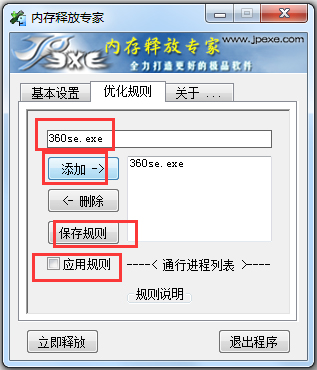
3. The memory release expert also has an "optimization rule" where you can add application rules;
4. If you play large games or run large software, you can add the relevant processes to the Memempty rules to prevent them from being cleaned up;
5. You can also add other programs so that the memory optimization expert will not interfere with the system's memory allocation for the process.
6. Memempty can release valuable memory resources from other processes for use by this process, making you use software or play games more smoothly;
7. Read the space allocation occupied by the software memory;
8. Provide a large amount of memory space for use by other computer applications and optimize system running speed.
How to use memory release expert
1. Open the software, where you can set the interval for releasing memory.
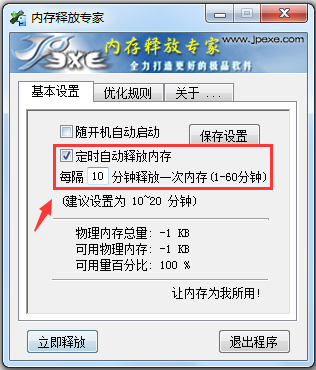
2. Here is the total amount of memory and current usage of the user’s computer;
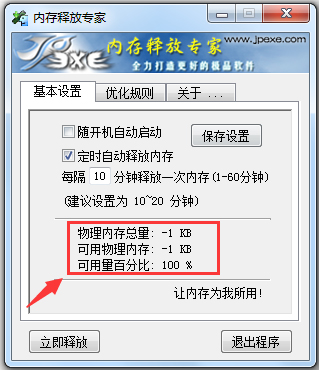
3. After setting, remember to click Save Settings to take effect;

4. Enter the optimization rule option. Here we need to add whitelist processes, such as some large-scale games, large-scale software and other processes, so that their resources will not be released by mistake when released, just like these processes. Please check it yourself for details.

5. Finally, add the specific process, save the rules, apply the rules, and enjoy the pleasure of releasing memory!
How does Memory Release Expert work?
Windows system and many application software under it, including software developed by Microsoft itself, have a problem. They like to occupy as much memory as possible. This is especially true for large software, which relies on large memory to speed up its own operation. But when this software exits, it often does not completely release the memory it occupies. This problem arises. The longer the computer is used, the less available memory and the slower it becomes. At this time, on the surface, no large software is running, and no software can be seen occupying a large amount of memory in the system process.
Based on this situation, someone developed memory organization software. The allocation of memory space will be reported to the operating system, and then the official version of Memory Release Expert will read out all memory allocations, and then compare whether the software occupying it is still running. If not, mark the memory as free. This is the working principle of the memory release expert, and of course there is more than one way to implement it.
More frequently asked questions from memory release experts
How to set the scheduled release interval?
It is recommended to adjust according to the system configuration:
Low-end computers (such as 2GB memory): set the interval to 15-30 minutes.
High-end computers (such as 8GB or more memory): can be set to 60 minutes or released manually.
Memory release expert update log:
1.Fix some bugs
2. Optimized some functions
Huajun editor recommends:
Huajun Software Park also has popular software with the same functions as this software, such as:Camera sd card low format tool,MaxxMEM2,Soft media memory disk,Longlong memory traversal tool,FMTWait, you can collect it if you need it!


















Useful
Useful
Useful