
If you are looking for software to use, go to Huajun Software Park! software release AI product list

Hello, if there is a need for software inclusion, please package the software and attach the software name, software introduction, software-related screenshots, software icon, soft copy, business license (if you do not have a business license, please provide the front and back of the corresponding developer ID card and a photo of yourself holding the ID card), and send it to email http://softwaredownload4.com/sbdm/user/login

Close >>

Send to email:news@onlinedown.net

Close >>

Location: Home pageAndroid softwareApplicationText input Fenfen Diary

89.63%

10.37%
QR code

Scan the QR code to access the mobile version

Permissions: View

The following important permissions need to be called
uses-permission:'android.permission.WAKE_LOCK', allows the background process to still run after the phone screen is turned off
uses-permission:'android.permission.MODIFY_AUDIO_SETTINGS', allows the program to modify the sound setting information
uses-permission:'com.asus.msa.SupplementaryDID.ACCESS'
uses-permission:'android.permission.ACCESS_FINE_LOCATION', allows the program to receive satellite positioning information through the GPS chip
uses-permission:'android.permission.ACCESS_LOCATION_EXTRA_COMMANDS', allows the program to access additional location provider instructions
uses-permission:'android.permission.WRITE_EXTERNAL_STORAGE', allows the program to write to external storage, such as writing files on the SD card
uses-permission:'android.permission.READ_EXTERNAL_STORAGE', the program can read files in the device's external storage space (built-in SDcard and external SDCard)
uses-permission:'android.permission.MANAGE_EXTERNAL_STORAGE'
uses-permission:'android.permission.MOUNT_UNMOUNT_FILESYSTEMS', allows the program to mount and unmount external file systems
uses-permission:'android.permission.RECORD_AUDIO', allows the program to record sound through the microphone of the phone or headset
uses-permission:'android.permission.CAMERA', allows the program to access the camera to take pictures
uses-permission:'android.permission.INTERNET', allows the program to access the network connection, which may generate GPRS traffic
uses-permission:'android.permission.ACCESS_WIFI_STATE', allows the program to obtain the current WiFi access status and WLAN hotspot information
uses-permission:'android.permission.CHANGE_WIFI_STATE', allows the program to change the WiFi state
uses-permission:'android.permission.CHANGE_NETWORK_STATE', allows the program to change the network status, such as whether it is connected to the Internet
uses-permission:'android.permission.ACCESS_NETWORK_STATE', allows the program to obtain network information status, such as whether the current network connection is valid
uses-permission:'android.permission.READ_PHONE_STATE', allows the program to access the phone state
uses-permission:'android.permission.READ_PHONE_NUMBERS'
uses-permission:'android.permission.READ_LOGS', allows the program to read the system's underlying logs
uses-permission:'android.permission.VIBRATE', allows the program to vibrate
uses-permission:'android.permission.GET_TASKS', allows the program to obtain task information
uses-permission:'android.permission.REORDER_TASKS', allows the program to reorder the running tasks of the system Z axis
uses-permission:'android.permission.REQUEST_INSTALL_PACKAGES', allows access to installed applications from unknown sources
uses-permission:'android.permission.SYSTEM_ALERT_WINDOW', allows the program to display the system window
uses-permission:'android.permission.ACCESS_COARSE_LOCATION', allows the program to obtain the user's erroneous latitude and longitude information through WiFi or mobile base stations
uses-permission:'android.permission.EXPAND_STATUS_BAR', allows the program to expand or shrink the status bar
uses-permission:'android.permission.KILL_BACKGROUND_PROCESSES', allows the program to call the killBackgroundProcesses(String). method to end the background process
uses-permission:'android.permission.READ_SMS', allows the program to read the text message content
uses-permission:'android.permission.READ_PHONE_NUMBERS'
uses-permission:'android.permission.READ_SETTINGS'
uses-permission:'pinkdiary.xiaoxiaotu.com.permission.MIPUSH_RECEIVE'
uses-permission:'android.permission.WRITE_SECURE_SETTINGS', allows applications to read or write security system settings
uses-permission:'android.permission.PACKAGE_USAGE_STATS'
uses-permission:'android.permission.USE_FULL_SCREEN_INTENT'
uses-permission:'com.coloros.mcs.permission.RECIEVE_MCS_MESSAGE'
uses-permission:'com.heytap.mcs.permission.RECIEVE_MCS_MESSAGE'
uses-permission:'android.permission.QUERY_ALL_PACKAGES'
uses-permission:'freemme.permission.msa'
uses-permission:'pinkdiary.xiaoxiaotu.com.openadsdk.permission.TT_PANGOLIN'
uses-permission:'android.permission.READ_PRIVILEGED_PHONE_STATE'
uses-permission:'android.permission.DOWNLOAD_WITHOUT_NOTIFICATION'
uses-permission:'android.permission.FOREGROUND_SERVICE'
uses-permission:'android.permission.AUTHENTICATE_ACCOUNTS', allows the program to access account management ACCOUNT_MANAGER related information through account verification
uses-permission:'pinkdiary.xiaoxiaotu.com.permission.KW_SDK_BROADCAST'
uses-permission:'android.permission.WRITE_SETTINGS', allows the program to read or write system settings
uses-permission:'android.permission.BLUETOOTH', allows the program to connect to paired Bluetooth devices
uses-permission:'android.permission.SCHEDULE_EXACT_ALARM'
uses-permission:'getui.permission.GetuiService.pinkdiary.xiaoxiaotu.com'
uses-permission:'com.vivo.notification.permission.BADGE_ICON'
uses-permission:'android.permission.ACCESS_BACKGROUND_LOCATION'
uses-permission:'pinkdiary.xiaoxiaotu.com.permission.PROCESS_PUSH_MSG'
uses-permission:'pinkdiary.xiaoxiaotu.com.permission.PUSH_PROVIDER'
uses-permission:'android.permission.BROADCAST_STICKY', allows the program to quickly receive the next broadcast after receiving the broadcast
uses-permission:'com.google.android.gms.permission.AD_ID'
uses-permission:'com.hihonor.permission.MANAGE_FOLD_SCREEN'
uses-permission:'com.hihonor.permission.MANAGE_FOLD_SCREEN_PRIVILEGED'

Fenfen Diary 8.48

Special area
Software size:82.14 MB
software language:Simplified Chinese
Software rating:
Software type:Domestic software
Software licensing:shareware
Update time:2025-05-12
Application platform:Android
Software classification:Text input
version:8.48
Registration number:Shanghai ICP No. 12018816-8A
Software vendor:Shanghai Panlong Technology Co., Ltd.

Software introduction Related topics FAQ Download address

Basic introduction
Fenfen diary paragraph first LOGO
Fenfen Diary is a software with cute design, safe storage, and flexible editing as its core. It meets the all-round needs of users from "simple recording" to "emotion management". Whether you are recording every moment of your life or tracking your mood changes, you can easily do it with this tool. Friends who like Fenfen Diary, come to Huajun Software Park to download and experience it!

Highlights of Fenfen Diary


Emotional accumulation and private recording

Core concept: Through daily recording, emotional fragments are accumulated to form a personal "emotional growth archive".

Applicable scenarios: recording love moods, life insights, growth diaries, etc., helping users sort out their emotions and review important moments.

Cute style and fun expression

Interface design: Use sweet colors (such as pink, macaron color) and bear theme icons to create a warm and healing feeling.

Fun elements: Built-in 100+ dynamic stickers (such as "Happy Bear" and "Crying Cat Head"), support text bubbles and hand-drawn graffiti, making the diary more vivid.
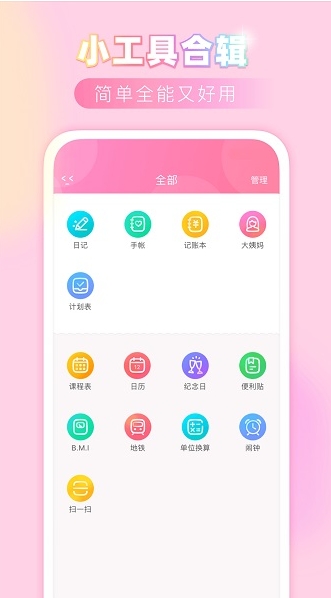
screenshot of pink diary

Features of Fenfen Diary


Local storage: All data is stored locally on the phone without the need for an Internet connection, eliminating the risk of privacy leaks.

Encryption protection: Support setting password lock (pattern/fingerprint) to prevent others from peeking.

Backup and recovery: Provides local backup function (export to TXT/PDF), which can be quickly restored when changing devices or accidentally deleting.

screenshot of pink diary

Fenfen diary function


Flexible and diverse display methods

View mode:

Timeline view: arranged by date, clearly view daily records.

Card view: Displays diary summaries in the form of cards, suitable for quick browsing.

Calendar View: Dates marked with recordings provide a visual representation of recording frequency.

Customized typesetting: Supports adjusting fonts, colors, and paragraph spacing to create a personalized diary style.

Rich editing and beautification tools

Background templates: Provide 20+ solid color backgrounds (such as mint green, cherry blossom pink) and 10+ illustration backgrounds (such as starry sky, forest).

Stickers and emoticons: Dynamic stickers are updated in real time and support dragging, scaling, and overlaying, making them more interesting.

Auto-save: When turned on, the input content will be saved in real time to avoid accidental loss.

Intelligent reminders and habit formation

Daily reminder: Customize the reminder time (such as 8 o'clock every night) to help develop recording habits.

Mood statistics: Generate mood trend graphs every week (such as "happy index 70% this week") to intuitively reflect mood changes.

screenshot of pink diary

Fenfen Diary FAQ


Q1: How to quickly start recording a diary?

Operation steps:

Open the App and click the "+" sign at the bottom.

Choose a background template (e.g. solid color, illustration).

Enter the text content and click "Sticker" to add interesting elements.

Click "Save" in the upper right corner.

Tip: Turn on the "Auto Save" function (Settings → Auto Save) to save the input content in real time to avoid loss.

Q2: How to switch the diary display mode?

Supported modes:

Timeline view: arranged by date, suitable for viewing continuous records.

Card view: Display summaries in the form of cards, suitable for quick browsing.

Calendar View: Dates marked with recordings provide a visual representation of recording frequency.

Switching method: Click the "View Switching" icon in the upper left corner of the homepage and select the desired mode.

Fenfen diary update log:


Developer GG said there are really no bugs this time~

Huajun editor recommends:

The operation steps of Fenfen Diary software are very simple and very fast, so users can use it with confidence. Also recommendedGoogle phonetic input method,iFlytek input method,Sum code Chinese character input method,counter,QQ Pinyin input methodDownload and use related software.


Related topics

  • t9 input method

    t9 input method

  • Special topic on voice input software

    Special topic on voice input software

  • input method

    input method

  • Complete collection of writing tablets

    Complete collection of writing tablets

  • Non-mainstream input method software download

    Non-mainstream input method software download

FAQ