
If you are looking for software to use, go to Huajun Software Park! software release AI product list

Hello, if there is a need for software inclusion, please package the software and attach the software name, software introduction, software-related screenshots, software icon, soft copy, business license (if you do not have a business license, please provide the front and back of the corresponding developer ID card and a photo of yourself holding the ID card), and send it to email http://softwaredownload4.com/sbdm/user/login

Close >>

Send to email:news@onlinedown.net

Close >>

Location: Home pageAndroid softwareApplicationText input Speech to text assistant

91.33%

8.67%
QR code

Scan the QR code to access the mobile version

Permissions: View

The following important permissions need to be called
uses-permission:'android.permission.RECORD_AUDIO', allows the program to record sound through the microphone of the phone or headset
uses-permission:'android.permission.ACCESS_NETWORK_STATE', allows the program to obtain network information status, such as whether the current network connection is valid
uses-permission:'android.permission.INTERNET', allows the program to access the network connection, which may generate GPRS traffic
uses-permission:'android.permission.WRITE_EXTERNAL_STORAGE', allows the program to write to external storage, such as writing files on the SD card
uses-permission:'android.permission.ACCESS_WIFI_STATE', allows the program to obtain the current WiFi access status and WLAN hotspot information
uses-permission:'android.permission.READ_EXTERNAL_STORAGE', the program can read files in the device's external storage space (built-in SDcard and external SDCard)
uses-permission:'android.permission.MODIFY_AUDIO_SETTINGS', allows the program to modify the sound setting information
uses-permission:'android.permission.READ_PHONE_STATE', allows the program to access the phone state
uses-permission:'android.permission.MANAGE_EXTERNAL_STORAGE'
uses-permission:'android.permission.QUERY_ALL_PACKAGES'
uses-permission:'android.permission.CHANGE_WIFI_STATE', allows the program to change the WiFi state
uses-permission:'android.permission.WAKE_LOCK', allows the background process to still run after the phone screen is turned off
uses-permission:'android.permission.BROADCAST_STICKY', allows the program to quickly receive the next broadcast after receiving the broadcast
uses-permission:'android.permission.BLUETOOTH', allows the program to connect to paired Bluetooth devices
uses-permission:'android.permission.BLUETOOTH_ADMIN', allows the program to discover and pair new Bluetooth devices
uses-permission:'android.permission.MOUNT_UNMOUNT_FILESYSTEMS', allows the program to mount and unmount external file systems
uses-permission:'android.permission.REQUEST_INSTALL_PACKAGES', allows access to installed applications from unknown sources
uses-permission:'android.permission.CHANGE_NETWORK_STATE', allows the program to change the network status, such as whether it is connected to the Internet
uses-permission:'android.permission.REORDER_TASKS', allows the program to reorder the running tasks of the system Z axis
uses-permission:'android.permission.VIBRATE', allows the program to vibrate
uses-permission:'android.permission.ACCESS_COARSE_LOCATION', allows the program to obtain the user's erroneous latitude and longitude information through WiFi or mobile base stations
uses-permission:'com.voice.transform.exame.openadsdk.permission.TT_PANGOLIN'
uses-permission:'com.asus.msa.SupplementaryDID.ACCESS'
uses-permission:'android.permission.SYSTEM_ALERT_WINDOW', allows the program to display the system window

Voice to Text Assistant 1.7.3

Special area
Software size:30.55 MB
software language:Simplified Chinese
Software rating:
Software type:Domestic software
Software licensing:shareware
Update time:2025-05-22
Application platform:Android
Software classification:Text input
version:1.7.3
Registration number:Shanghai ICP No. 2023001685-6A
Software vendor:Shanghai Yuwang Information Technology Co., Ltd.

Software introduction Related topics FAQ Download address

Basic introduction
Speech-to-text assistant logo
Speech-to-text Assistant is a carefully developed speech-to-text tool for mobile phones. With its powerful intelligent speech recognition technology, it provides users with efficient, accurate, and convenient speech-to-text services. This App not only greatly meets the needs of daily life and work, but also provides users with an unprecedented user experience through its rich functional features. Friends who like voice-to-text assistants, come to Huajun Software Park to download and experience it!

Highlights of speech-to-text assistant


Meeting recording and recording: Designed specifically for business people, it supports recording and text conversion of conference interviews, interview records, business meetings and other scenarios, and can easily record meeting minutes.

Learning assistance: For school students, by recording and identifying documents, they can fill in the missing knowledge in class, improve the efficiency of listening to classes, and save time for re-listening.

Cross-border travel translation: When traveling across borders, there is no need to worry about language barriers. Long recording recognition and real-time translation functions allow users to go out with peace of mind.
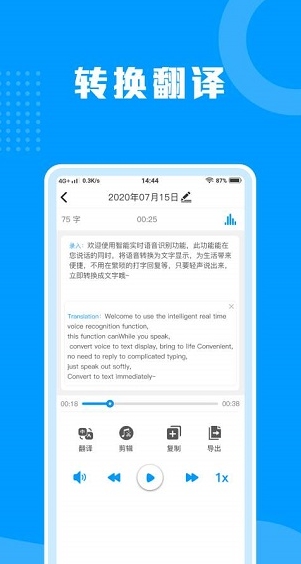
Screenshot of speech-to-text assistant

Features of speech-to-text assistant


Business people: In conference interviews, interview records, business meetings and other occasions, through the voice-to-text assistant app, you can instantly record and translate in real time, easily record meeting minutes, and improve work efficiency.

School students: Through the recording and recognition functions, students can better grasp classroom knowledge, improve learning efficiency, and fill in missing content in class.

Cross-border tourists: When traveling across borders and encountering language barriers, long recording recognition and real-time translation functions can be used to solve communication problems.
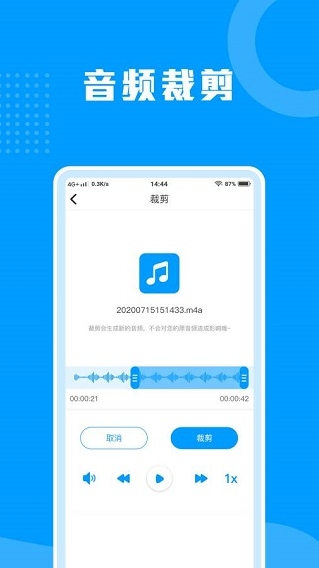
Screenshot of speech-to-text assistant

Voice to text assistant function


Speech to text: Using advanced intelligent speech recognition technology, it can easily convert speech into text. Whether it is oral communication in daily life or work, it can be recorded accurately and efficiently.

Audio file recognition: Supports the import and recognition of audio files in multiple formats. You can realize text conversion of audio content without having to convert formats, which greatly improves work efficiency.

Audio cropping and text editing: Imported or recorded audio can be cropped, and the converted text can also be edited and proofread, allowing users to accurately control the content.

Audio management and sharing: Supports one-click deletion and renaming of audio files. It also supports the sharing or export of audio files or converted text, making it convenient for users to transfer and communicate information.

Online translation: Supports online translation between Chinese and English. Whether it is text or voice, real-time translation can be achieved, providing users with the convenience of cross-language communication.
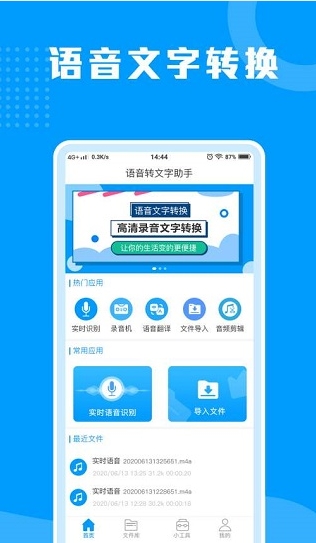
Screenshot of speech-to-text assistant

Frequently Asked Questions about Speech-to-Text Assistant


Voice recognition is inaccurate

Reason: It may be due to poor voice quality, such as noise interference, too fast or too slow speaking speed, unclear pronunciation, etc. It may also be due to limitations of the recognition algorithm of the software itself.

Solution: Use speech-to-text in a quiet environment to control speech speed and pronunciation clarity. At the same time, you can try to update the software version or adjust the recognition settings to improve recognition accuracy.

Unable to recognize specific dialects or accents

Reason: The software's speech recognition algorithm may be mainly designed for standard Mandarin, and has limited recognition capabilities for dialects or accents.

Solution: Try to use standard Mandarin for recording and recognition. If you really need to use a dialect or accent for recognition, you can try to find speech-to-text software that supports that dialect or accent.

Speech to text assistant update log:


1. The details are more outstanding!

2. BUG gone without a trace

Huajun editor recommends:

Huajun Software Park also has popular software with the same functions as this software, such as:Google phonetic input method,iFlytek input method,Sogou mobile phone input method,counter,QQ Pinyin input methodWait, you can collect it if you need it!


Related topics

  • t9 input method

    t9 input method

  • Special topic on voice input software

    Special topic on voice input software

  • input method

    input method

  • Complete collection of writing tablets

    Complete collection of writing tablets

  • Non-mainstream input method software download

    Non-mainstream input method software download

FAQ