
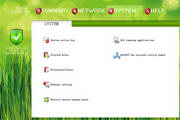



Multifunctional application firewall includes the following features:
1 System behavior active defense:
Monitors nearly 100 system kernel function calls. When there is suspicious behavior, it will accept the user's response in the form of UI, and use various methods to cooperate with other security software (please note: when 360 Security Software exists, the default active defense function will be taken over by 360 Security Software). Active defense protects a variety of system behaviors, such as driver loading, key registry information access/modification, key file information access/modification, etc.
Users can view active defense log information, add custom system behavior rules, trust and block target programs.
2 Application layer network firewall:
Control Internet access by domain name or IP.
Users can customize network behavior rules (including IP and URL, if you need other control methods, you can give opinions). When suspicious network behavior occurs, the user's response will be accepted in the form of UI, and target programs can be added to trust and block to view/block/control network communications for all programs.
3 System protection information and management panel:
In this interface, users can understand the overall working status and protection level status of the system, and can easily perform some important and commonly used functional operations, and can quickly switch working modes on the left panel.
4 Help information panel:
Including application firewall help information, Kodi Ribo software forum, security information and other related information web link addresses, copyright information, manual update function, and also has network management functions for remote hosts through an email. The specific usage is as follows:
1. Configure the same email account on the controlled host and the control command host.
2. Open the remote command receiving service on the controlled host.
3. Send the corresponding control command on the control command host.
4. Within about 10 minutes, the controlled host will receive and run the corresponding control command.
5. For specific details, please refer to the prompt information in the corresponding form.
Software features:
The software interface is implemented using more advanced UI technology. It is based on a comprehensive kernel function support module, supports WINDOWS XP and WINDOWS 7 32-bit operating systems, provides multi-language support, is relatively small in size, but has very comprehensive functions.




Useful
Useful
Useful