





Features of Wukong Browser PC version software
Rich content aggregation: Integrate 21+ resource libraries such as news, short videos, movies, novels, etc., covering sports finance, entertainment information, popular websites, etc., to achieve one-stop browsing.
Extremely optimized performance: Using Blink56 core technology, web pages load faster, run more smoothly, and support intelligent imageless mode to save traffic.
Security and privacy protection: Full-link data encryption provides invisible browsing capabilities to prevent user behavior from being tracked and ensure privacy and security.
Interesting money-making model: Users can earn coins by browsing content, completing tasks, inviting friends, etc. and withdraw them to their WeChat account to maximize online income.
Deep personalized customization: From interface appearance to function expansion, users can make all-round adjustments according to their own needs, such as customizing background images, font styles, and interface layouts through the theme skin system.
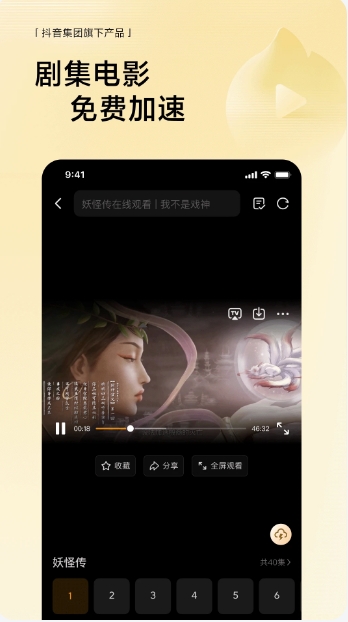
Wukong Browser PC version software functions
Intelligent search and AI assistance: Built-in network-wide search engine, supports one-click query for accurate results, integrates DeepSeek and Doubao dual models, and provides AI question and answer services.
Ad blocking and traffic management: Automatically filter web ads, support imageless mode, save traffic consumption, and improve browsing efficiency.
Video small window playback: Click the "Small Window" button in the upper left corner of the video to reduce the video to a floating window, allowing you to watch content while browsing the web.
Content caching and offline reading: Supports content caching for TV series, novels, etc., which can be watched offline without the need for an Internet connection to meet fragmented time needs.
Plug-in extension support: Supports the installation of third-party plug-ins such as ad blocking, translation tools, and password managers to expand the boundaries of browser functionality.
Cloud synchronization service: supports cross-device synchronization of bookmarks, favorites, and browsing history, allowing users to seamlessly switch between mobile phones and computers.

Frequently Asked Questions about Wukong Browser PC Version
How to fill in the invitation code for Wukong Browser App?
1. Start Wukong Browser and click the "My Gold Coins" option at the bottom of the homepage.
2. In the opened interface, scroll down to the "Fill in invitation code" area.
3. Then, enter the invitation code and bind friends to easily earn coins.
How to invite friends in Wukong Browser?
1. Tap the "My Gold Coins" option at the bottom of the Wukong browser interface, and then scroll down the screen until the "Invite Friend Rewards" function appears in front of you.
2. At this time, you can invite friends through three ways: scanning the QR code on site, inviting via WeChat or using QQ.
How to listen to novels on Wukong browser?
1. Start Wukong Browser and tap the "Free Novels" tab at the bottom of the screen.
2. Browse to the novel section and select your favorite reading material from the bookshelf.
3. On the novel reading page, tap the center of the screen to bring up the function toolbar.
4. Click the "Listen" icon in the lower right corner of the page to start listening to the novel.
Wukong browser also has powerfulSearchFunction, supports one-click search of the entire network content, ensuring that users can obtain accurate and reliable search results. In addition, the platform also provides a large number of genuine freenoveland original film and television works, updated daily to meet users' reading needs. In terms of browsing experience, Wukong Browser focuses on user experience, provides a refreshing reading interface, and supports functions such as custom font size, background replacement, and dark mode to effectively protect users' eyesight.
How to bind friend relationships in Wukong Browser
1. Open the Wukong Browser App, enter the homepage, and click the [My Gold Coins] option at the bottom.

2. Enter the gold coin task page, find and select the [Invite friends to get rewards] option, and then click the [Invite] button on the right.
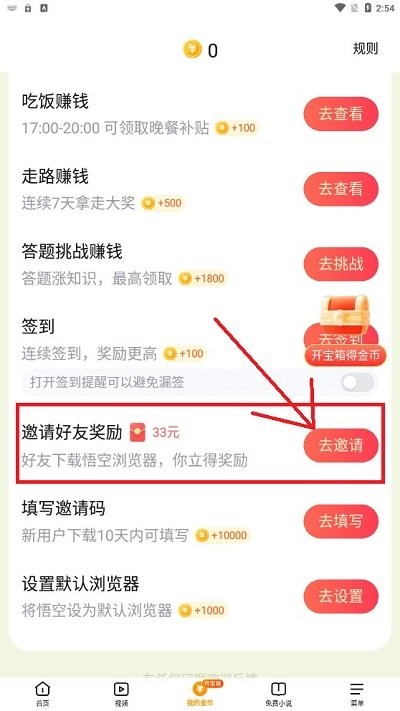
3. After jumping to the invitation friend activity page, click the [Invite Now] button.

4. In the pop-up window, select [Paste in WeChat] and share the invitation password with your friends.
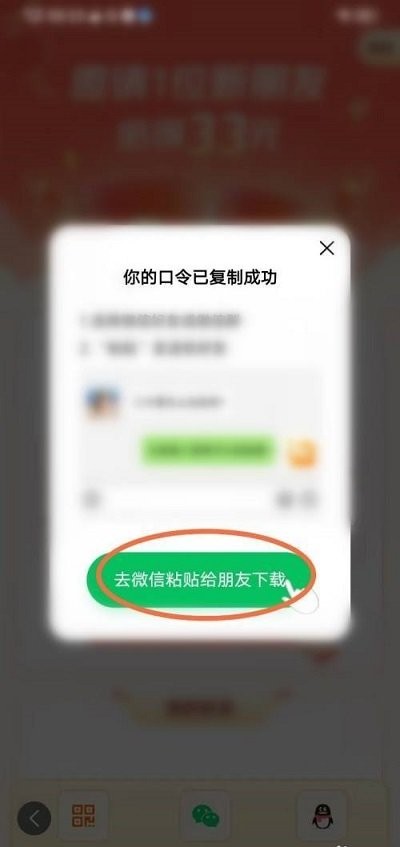
Tip: You can also "bind a friend" by entering the invitation code. After successful binding, you can receive the red envelope as a reward for binding friends.
Wukong Browser account cancellation tutorial
The first step is to open the Wukong browser application and click the [Menu] button in the lower right corner. In the pop-up interface, click the small gear icon in the upper right corner.
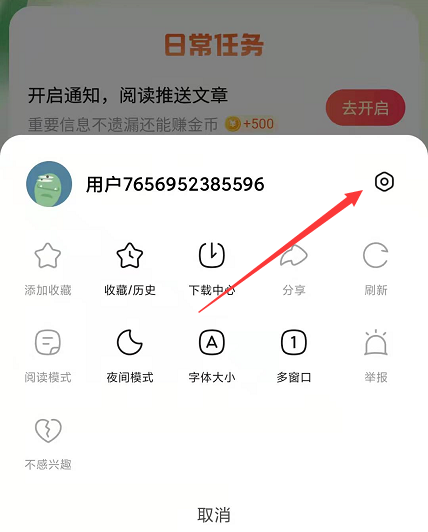
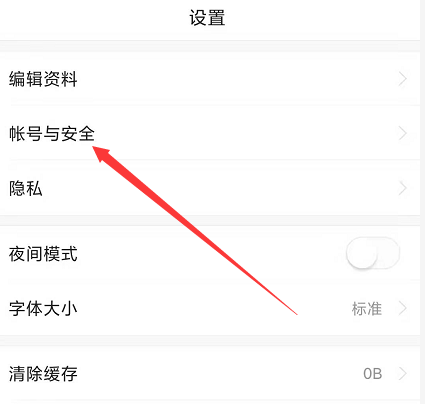
Step 2: After entering the settings page, select the [Account and Security] option and click to enter.
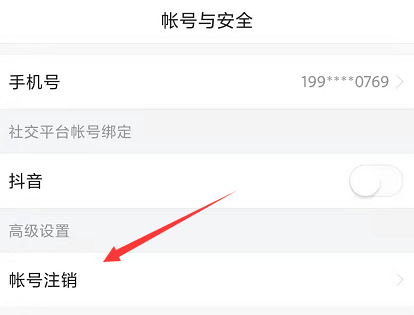
Step 3: On the [Account and Security] page, find and click the [Account Logout] option. After confirming the operation, the account cancellation can be completed.
Installation steps
Special note: The installation package provided by Huajun Software Park contains the Android emulator and software APK files. For the computer version, you need to install the emulator first and then install the APK file.
1. First download the installation package from Huajun Software Park. The software package contains an Android emulator exe installation program and an APK file and unzip it. First click on the exe program to install the lightning simulator.

2. Double-click "Lightning simulator.exe" file to enter the installation interface. Users can click "Quick Installation" to select the system's default installation address for installation, or click "Custom Installation" to choose the installation path. Custom installation is recommended here.

3. WaitingLightning simulatorAfter the installation is complete, click "Try Now" to open the emulator.

4. Enter the main interface of the lightning simulator and clickRight column APK iconSelect the "Local APK Install" button.

5. In the pop-up window, click on the decompressed APK file, and then click to open.

6. After that, the software will enter the installation process. You need to wait for a moment. After the software installation is completed, it will appear in my software list. Click the icon and double-click to open it. 
Wukong browser update log:
Improved the stability of the app and made it run more smoothly
Huajun editor recommends:
Wukong browser software is a software with excellent performance, which is obvious to all. Huajun Software Park also hasAmap 2021,Xiaoyuan.com Business Edition,Educational qualification inquiry,Crazy Master Android Unlock Master (iMyFone LockWiper Android),liepinWaiting for related software that is definitely worth downloading and using, come and choose your favorite one!




Your comment needs to be reviewed before it can be displayed