
If you are looking for software to use, go to Huajun Software Park! software release AI product list

Hello, if there is a need for software inclusion, please package the software and attach the software name, software introduction, software-related screenshots, software icon, soft copy, business license (if you do not have a business license, please provide the front and back of the corresponding developer ID card and a photo of yourself holding the ID card), and send it to email http://softwaredownload4.com/sbdm/user/login

Close >>

Send to email:news@onlinedown.net

Close >>

Location: Home pageAndroid softwareApplicationOther applications PP Assistant

99.61%

0.39%
QR code

Scan the QR code to access the mobile version

Permissions: View

The following important permissions need to be called
uses-permission:'android.permission.WRITE_EXTERNAL_STORAGE', allows the program to write to external storage, such as writing files on the SD card
uses-permission:'android.permission.READ_PHONE_STATE', allows the program to access the phone state
uses-permission:'android.permission.READ_EXTERNAL_STORAGE', the program can read files in the device's external storage space (built-in SDcard and external SDCard)
uses-permission:'android.permission.READ_SETTINGS'
uses-permission:'android.permission.MOUNT_UNMOUNT_FILESYSTEMS', allows the program to mount and unmount external file systems
uses-permission:'android.permission.INTERNET', allows the program to access the network connection, which may generate GPRS traffic
uses-permission:'android.permission.ACCESS_NETWORK_STATE', allows the program to obtain network information status, such as whether the current network connection is valid
uses-permission:'android.permission.ACCESS_WIFI_STATE', allows the program to obtain the current WiFi access status and WLAN hotspot information
uses-permission:'android.permission.CHANGE_WIFI_STATE', allows the program to change the WiFi state
uses-permission:'android.permission.CHANGE_WIFI_MULTICAST_STATE', allows the program to change the WiFi multicast state
uses-permission:'android.permission.SET_WALLPAPER', allows the program to set the desktop wallpaper
uses-permission:'android.permission.SET_WALLPAPER_HINTS', allows the program to set wallpaper suggestions
uses-permission:'android.permission.WRITE_SETTINGS', allows the program to read or write system settings
uses-permission:'android.permission.FLASHLIGHT', allows access to flash
uses-permission:'com.android.launcher.permission.INSTALL_SHORTCUT', create a shortcut
uses-permission:'com.android.launcher.permission.UNINSTALL_SHORTCUT', delete shortcuts
uses-permission:'com.android.launcher.permission.READ_SETTINGS'
uses-permission:'android.permission.MODIFY_AUDIO_SETTINGS', allows the program to modify the sound setting information
uses-permission:'android.permission.SYSTEM_ALERT_WINDOW', allows the program to display the system window
uses-permission:'android.permission.GET_PACKAGE_SIZE', allows the program to obtain the file size of the application
uses-permission:'android.permission.KILL_BACKGROUND_PROCESSES', allows the program to call the killBackgroundProcesses(String). method to end the background process
uses-permission:'android.permission.CLEAR_APP_CACHE', allows the program to clear the application cache
uses-permission:'android.permission.DISABLE_KEYGUARD', allows the program to disable the keyboard lock
uses-permission:'android.permission.WAKE_LOCK', allows the background process to still run after the phone screen is turned off
uses-permission:'android.permission.BROADCAST_PACKAGE_ADDED'
uses-permission:'android.permission.BROADCAST_PACKAGE_CHANGED'
uses-permission:'android.permission.BROADCAST_PACKAGE_INSTALL'
uses-permission:'android.permission.BROADCAST_PACKAGE_REPLACED'
uses-permission:'android.permission.RESTART_PACKAGES', allows the program to end the task through the restartPackage(String) method, which will be abandoned externally
uses-permission:'android.permission.GET_TASKS', allows the program to obtain task information
uses-permission:'android.permission.RECEIVE_BOOT_COMPLETED', allows the program to run automatically after booting
uses-permission:'android.permission.CHANGE_NETWORK_STATE', allows the program to change the network status, such as whether it is connected to the Internet
uses-permission:'android.permission.VIBRATE', allows the program to vibrate
uses-permission:'android.permission.BIND_ACCESSIBILITY_SERVICE', requests the accessibilityservice service to ensure that only the system can bind to it.
uses-permission:'android.permission.READ_LOGS', allows the program to read the system's underlying logs
uses-permission:'android.permission.AUTHENTICATE_ACCOUNTS', allows the program to access account management ACCOUNT_MANAGER related information through account verification
uses-permission:'android.permission.WRITE_SYNC_SETTINGS', write Google online synchronization settings
uses-permission:'android.permission.MANAGE_ACCOUNTS', allows the program to manage the account list in AccountManager
uses-permission:'com.pp.assistant.permission.MIPUSH_RECEIVE'
uses-permission:'android.permission.PACKAGE_USAGE_STATS'
uses-permission:'android.permission.REQUEST_INSTALL_PACKAGES', allows access to installed applications from unknown sources
uses-permission:'com.asus.msa.SupplementaryDID.ACCESS'
uses-permission:'android.permission.ACCESS_COARSE_LOCATION', allows the program to obtain the user's erroneous latitude and longitude information through WiFi or mobile base stations
uses-permission:'android.permission.QUERY_ALL_PACKAGES'
uses-permission:'android.permission.REORDER_TASKS', allows the program to reorder the running tasks of the system Z axis
uses-permission:'android.permission.INSTALL_SHORTCUT'
uses-permission:'com.android.launcher2.permission.INSTALL_SHORTCUT'
uses-permission:'com.android.launcher3.permission.INSTALL_SHORTCUT'
uses-permission:'android.permission.UNINSTALL_SHORTCUT'
uses-permission:'com.android.launcher2.permission.UNINSTALL_SHORTCUT'
uses-permission:'com.android.launcher3.permission.UNINSTALL_SHORTCUT'
uses-permission:'com.android.launcher2.permission.READ_SETTINGS'
uses-permission:'com.android.launcher3.permission.READ_SETTINGS'
uses-permission:'org.adw.launcher.permission.READ_SETTINGS'
uses-permission:'com.htc.launcher.permission.READ_SETTINGS'
uses-permission:'com.qihoo360.launcher.permission.READ_SETTINGS'
uses-permission:'com.lge.launcher.permission.READ_SETTINGS'
uses-permission:'net.qihoo.launcher.permission.READ_SETTINGS'
uses-permission:'org.adwfreak.launcher.permission.READ_SETTINGS'
uses-permission:'org.adw.launcher_donut.permission.READ_SETTINGS'
uses-permission:'com.huawei.launcher3.permission.READ_SETTINGS'
uses-permission:'com.fede.launcher.permission.READ_SETTINGS'
uses-permission:'com.sec.android.app.twlauncher.settings.READ_SETTINGS'
uses-permission:'com.anddoes.launcher.permission.READ_SETTINGS'
uses-permission:'com.tencent.qqlauncher.permission.READ_SETTINGS'
uses-permission:'com.huawei.launcher2.permission.READ_SETTINGS'
uses-permission:'com.android.mylauncher.permission.READ_SETTINGS'
uses-permission:'com.ebproductions.android.launcher.permission.READ_SETTINGS'
uses-permission:'com.oppo.launcher.permission.READ_SETTINGS'
uses-permission:'com.lenovo.launcher.permission.READ_SETTINGS'
uses-permission:'com.huawei.android.launcher.permission.READ_SETTINGS'
uses-permission:'com.bbk.launcher2.permission.READ_SETTINGS'
uses-permission:'com.bbk.launcher2.permission.WRITE_SETTINGS'
uses-permission:'cn.nubia.launcher.permission.READ_SETTINGS'
uses-permission:'cn.nubia.launcher.permission.WRITE_SETTINGS'
uses-permission:'com.meizu.flyme.launcher.permission.READ_SETTINGS'
uses-permission:'android.permission.READ_PRIVILEGED_PHONE_STATE'
uses-permission:'com.pp.assistant.openadsdk.permission.TT_PANGOLIN'
uses-permission:'android.permission.CAMERA', allows the program to access the camera to take pictures
uses-permission:'cn.cyberidentity.certification.AUTH'
uses-permission:'com.taobao.taobao.permission.C2D_MESSAGE'
uses-permission:'com.google.android.c2dm.permission.RECEIVE'

PP Assistant 8.5.3.0

Special area
Software size:28.36MB
software language:Simplified Chinese
Software rating:
Software type:Domestic software
Software licensing:shareware
Update time:2024-12-31
Application platform:Android
Software classification:Other applications
version:8.5.3.0
Registration number:Guangdong ICP No. 2023016695-5A
Software vendor:Guangzhou Lingxi Interactive Entertainment Information Technology Co., Ltd.

Software introduction Related topics FAQ Other versions Download address

Recommended for you:- PP Assistant

Basic introduction
PP Helper LOGO
      pp assistantDownload and install the app into the mobile resource library, which has a large number of free resources.databaseAutomatically detects and updates applications. The update speed is at the forefront among similar software and can meet the needs of most users.PP AssistantThe Android version is installed on mobile Android devicesApplication platform, facing hundreds of millions of domestic Android users, with green resources, no plug-ins, and no impurities, which greatly reduces the security risks of users downloading and installing applications. Supports data-saving mode settings under 2G/3G and WiFi, ensuring users’ browsing and downloading speeds, saving users money and data! Huajun Software Park provides you with PP Assistant app download, come and experience it!


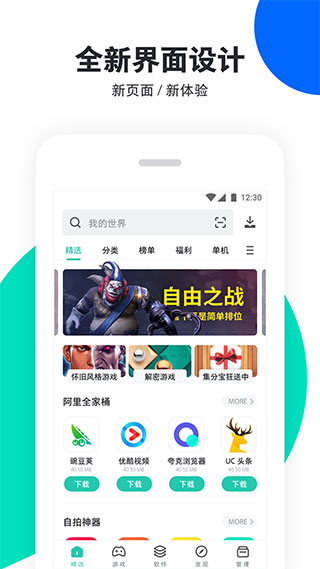
   PP Assistant screenshot

pp assistantSoftware introduction

​ ​ 1. Massive resources are available for free.

      遵循用户需求,坚持每日更新大量资源,涵盖最新最全的应用,最热最火的游戏,以及流行搞笑铃声,精美个性壁纸等等,为国内数以亿计的安卓用户提供一站式免费获取安卓资源的服务。

​ ​ 2.Official and genuine, safe and secure

      所有上架资源绿色,无插件,不掺杂任何杂质,大幅降低用户下载安装应用的安全风险,保障用户设备安全和信息安全,不仅能为用户提供免费的安卓资源下载服务,还能让用户获得安全放心的使用体验。

​ 3.Interface interaction is unique and thoughtful

​​The exquisite and simple interface style and friendly interactive operation methods demonstrate the humanity and thoughtfulness of the design. The layout of each column is intuitive and generous, and the resources are clearly presented, effectively avoiding visual obstacles caused by rich content; column switching, left and right, up and down sliding operations are smooth and smooth, without limiting procrastination, and respecting the user's autonomy in operation.

4. Resource management, comprehensive and worry-free

​​Integrate multiple functions such as application download, installation, update, uninstallation, etc. Ultra-high-speed downloading is fully automatic in the background, and the installation package can be automatically deleted after downloading and installing. Supports one-click all updates; intelligently reads installed software, allowing users to directly click and uninstall, making it simple and worry-free!

5. Traffic-saving mode is practical and considerate

Supports the data-saving mode setting under 2G/3G and WiFi, meeting the different usage habits of users under different network conditions, effectively preventing misoperations, ensuring users’ browsing and downloading speeds, and saving users money and data!
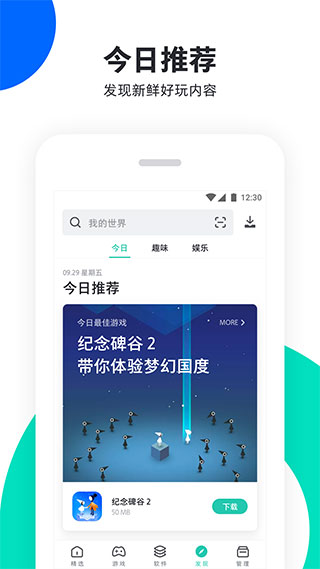
   PP Assistant screenshot

pp assistantSoftware function

Effective resource management: Integrate multiple functions such as application download, installation, update, and uninstall. Wallpapers and ringtone resources can be replaced with one click.

Unique interface interaction: exquisite and simple interface style, intuitive and generous column layout, and clear presentation of resources make the operating experience more streamlined

Green official resources: Unlimited downloads of massive resources, focusing on official genuine resources, green, no plug-ins, greatly reducing the security risks of users downloading applications.

Massive free resources: the latest and most comprehensive, the hottest games, popular funny ringtones, and exquisite personalized wallpapers are available for free in one stop.

​​Save traffic and speed: The traffic-saving mode in 2G/3G/WiFi environment ensures users’ browsing and downloading speeds and saves users money on traffic.

pp assistantSoftware FAQ


PP Assistant crashes

Possible reasons: software conflicts, system permission issues, out-of-date PP Assistant version, etc.

Solution:

Try closing other running applications to reduce the possibility of software conflicts.

Check and adjust the device system permission settings to ensure that PP Assistant has the necessary running permissions.

Update PP Assistant to the latest version to fix possible crash issues.

PP Assistant update log:


Working day and night just so you can be happier

Mummy, Mummy, coax~all the bugs are gone!

Huajun editor recommends:

The editor of Huajun Software Park has compiled and collected software that you may like, such as:XuRong cashier system software,Perfect World Esports,Baidu Skydisk 11,attention,random number generatorYou can download it from this site.


FAQ

Associated version