






Introduction to MeiyinTuTu software
US, TUTU, provides users with a comprehensive range of quick photo management functions. You can upload your photos to the background, generate exquisite electronic photo albums, and permanently preserve the beautiful moments in life! Users can create unparalleled customized works with photos on their mobile phones through this software in just a few minutes. The operation is simple and suitable for consumer groups of all ages.
Highlights of MeiyinTuTu Software
1. The brand new Meiyin Tutu app is a personalized customized product service company integrating technology research and development, design and production, production and sales. It is an innovative and powerful brand in the field of mobile Internet customization.
2. So far, the company operates more than 200 kinds of products, among which photo books, pillows, mobile phone cases, etc. are favored by the public.
3. In just a few minutes, consumers can use the photos on their mobile phones to create unparalleled customized works through the Meiyin App. The operation is simple and suitable for consumer groups of all ages.
Meiyintutu software functions
1. Personalized customization on mobile terminal
The passage of time is a book, a record of ordinary life, carrying every bit of your life and showing your individual life, it’s that simple!
2. Rich customized products
Photo books, hardcover albums, desk calendars, mobile phone cases, water bottles, pillows, postcards, table settings and other products can be customized;
3. Massive templates, new ones added every week
1000+ exquisite templates, pictorial level layout, to meet your personalized customization requirements;
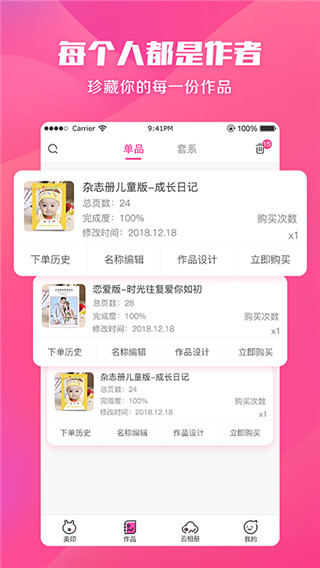
4. My works
Collect every DIY souvenir you have and be the author of your own beautiful moments;
5. Cloud photo album
记录点滴美好,分享精彩时光,和朋友一起发现生活中的感动与回忆;
6. Beautify pictures
胶片级滤镜、电影效果、柔焦、动态虚化,拒绝游客照,你就是画面焦点!
7. Shopping cart
Add your favorite products to the shopping cart to make shopping and payment more convenient;
8. Logistics tracking and instant push
The real-time update reminder of baby logistics allows you to track the logistics status of your baby anytime and anywhere;
9. Online customer service facilitates communication
FAQ
Logistics information update delayed
Phenomenon: After the user places an order, the logistics information has not been updated for a long time, or it displays "shipped" but no specific track.
Reason:
Logistics company data synchronization is delayed or not entered into the system in time.
There are compatibility issues between software and logistics interfaces.
Solution:
Click "Logistics Tracking" in the software to manually refresh the logistics information.
Copy the logistics order number and query it through the logistics company's official website or a third-party platform (such as Cainiao Wrap).
If the problem persists, contact customer service and provide the order number to help urge logistics updates.
Online customer service responds slowly
Phenomenon: When users consult the online customer service within the software, the waiting time is too long or no one responds.
Reason:
The customer service team has insufficient manpower, or there is a large queue during peak consultation periods.
There are technical failures in the software customer service system (such as message push delays).
Solution:
Prioritize finding answers to frequently asked questions through the "Help Center" in the software.
Contact customer service during off-peak hours (such as weekday mornings) to reduce waiting time.
If the urgent problem is not resolved, you can contact the official account for feedback through the official website or social media (such as Weibo).
Installation steps
Special note: The installation package provided by Huajun Software Park contains the Android emulator and software APK files. For the computer version, you need to install the emulator first and then install the APK file.
1. First download the installation package from Huajun Software Park. The software package contains an Android emulator exe installation program and an APK file and unzip it. First click on the exe program to install the lightning simulator.

2. Double-click "Lightning simulator.exe" file to enter the installation interface. Users can click "Quick Installation" to select the system's default installation address for installation, or click "Custom Installation" to choose the installation path. Custom installation is recommended here.

3. WaitingLightning simulatorAfter the installation is complete, click "Try Now" to open the emulator.

4. Enter the main interface of the lightning simulator and clickRight column APK iconSelect the "Local APK Install" button.

5. In the pop-up window, click on the decompressed APK file, and then click to open.

6. After that, the software will enter the installation process. You need to wait for a moment. After the software installation is completed, it will appear in my software list. Click the icon and double-click to open it. 
Meiyintutu update log
Working day and night just so you can be happier
are all gone!
Huajun editor recommends:
Meiyintutu is very simple to install, has powerful functions, and has no installation garbage. It is specially recommended to everyone, and everyone is welcome to download it! This site also hasDangdang.com,Enjoy Tesco,Ali Auction,Taobao, available for you to download!




Your comment needs to be reviewed before it can be displayed