




Tuoxin barcode generation system software functions
1. Tuoxin barcode generator has three built-in barcodes: Code128, EAN13 and Code39.
2. Tuoxin barcode generator can set the height and width of the barcode.
3. The data used to generate barcodes can be displayed or hidden.
4. The barcodes generated by these three code systems can be directly saved as pictures.
5. Tuoxin barcode generator can directly print the generated barcode.
6. You can add barcode data to be collected in batches and printed in batches to achieve barcode management integration with other software (such as ERP).
Main features of Tuoxin barcode generation system
1. The height and width of the barcode can be set.
2. The generated barcode can be printed directly.
3. The data used to generate barcodes can be displayed or hidden.
4. Built-in three barcodes: Code128, EAN13 and Code39.
5. The barcodes generated by these three code systems can be saved directly as pictures.
6. Barcode data can be collected in batches and printed in batches to achieve barcode management integration with other software (such as ERP).
Tuoxin barcode generation system installation steps
1. First download the Tuoxin barcode generator software package from Huajun Software Park. After the download is completed, right-click the mouse and select to extract to the current folder. After decompression, you will get the exe file.

2. Double-click to run the Tuoxin Barcode Generator.exe file, and the installation wizard interface as shown below will open. Click Next
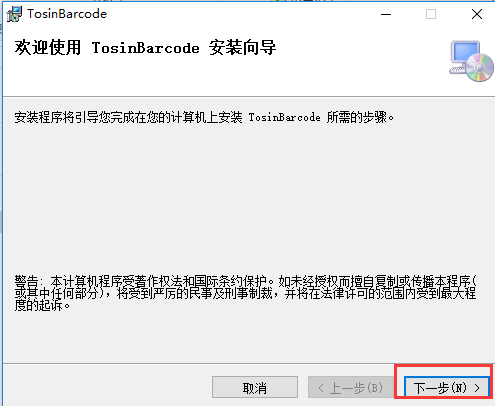
3. Select the installation folder: You can choose the default installation or click Browse to select a custom installation, and then click Next. The editor here would like to remind everyone that the program is installed on the C drive by default and will occupy some system resources. In order not to affect the use of the software and the running speed of the computer, it is recommended that you choose a custom installation method.

4. Confirm the installation, click Next to prepare to install Tuoxin Barcode Generator

5. Waiting for installation, please wait patiently during the installation process. Wait for the progress bar to complete and click Next to continue.

6. After the installation of Tuoxin Barcode Generator is completed, you will see the following interface. Click Close to exit the installation wizard.

How to use Tuoxin barcode generation system
Step 1: Open the Tuoxin barcode generator we have installed and enter the information to generate the barcode in the barcode data input box.

Second step: Then set the barcode parameters accordingly. You can set this according to your own needs.

Step 3: After the settings are completed, you can see the barcode image generated for us by Tuoxin Barcode Generator in the barcode generation area.
Step 4: Finally, click the barcode generation button in the upper right corner of Tuoxin Barcode Generator. Then you will see two options: save pictures and batch generate. You can choose according to your own needs.

Tips for using Tuoxin barcode generation system
1. Barcode editing software
Edit the barcode and then print it out by sending it to the barcode printer. You can save the edited content and open it when you need to print it next time.
Generally, barcode printers have their own editing software. You can also purchase professional third-party software such as Bartender, or you can download Tuoxin Barcode Generator online.
2. The number of barcode digits depends on your needs
首先是数据的需要,然后是标签宽度的限制。 In addition, you cannot print too densely, as some scanners cannot recognize overly dense barcodes.
Tuoxin Barcode Generation System Frequently Asked Questions
Question: How does Tuoxin barcode generator save images?
Answer: There is an option to save pictures in the barcode generation in the upper right corner of Tuoxin Barcode Generator. Click this option to save the picture.
Question: How does Tuoxin barcode generator generate batches?
Answer: There is a batch generation option in the barcode generation in the upper right corner of the Tuoxin barcode generator. You can also batch generate it after clicking it.
Question: Comparison of Tuoxin barcode generator FreeBarcode software
Answer: FreeBarcode is a powerful barcode production software that can support a variety of commonly used barcode formats. The barcode generated by it can be pasted into WORD, EXCEL, PPT and other application software at will, which is very convenient.
Tuoxin Barcode Generator is also a barcode production software. It is simple to operate. You only need to enter the barcode information to automatically generate a barcode image. It can not only print on A4 paper but also on ID photos. Of course, the biggest feature is that it is free and can be printed in batches, which is very practical.
Tuoxin barcode generation system update log
1. Add QR code PDF417, QRCode, Datamtrix
2. Import of Excel data added to Tuoxin barcode generator
3. Tuoxin Barcode Generator adds the ability to directly copy barcode images to the pasteboard for use
Huajun editor recommends:
Tuoxin barcode generation system software feels really good! The editor specially tested it for this purpose, and it works really well.Ruida carton factory management software,Ruitian author number automatic generation system,No typos - Chinese automatic proofreading Word plug-in,Hongda Press Information Management System,Yint 0 series picture and text store fast printing store management softwareThese are all very good software tested by the editor, come and choose the one that suits you!




Useful
Useful
Useful