
-
Convert Word to PDF
- Size: 13.77M
- Language: Simplified Chinese
- Category: File conversion
- System: WinAll






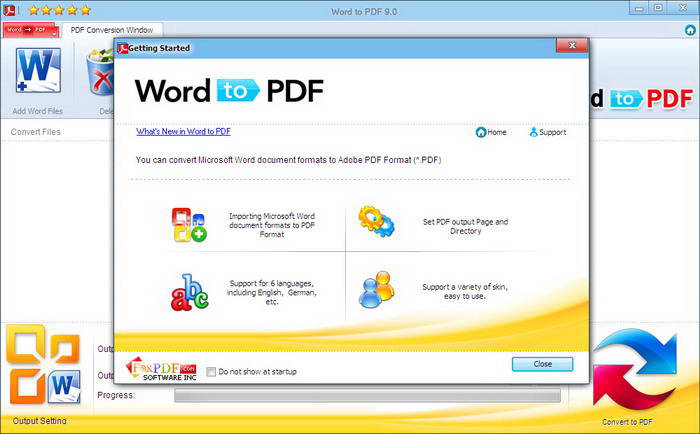
Word to PDF is an easy-to-use PDF file converter. And convert Word to PDF is a multi-language software, including English, Chinese, French, German, Italian and Japanese. Word to PDF Converter has a very user-friendly interface and is easy to use. The conversion speed is very fast and there are no quality issues!

Using Word to PDF you can convert Microsoft Word 2013 (*.DOCX, *.Doc), Microsoft Word 2010 (*.DOCX, *.Doc), Microsoft Word 2007 (*.DOCX, *.Doc), Microsoft Word 97-2003 (*.DOC), web page files (*.Htm, *.Html), text files (*.TXT), Rich Text Format (*.RTF), CSS Format (*.CSS), Extensible Markup Language (*.XML), and image files BMP, JPG, JPEG, PNG, GIF, WMF and TIF to Adobe PDF files (*.PDF).
Among them, convert Word 2013 to PDF, Word 2010 to PDF, Word 2007 to PDF, Word 2003 to PDF, Word 2000 to PDF, Word 97 to PDF, Html to PDF, Htm to PDF, TXT to PDF, RTF to PDF, CSS to PDF, XML to PDF, BMP to PDF, JPG to PDF, JPEG to PDF, PNG to PDF, GIF to PDF, WMF to PDF, TIF to PDF, DOC to PDF, DOCX to PDF. You can set PDF password, size.
The word to pdf converter does not require the installation of Adobe Acrobat or Acrobat Reader software.
PDF security: You can create and set passwords for PDF files.
Word to PDF software features
1. The document can be directly output as a picture, and the user can personalize it;
2. The PDF to WORD converter can output a variety of formats. In addition to Word documents (.doc), it can also be output as (.rtf) documents;
3. The PDF to WORD converter output document can be customized to change the page size;
4. When converting encrypted PDF files, you can convert them directly without unlocking (you need to manually enter the PDF document password);
5. PDF to WORD converter can convert PDF files in batches;
6. The conversion speed is fast. The PDF to WORD converter takes into account both conversion speed and quality, and can better preserve the images, hyperlinks, and plans in the PDF document;
7. The generated Word document is not a read-only document and can be modified directly by the user;
8. Can be run independently without relying on Adobe Acrobat, Acrobat Reader and other software.
Word to PDF software download steps:
1. Open the word_65848 compressed package downloaded from Huajun Software Park, decompress it with WinRAR compressed package, double-click to open word_65848.exe, and enter the installation interface.
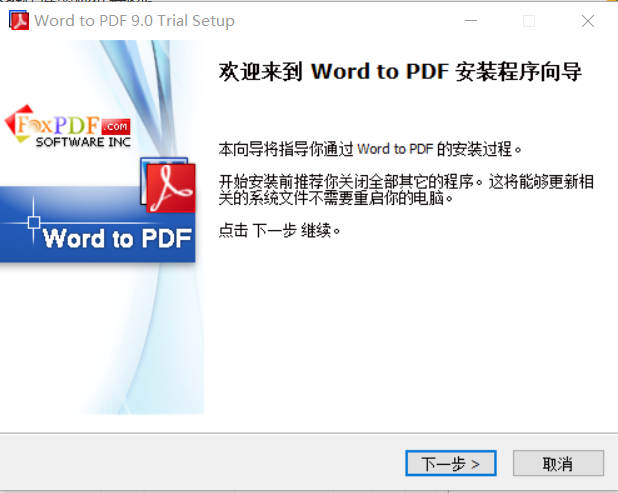
2. Select the installation location of the software and select the folder to install it to according to your own habits.

3. Check before installation to see if the target folder location is the one you selected. If it is correct, click Next.

4. Wait for a few minutes and the installation will be successful.


Instructions for converting Word to PDF
1. If the PDF you want to convert is encrypted, please enter the PDF document password in the software, and then you can convert it.

2. The easy-to-use pdf to word converter supports adding PDF documents in batches. You can directly drag PDF files into the software window, or click "Add Files" to add PDF documents.
3. The easy-to-use pdf to word converter itself is an independent software that does not depend on Adobe Acrobat software.
Convert Word to PDF updated content
1. The program supports multiple languages: Simplified, Traditional, English and Japanese;
2. Changed the conversion core package, and the conversion effect is better;
3. When converting PDF to Word, you can choose Doc or Docx format, and also add "Editing Priority" or "Display Priority";
4. Fixed some bugs.
Huajun editor recommends:
Word to PDF and Quick PDF Converter, .NET, Batch Manager, etc. are all very good software. Welcome to our site to download and experience!
Version: 9.3 | Update time: 2024-12-23
Similar recommendations




Latest updates




How to create a folder on Thunder Cloud Disk - How to create a folder on Thunder Cloud Disk
How to take screenshots in Video Pioneer? -How to take screenshots in Video Pioneer
Stickman War Legacy web version entrance-Stickman War Legacy online play
How does kimi generate PPT? -Kimi’s operation process for generating PPT
Peace Elite instant play entrance-Peace Elite web version online play entrance without login
Word to PDF comments
-
1st floor Huajun netizen 2020-08-25 05:25:09Converting Word to PDF is very easy to use, thank you! !
-
2nd floor Huajun netizen 2021-05-15 14:52:59The software to convert Word to PDF is very easy to use, the download speed is very fast and very convenient!
-
3rd floor Huajun netizen 2020-06-19 12:43:57Converting Word to PDF is awesome! 100 million likes! ! !
Recommended products






- Diablo game tool collection
- Group purchasing software collection area
- p2p seed search artifact download-P2P seed search artifact special topic
- adobe software encyclopedia - adobe full range of software downloads - adobe software downloads
- Safe Internet Encyclopedia
- Browser PC version download-browser download collection
- Diablo 3 game collection
- Anxin Quote Software
- Which Key Wizard software is better? Key Wizard software collection




