
-
Bluestack Android Emulator
- Size: 0.77M
- Language: Simplified Chinese
- Category: PC emulator
- System: WinAll






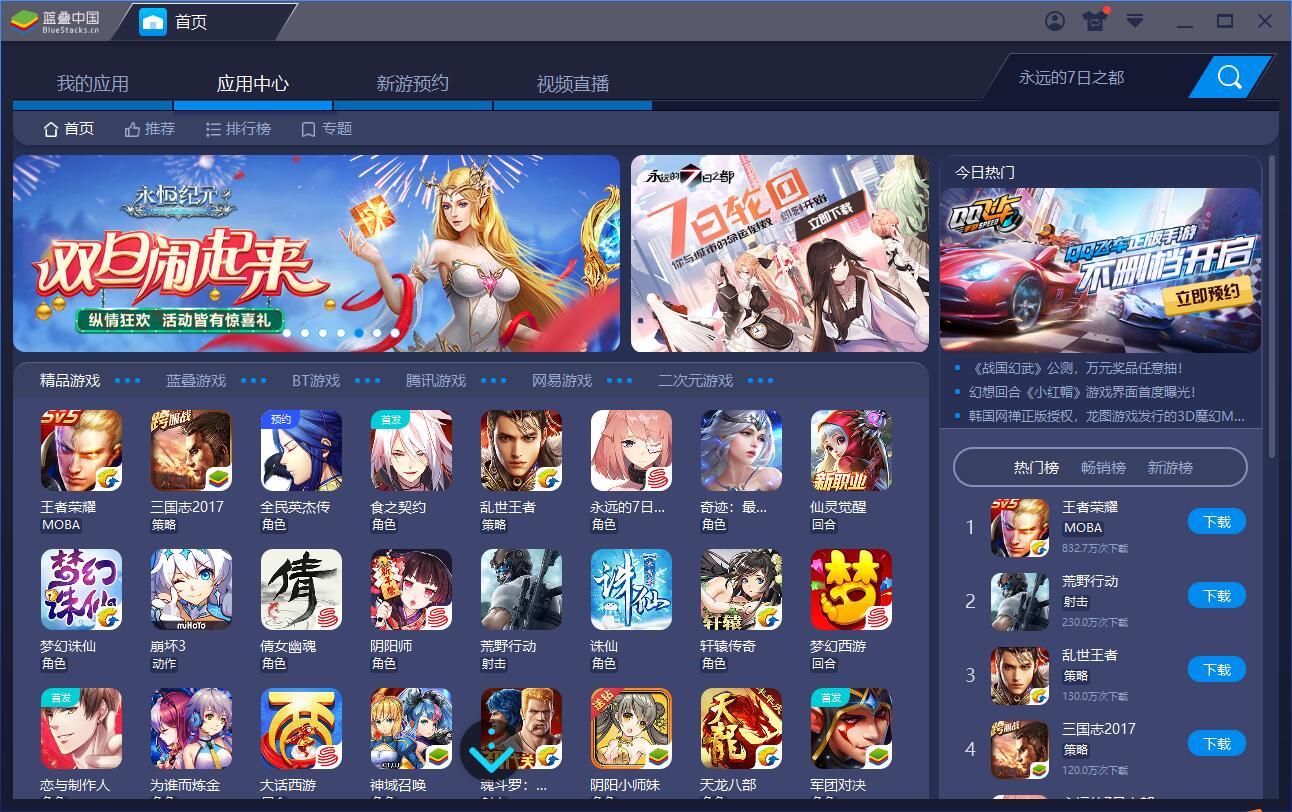
Bluestack Android EmulatorIt is a powerful Android emulator that has been proven over time. BlueStacks (BlueStacks emulator) is so powerful that any Android software can run perfectly on it. It has also received widespread praise. Up to now, BlueStacks (BlueStacks emulator) has been promoted to more than 100 countries and regions around the world, so you can use it with confidence. Huajun Software Park provides the official version of the BlueStack Android emulator for download. Friends who like to play mobile games on computers should download it quickly!
Highlights of BlueStack Android Emulator
Game-specific optimization
Adapt versions of popular games (such as "The Battle of the Golden Shovel" and "Three Kingdoms: Strategy Edition") to solve compatibility issues.
Provides one-click daily tasks, automatic hang-up and other script functions to simplify repetitive operations.
Synchronizer function
Copy the operations of multiple simulator windows in real time, suitable for batch idle or resource collection of strategy games (such as "Clash of Clans").
Macros and Automation
Supports operation recording function, which can record complex operation processes and play them in a loop, suitable for automatic monster spawning, daily tasks and other scenarios.
Picture and control optimization
Supports horizontal screen/vertical screen switching to adapt to different application scenarios.
Provides advanced control functions such as MOBA skill joystick and free looking around (360-degree viewing angle).
Frequently Asked Questions about BlueStack Android Emulator
1. How to open more bluestack simulators?
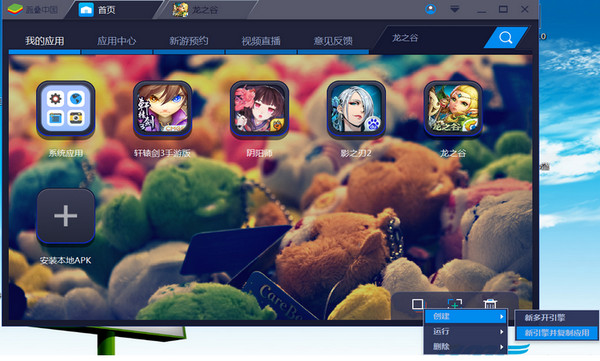
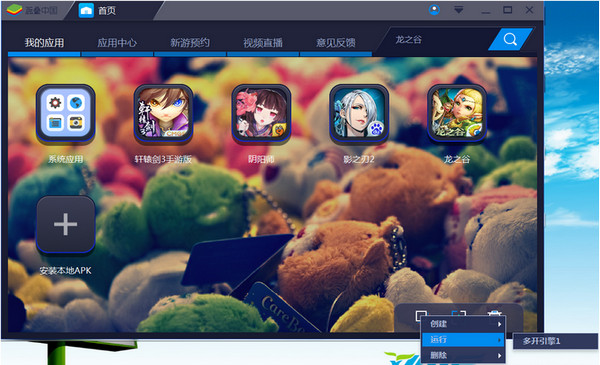
1. After starting the Bluestack simulator, there is a multi-open icon in the lower right corner of the homepage. Click and select Create. Generally speaking, select "New Engine and Copy Application" because selecting "New Multi-Open Engine" only copies the simulator, while "New Engine and Copy Application" copies and installs the application while copying the simulator. We ultimately hope to open several more games at the same time, so it is recommended that you select "New Engine and Copy Application" after installing the game on the home page.
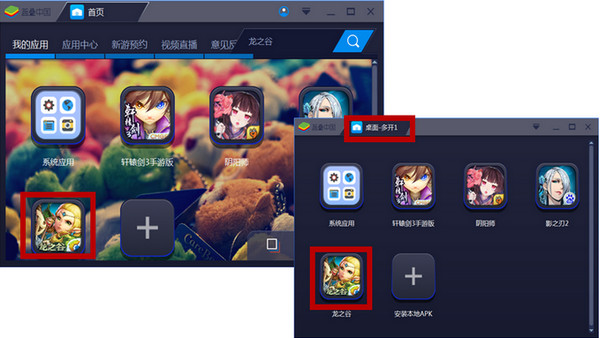
2. After the creation is successful, a new simulator operation interface will appear, displaying "Desktop - Open Multiple 1". At the same time, you will notice that multiple games on the homepage have been copied. For example, if you want to play "Dragon Nest", please click the "Dragon Nest" icon in the "Home Page" , click the "Dragon Nest" icon in "Desktop - Open More 1", and 2 "Dragon Nest" games will be opened. By analogy, you can open 3 more, 4 more, 5 more, or even more. However, depending on your computer configuration, it is recommended that you open 3 more games.
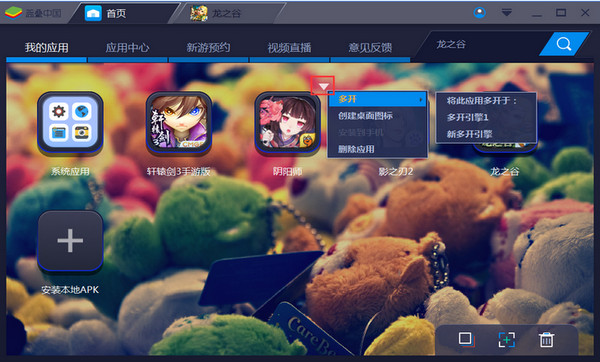
3. After you have successfully created a multi-open game, the next time you need to open more games, you only need to click the drop-down box in the upper right corner of the game icon on the home page, or home page --- multi-open icon --- run --- multi-open engine 1. The same goes for deleting it. I wish you guys a good time.
2. Where are the downloaded files for the BlueStacks simulator?
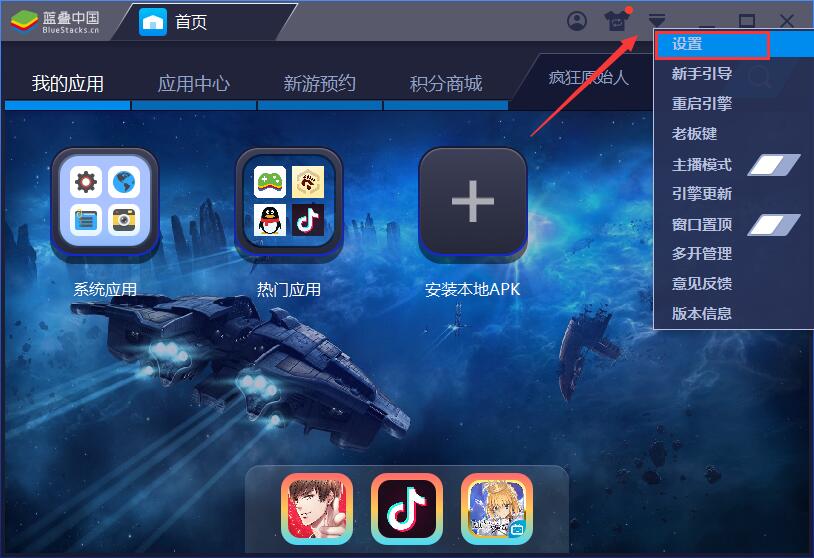
1. Open the installed BlueStacks simulator, click the arrow on the upper right to open the main menu, and then open the "Settings" option in the drop-down menu.
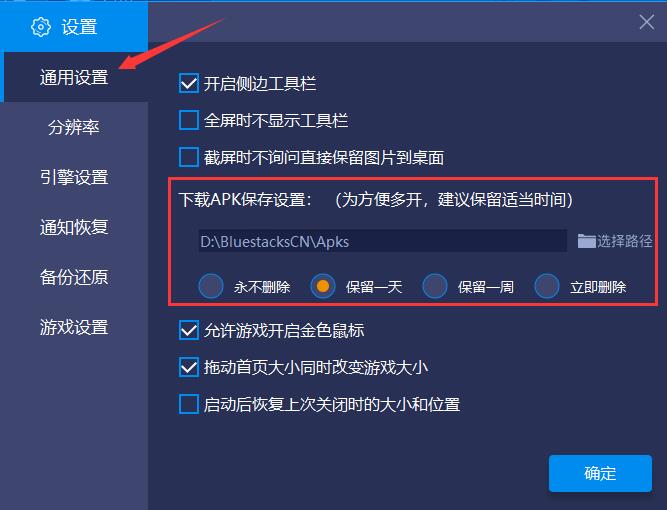
2. In the "General Settings" column of the settings window, you can directly see the save location of the downloaded APK. Just follow this address to find it.
Bluestack Android emulator usage tutorial
How to root BlueStack emulator
1. Open the installed BlueStacks simulator, click the arrow on the upper right to open the main menu, and then open the "Settings" option in the drop-down menu.
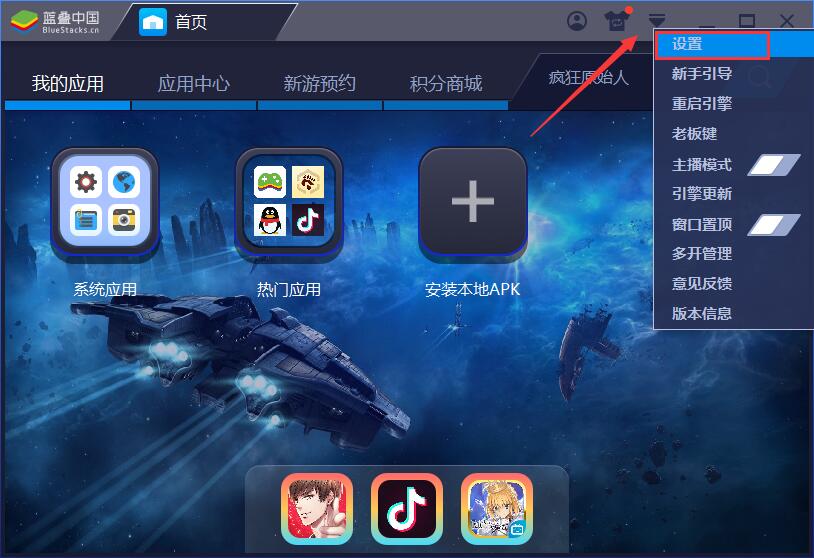
2. Switch the settings window to the "Engine Settings" column and directly click the "Get Root Permissions" button.
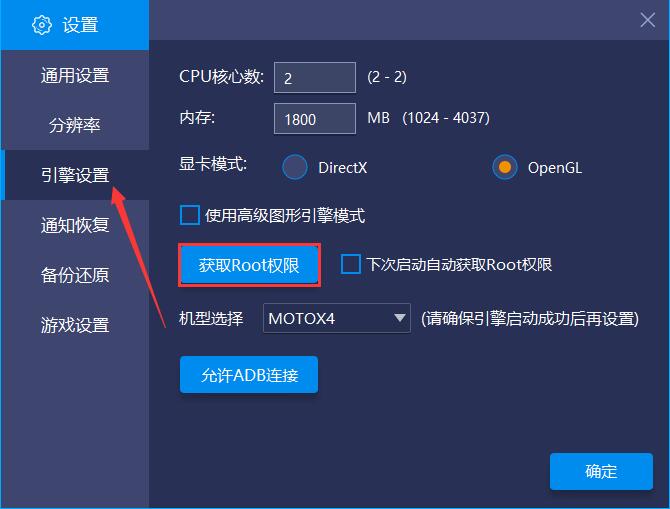
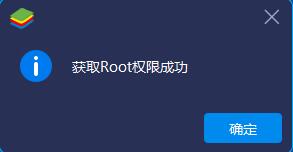
3. In this way, you can successfully root. Come and try it.
Features of the latest version of LanStack Android emulator
Cross-platform compatibility
It supports multiple operating systems from Windows XP to Windows 10, macOS, etc., and is compatible with hardware architectures such as Intel, AMD, and Qualcomm.
Through virtualization technology (such as KVM) and instruction set simulation, ARM-based Android applications can run efficiently on x86/64-bit PCs.
High performance graphics rendering
It adopts Microsoft DirectX acceleration technology to optimize 3D graphics performance and support the smooth running of high-definition games such as "Honkai Impact 3" and "Genshin Impact".
The exclusive "HD+" intelligent engine dynamically adjusts resource allocation, reduces memory usage, and improves multi-open stability.
Multiple opening and batch management
Supports unlimited multi-opening. Users can run multiple game accounts or application instances at the same time, and create, close, and arrange windows in batches through the multi-opening manager.
Energy-saving mode optimizes background resource usage to ensure that computer performance is not affected when running multiple functions.
Keyboard, mouse and gamepad control
Provides full keyboard mapping function and supports customized key layout (such as one-click combos in "Honor of Kings" and right-click mouse movement in "Peace Elite").
Native controller connection, plug and play, suitable for MOBA, FPS, and action game operation needs.
Shooting mode (enabled by pressing the F1 key) realizes the seamless connection between mouse aiming and keyboard shooting, improving the accuracy of FPS game operations.
Virtual location and file sharing
Built-in virtual positioning function to simulate LBS application requirements (such as geographical location check-in).
Supports fast file transfer between PC and simulator, breaking device barriers.
BlueStack Android emulator installation steps
1. Download the BlueStacks simulator software from this site, double-click the .exe, and an installation interface will appear. Click "Custom Installation"
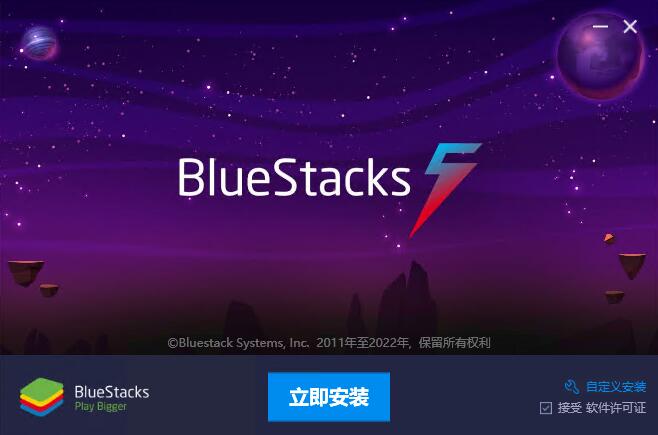
2. It is recommended to install the file on the D drive, or install it on the C drive by default. Click "Install Now"
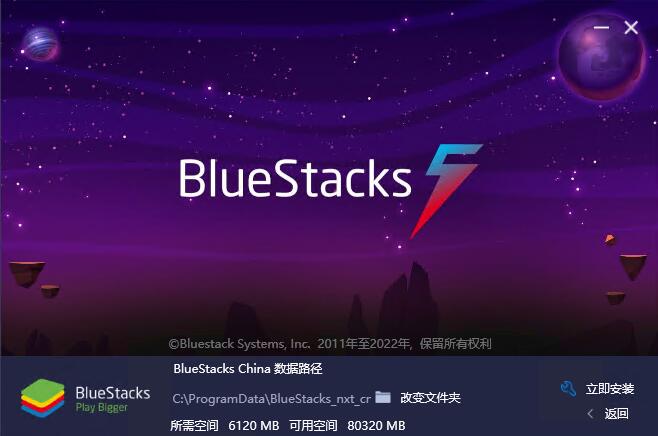
3. BlueStacks simulator is being installed, the process is slow, please wait patiently.
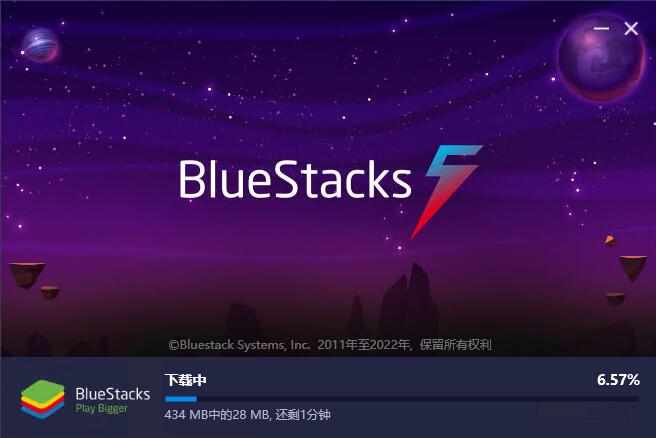
4. The BlueStacks simulator is installed, click "Try Now".
Which one is better, Landie Android emulator or Tiantian emulator?
As the leader in computer-side Android emulators, BlueStacks can be said to be a very forward-looking brand with comprehensive functions, smooth operation, and simple interface, making it suitable for all types of users. However, due to its early launch, its software performance is overtaken by some niche emulators, and its compatibility with some Android software is not very good, and it takes up a lot of space.
Tiantian simulator is an emerging simulator. Although it does not have a self-developed core, it has optimized its performance with local characteristics, making it easier for domestic users to use. However, due to limited technology, users may experience some operational difficulties during use, which affects the user experience, and the computer space is not small. If you want to download the Tiantian simulator, you can go to the following address.
Tiantian simulator download address:http://softwaredownload4.com/soft/561885.htm
BlueStacks Android emulator BlueStacks update log
1. Support the use of computer input methods
2. Significantly optimized the cross keys
3. Fix crash on some AMD machines
4. Enhanced game compatibility
5. Optimized the speed of apk installation
6. Enhanced the display effect of the game
7. Fixed some known issues
Huajun editor recommends:
bluestacks is an Android emulator with core technology patents. Users only need to install the emulator on the computer first, then download the app for simulated installation, and then they can use mobile applications on the computer. In addition, this website also provides downloads of Yeshen Android emulator, Xiaoyao Android emulator, National Assistant Android emulator, Haimawan Android emulator, NetEase MuMu Android emulator, etc.
Version: 5.22.91 | Update time: 2025-11-07
Similar recommendations







Latest updates



"Super Evolution Story" BlueStacks blue stack Android emulator installation and usage tutorial
How to add background music in python-How to add background music in python
How to configure environment variables in python - How to configure environment variables in python
How to run python - How to run python
How to create a project in python - How to create a project in python
How to make a blue sky background with scratch-How to make a blue sky background with scratch
How to create a linked list in scratch-How to create a linked list in scratch
How to add local programs to scratch-How to add local programs to scratch
How to input Chinese in scratch-How to input Chinese in scratch
Bluestack Android Emulator Review
-
1st floor Huajun netizen 2021-11-02 10:20:50I love the BlueStack simulator, it downloads very quickly! !
-
2nd floor Huajun netizen 2021-12-04 18:19:12Bluestack simulator must be praised first! ! !
-
3rd floor Huajun netizen 2021-05-26 23:40:39BlueStacks Simulator is very unique, this is indeed a very innovative game, highly recommended! !
Recommended products









- Diablo game tool collection
- Group purchasing software collection area
- p2p seed search artifact download-P2P seed search artifact special topic
- adobe software encyclopedia - adobe full range of software downloads - adobe software downloads
- Safe Internet Encyclopedia
- Browser PC version download-browser download collection
- Diablo 3 game collection
- Anxin Quote Software
- Which Key Wizard software is better? Key Wizard software collection




