
-
Startup screen modification tool
- Size: 0.33M
- Language: Simplified Chinese
- Category: System settings
- System: vista/win7






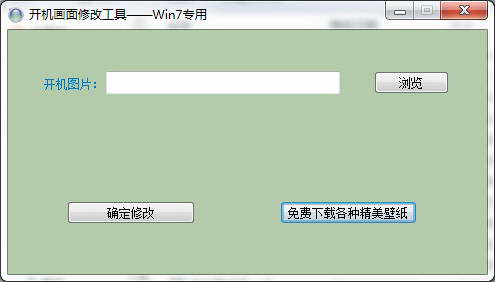
Startup screen modification toolThe official version includes four startup screen modification tools designed for computer systems. The startup screen modification tool can help us easily modify the display screen when the computer is turned on and off, making our computer more unique and very convenient to use. andStartup screen modification toolYou can also set the startup screen, menu background, etc., and support screen saving and bin file saving. Huajun Software Park provides download services for boot screen modification tools. Everyone is welcome to download and use them!
Boot screen modification tool software functions
1. There are 3 pictures in total, a startup screen, a broadcast screen, and a background. Any one or more of them can be modified individually.
2. The startup screen modification tool can extract the startup screen in the original BIN, decompress it and save it as a separate mpg file.
3. MPG files that have been prepared in advance can be compressed and synthesized into BIN.
4. When making MPG, you should pay attention to the complexity of the picture to control the file size.
5. Please test the size before changing the BIN to ensure that the size is appropriate and that useful data is not overwritten.
How to install startup screen modification tool
1. Download the startup screen modification tool from the Huajun Software Park and you will get a software compressed package.

2. Then we decompress the software compressed package and get the modifylogo.exe application.
3. Finally, double-click to open the modifylogo.exe application and you can use it directly.
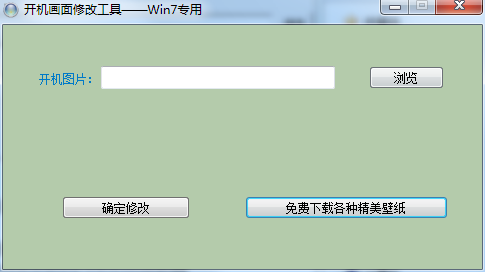
Instructions for using the startup screen modification tool
The pictures you choose must meet the requirements, otherwise they will not be able to enter the system. Select the built-in picture (double-click to see the full-screen effect) or click to open the file, select your own picture, click Apply, and it will be displayed successfully. If you don’t want to use it, just click Restore (you don’t need to click Restore to change the picture, and it will not affect the backed up files). Double-click the file in the file box to preview it in full screen, or select it and click "Preview in full screen". The startup waiting time setting is added to prevent setting errors. If an error occurs, select the second item to enter the system when starting, confirm that there is no error, and set it to 0 (the setting is valid only when you select a picture) and enter directly (it is recommended to set it to 5 seconds first).
Frequently Asked Questions about Splash Screen Modification Tool
Question: How to delete the "Startup Screen Modification Tool"?
Answer: Right-click My Computer, click Properties to enter the system properties, click to the Advanced page, set startup and recovery, change the time to display the operating system list to 3 seconds, or directly click to start running boot, ini ,[boot loader]timeout=30default=multi(0)disk(0)rdisk(0)partition(1)WINDOWS[operating systems]multi(0)disk(0)rdisk(0)partition(1)WINDOWS="Microsoft Windows XP Professional" /fastdetect /KERNEL=LOGOOS.EXEC:GRLDR="Deep one-click restore GHOST V11.0" Change timeout=30 from 30 to 3 and then delete the startup limit that you think is unnecessary, for example, C:GRLDR="Deep One-Click Restore GHOST V11.0" delete, close Notepad and save it.
Comparison of similar software
WindowsXP startup screen changesIt is a simple and refined system modification program. The user only needs to select a 640*480*4-bit (16-color) picture, and then select the application. After restarting the computer, your startup screen has been changed.
WIN boot screen automatic changerCan automatically change the WINDOWS startup screen. Every time it is restarted, the program will randomly select one of the 10 pictures that comes with it as the WINDOWS The next startup screen.
Huajun editor recommends:
Startup screen modification toolIt can help us easily modify the display screen when the computer is turned on and off, making our computer more unique and very convenient to use. This software is powerful and easy to operate. I hope everyone will like it!
Version: 1.3 Official version | Update time: 2024-12-23
Similar recommendations





Latest updates

Pixel Naruto online play entrance-Pixel Naruto web version online play-Huajun Software Park
How to add background music in python-How to add background music in python
How to configure environment variables in python - How to configure environment variables in python
How to run python - How to run python
How to create a project in python - How to create a project in python
How to make a blue sky background with scratch-How to make a blue sky background with scratch
How to create a linked list in scratch-How to create a linked list in scratch
Startup Screen Modification Tool Reviews
-
1st floor Huajun netizen 2022-02-22 21:38:52The startup screen modification tool is very useful, thank you! !
-
2nd floor Huajun netizen 2022-03-18 19:13:40The startup screen modification tool is awesome! 100 million likes! ! !
-
3rd floor Huajun netizen 2021-10-18 14:16:50The startup screen modification tool is pretty good and downloads very quickly. I’d like to give you a good review!
Recommended products







- Diablo game tool collection
- Group purchasing software collection area
- p2p seed search artifact download-P2P seed search artifact special topic
- adobe software encyclopedia - adobe full range of software downloads - adobe software downloads
- Safe Internet Encyclopedia
- Browser PC version download-browser download collection
- Diablo 3 game collection
- Anxin Quote Software
- Which Key Wizard software is better? Key Wizard software collection




