
-
explorer.exe repair tool
- Size: 3.08M
- Language: Simplified Chinese
- Category: System settings
- System: WinAll






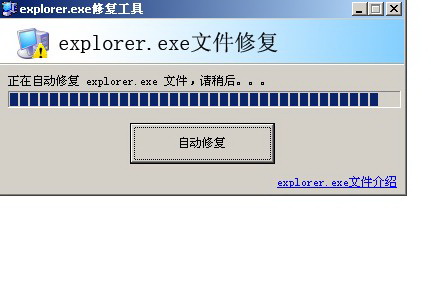

explorer.exe repair toolIt is a repair tool developed for explorer.exe program errors under Windows systems. The reasons for explorer.exe errors can be big or small. It may be a software conflict or a virus infection, so we must not ignore it. Using explorer.exe repair tool, this software can help you solve this problem easily. Friends who like explorer.exe repair tool, please come to Huajun Software Park to download and experience it!
explorer.exe repair tool installation steps
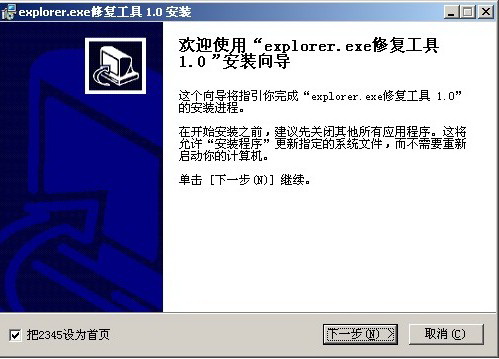
1. Download the explorer.exe repair tool package named "exf-0.zip" from Huajun Software Park. After decompressing, double-click with the left mouse button to open the "Install" installation file in the folder.
Note: To decompress the compressed package, you need to use a compression and decompression tool. WinRAR is recommended because the technology is mature and reliable. WinRAR download address:http://softwaredownload4.com/soft/5.htm


2. After opening the installation program, you can see that the version to be installed is 1.0. Then click on the lower left corner to select whether to "Set 2345 as the homepage". After confirming the installation, click "Next".

3. Click "Browse" to select the installation directory of the explorer.exe repair tool. It is not recommended to install it on the C drive. If there are too many files on the C drive, it will affect the running speed of the computer. After selecting, click the "Install" button below to start the installation.
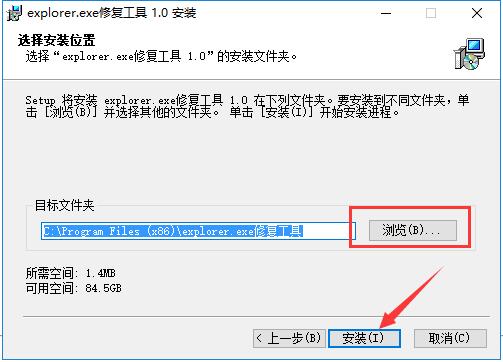
4. The installation process of explorer.exe repair tool takes about 2 minutes, please wait patiently.

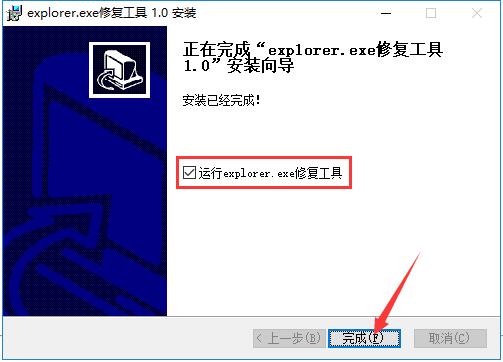
5. After the installation is completed, it will automatically jump to the installation completion interface. If you need to use the explorer.exe repair tool immediately, you need to check the "Run explorer.exe repair tool" in the middle, and then click the "Finish" button.
How to use explorer.exe repair tool:
Open the installed explorer.exe repair tool and click the "Automatic Repair" button in the middle.
Causes of problems with explorer.exe
1. Insufficient system resources and low computer configuration
2. System files are damaged, affecting use
3. Software conflicts
4. The computer is infected with viruses.
5. Other reasons
6. System kernel error, need to reinstall
explorer.exe repair tool parameter results:
/n Opens a new single-pane window for the default selection.
The default selection is usually the root directory of the drive where Windows is installed.
/e Starts Windows Explorer using the default view
explorer.exe repair tool FAQ
1. What should I do if the application startup error code: 0xc0000142 appears?
Cause of the error: This is caused by some DLL files failing to be registered by the system, resulting in dynamic library call errors.

1. You can try pressing win+R to bring up run and enter CMD.

2. Enter "for %1 in (%windir%system32*.dll) do regsvr32.exe /s %1" in CMD and wait for the program to finish running.
2. What should I do if Explorer.exe takes up too much CPU and memory?
1. You can close it through the task manager. First, right-click the toolbar at the bottom of the screen, click and select "Task Manager" in the right-click menu to open the task manager interface.
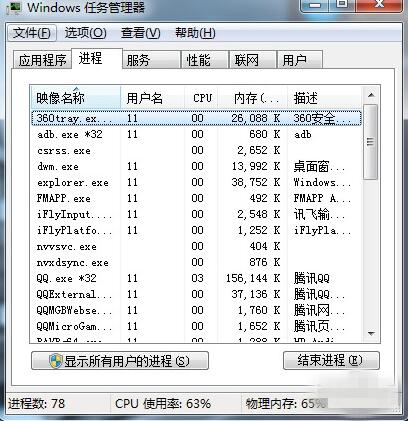
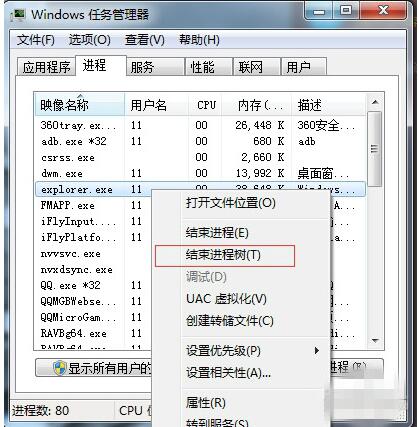
2. Then find Explorer.exe in the process, right-click and select End Process.
Comparison of similar software to explorer.exe:
DirectX Repair Tool: Easy to use. The DirectX Repair repair tool program is a green version and does not require installation and can be run directly. The main function of the DirectX repair tool is to detect the DirectX status of the current system and repair it if an abnormality is found.
EasyRecovery: Can help you recover lost data and rebuild the file system. easyrecovery provides complete data recovery solutions, such as deleted file recovery, format recovery, and lost partition recovery.
DirectX repair tool download address:http://softwaredownload4.com/soft/120082.htm
EasyRecovery download address:http://softwaredownload4.com/soft/575683.htm
explorer.exe repair tool update log
1. Fixed BUG, the new version has a better experience
2. Some pages have been changed
Huajun editor recommends:
Although the explorer.exe repair tool is small in size, it is powerful and can help users solve many unresolved problems. And the explorer.exe repair tool is very simple to operate and only requires one click. If you also encounter explorer.exe problems, download it and try it. In addition, the editor also recommends that the memory cannot be downloaded and used by read repair tools, windows system repair experts and other related software.
Version: 1.0 Free version | Update time: 2025-10-23
Similar recommendations





Latest updates





explorer.exe repair tool review
-
1st floor Huajun netizen 2022-01-02 23:22:59The explorer.exe repair tool is very useful, thank you! !
-
2nd floor Huajun netizen 2022-03-21 14:08:11The explorer.exe repair tool software is very easy to use, the download speed is very fast, and it is very convenient!
-
3rd floor Huajun netizen 2021-06-18 19:13:16The explorer.exe repair tool is convenient, practical and powerful. The software is very easy to use!
Recommended products










- Diablo game tool collection
- Group purchasing software collection area
- p2p seed search artifact download-P2P seed search artifact special topic
- adobe software encyclopedia - adobe full range of software downloads - adobe software downloads
- Safe Internet Encyclopedia
- Browser PC version download-browser download collection
- Diablo 3 game collection
- Anxin Quote Software
- Which Key Wizard software is better? Key Wizard software collection




