Hot search terms: 360 Security Guard Office365 360 browser WPS Office iQiyi Huawei Cloud Market Tencent Cloud Store
Hot search terms: 360 Security Guard Office365 360 browser WPS Office iQiyi Huawei Cloud Market Tencent Cloud Store

study education Storage size: 42.8 MB Time: 2021-12-17
Software introduction: Kingsoft PowerWord APP is one of the most popular English dictionary tools currently on the market, including more than 140 authoritative dictionaries such as Collins and Oxford Bilingual,...
It is very easy and convenient to use Kingsoft PowerWord software to translate. Today, the editor will explain the simple steps for setting up Chinese-Japanese translation on Kingsoft PowerWord. I hope it can help some novice friends.
First, open Kingsoft PowerWord and enter the translation interface. The default translation language is English. If you want to set up Japanese translation, you need special skills;

Click on the translation method, you can choose to convert Chinese into various languages, including German, French, English, Spanish, Japanese, etc. Here we can choose to translate Chinese into Japanese, or Japanese into Chinese;

Then enter Chinese and click Translate to get the Japanese translation results.
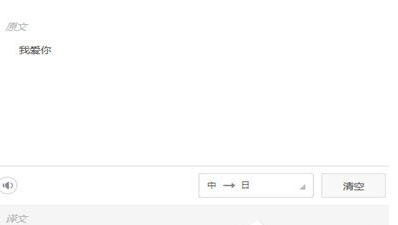
Come and learn the simple steps for setting up Chinese-Japanese translation on Kingsoft PowerWord today. I believe you will be able to use it in the future.

 How to download, install and register the EA platform (Rotten Orange), one article will teach you
 How to register for Google Mail - understand it all in one article - Huajun Software Park
 How to connect HP wireless printer to WiFi, one article will teach you
 Microsoft Edge browser
 Steam
Steam
 Tencent Video
 WPS Office
 iQiyi
iQiyi
 Sohu video player
 Lightning simulator
 MuMu emulator
 Eggman Party
 Detailed steps for renaming shape layers in Image Factory
 How to exit safe mode on Xiaomi? -How to exit safe mode in Xiaomi
 How to use Xiaomi Mobile Assistant? -Xiaomi Mobile Assistant usage tutorial
 How to force restart Xiaomi phone? -How to force restart your phone in Xiaomi
 How to set the computer shutdown timer? -Tutorial on setting up computer shutdown schedule