
Hot search terms: 360 Security Guard Office365 360 browser WPS Office iQiyi Huawei Cloud Market Tencent Cloud Store
Hot search terms: 360 Security Guard Office365 360 browser WPS Office iQiyi Huawei Cloud Market Tencent Cloud Store
For those who make websites, flashfxp is a very common tool, and flashfxp is indispensable for daily work. flashfxp integrates the advantages of other excellent FTP tools and is a very good FTP tool.

flashfxp
1. First we open the flashfxp tool, then we click the callback menu with the mouse and select "Quick Connection."

flashfxp download file
2. Enter the quick connection window, enter the address, account, password, address, which can be a domain name or IP. After entering, click Connect. Successfully connected and obtained space information.
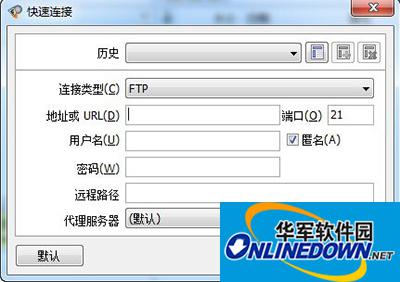
flashfxp download file
3. Now, we use the mouse to select the file to download in the right window, which is the ftp space. Then right click ===Transfer.

flashfxp download file
4. Start downloading the file and wait for the file download to complete.
Okay, isn’t this very simple? Downloading flashfxp is actually not difficult at all. I hope everyone can learn together.

 How to draw a lottery in 360 Software Butler - How to draw a lottery in 360 Software Butler
 How to collect software in 360 Software Manager - How to collect software in 360 Software Manager
 Microsoft Edge browser
 Steam
Steam
 Tencent Video
 WPS Office
 iQiyi
iQiyi
 Sohu video player
 Lightning simulator
 MuMu emulator
 Eggman Party
 What to do if there is no sound after reinstalling the computer system - Driver Wizard Tutorial
 How to switch accounts in WPS Office 2019-How to switch accounts in WPS Office 2019
 How to clear the cache of Google Chrome - How to clear the cache of Google Chrome
 How to fire bullets in scratch-How to fire bullets in scratch


