
Hot search terms: 360 Security Guard Office365 360 browser WPS Office iQiyi Huawei Cloud Market Tencent Cloud Store
Hot search terms: 360 Security Guard Office365 360 browser WPS Office iQiyi Huawei Cloud Market Tencent Cloud Store
How to check the password in FlashFXP?
1. Click [Properties]>>[Parameter Selection] in the menu bar, or press the shortcut key F6.
2. In the parameter selection interface, click [Options] on the left, and then check "Show password when selecting password field" under security at the bottom right.
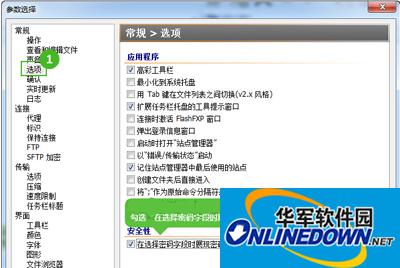
How to check password in FlashFXP
3. Open "Site Manager" in the menu bar or press the shortcut key F4. On the site manager interface, place the mouse cursor in the password input box and click once to see the clear text of the password displayed.

How to check password in FlashFXP

 How to add background music in python-How to add background music in python
 How to configure environment variables in python - How to configure environment variables in python
 How to run python - How to run python
 How to create a project in python - How to create a project in python
 How to make a blue sky background with scratch-How to make a blue sky background with scratch
 Steam
Steam
 Tencent Video
 WPS Office
 iQiyi
iQiyi
 Sohu video player
 Lightning simulator
 MuMu emulator
 Eggman Party
 WPS Office 2023
 What to do if there is no sound after reinstalling the computer system - Driver Wizard Tutorial
 How to switch accounts in WPS Office 2019-How to switch accounts in WPS Office 2019
 How to clear the cache of Google Chrome - How to clear the cache of Google Chrome
 How to fire bullets in scratch-How to fire bullets in scratch
