
Hot search terms: 360 Security Guard Office365 360 browser WPS Office iQiyi Huawei Cloud Market Tencent Cloud Store
Hot search terms: 360 Security Guard Office365 360 browser WPS Office iQiyi Huawei Cloud Market Tencent Cloud Store

video playback Storage size: 39.37MB Time: 2022-12-28
Software introduction: . PotPlayer software comes with a professional codec, which is convenient and fast. After being installed together, you can watch video files in any format. It is very powerful...
PotPlayerIt is a very useful player. Sometimes in order to introduce a certain software or teach others to use it, the best way is to record a tutorial video.PotPlayerThe player is a good choice for you. Today I will bring youPotPlayerPlayer screen recording tutorial. Hope it helps everyone.
Preparation before recording
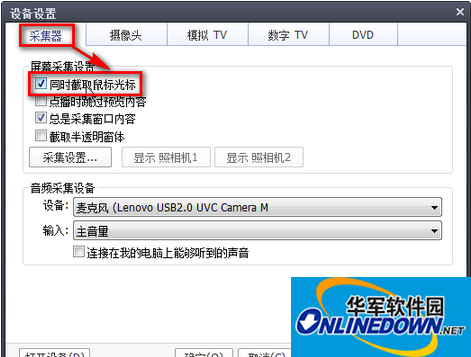
Right-click in the PotPlayer playback window, select "Open → Device Settings", switch to the "Collector" tab, and check the "Capture mouse cursor at the same time" option so that you can see mouse operations while recording. If you want to include sound in the video, you can select the microphone device in the "Device" list of "Audio Capture Device" (Figure 1).
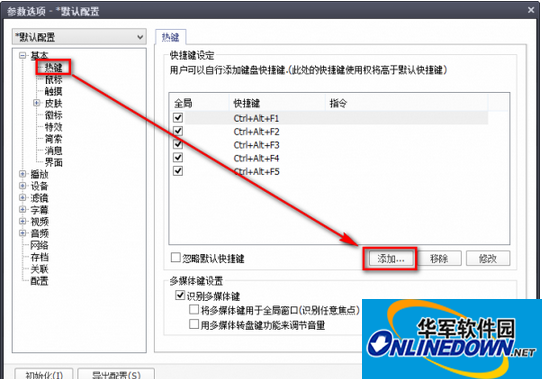
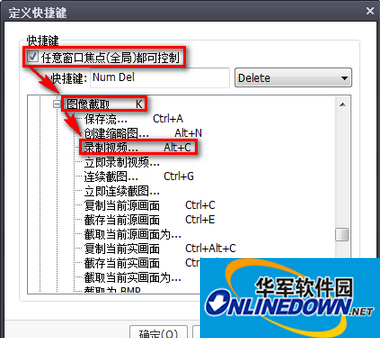
Also right-click in the playback window, select "Options", and select "Hotkeys" under "Basic" in the pop-up settings window. Then click "Add" in the right window and select the "Any window focus can be controlled" option (Figure 2). Now in the "Shortcut Keys" list, set the shortcut key command for the operation as needed. What I set here is the Del key of the small keyboard. Then in the command list, expand and select the "Video→Image Capture→Record Video" command, and finally click "OK" to exit (Figure 3).
Hide PotPlayer interface
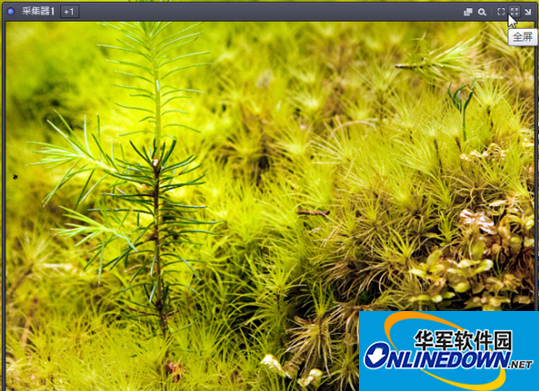
Or right-click in the playback window and select the "Open → Collector" command. Customize the size of the recording window in the pop-up recording window. We can either drag the recording window or directly click the "Full Screen" button in the upper right corner to record (Figure 4). Next, click the "Hide Lens 1" command in the upper right corner of the collector to hide the collector window to avoid interference with the recording. Then click the minimize button on the PotPlayer main interface to hide the player's main interface, otherwise picture-in-picture will occur during subsequent playback.
Okay, the above is what the editor of Huajun brings to you.PotPlayer playerThe entire screen recording tutorial is here, isn’t it very simple? Have you learned it? Want to know morePotPlayer playerFor related content, please stay tuned for Huajun information updates!

 How to draw a lottery in 360 Software Butler - How to draw a lottery in 360 Software Butler
 Microsoft Edge browser
 Steam
Steam
 Tencent Video
 WPS Office
 iQiyi
iQiyi
 Sohu video player
 Lightning simulator
 MuMu emulator
 Eggman Party
 What to do if there is no sound after reinstalling the computer system - Driver Wizard Tutorial
 How to switch accounts in WPS Office 2019-How to switch accounts in WPS Office 2019
 How to clear the cache of Google Chrome - How to clear the cache of Google Chrome
 How to fire bullets in scratch-How to fire bullets in scratch


