
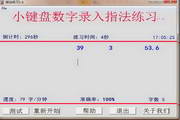



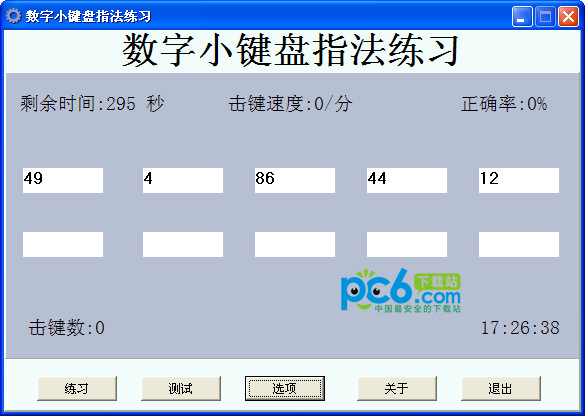
Instructions for use: After completing the input of each number, you must press the Enter key before starting the input of the next number.
Methods to improve speed: practice fingering, sitting posture, and touch typing for 1-2 days. On the third day, the test score can reach 120-240; the accuracy rate is over 99%.
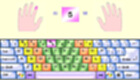
Fingering instructions: 0 key - thumb; 1, 4, 7 keys - index finger; 2, 5, 8 keys - middle finger; 3, 6, 9, decimal point key - ring finger; Enter key - little finger.
Preparation position: Follow the law enforcement instructions and place your fingers on the basic keys 0, 1, 2, 3 and the Enter key.
This software has strict fingering testing. Return to correct input errors is not allowed. At the end of the test, no key presses are allowed, otherwise the test results will not be retained. The purpose is to require input personnel to pay full attention when entering data, develop good input habits, and avoid mistakes in future positions.
System features:
1 Automatically generate various numbers mixed with integers and decimals.
2. The system automatically times the time. When the practice time is over, the window displays the fingering practice results, which is helpful for practitioners to check their own results.
3 Use animation and sound to make the exercises more interesting.
4 The online version scientifically records the historical results of practitioners, which is helpful for checking the learning status of practitioners.
5 The interface is simple and elegant, helping to protect the physical and mental health of practitioners.
6 Testing is rigorous. It is not allowed to return to correct input errors. At the end of the test, you are not allowed to press keys at will, otherwise the test results will not be retained. The purpose is to remind input personnel to pay full attention when inputting data, develop good input habits, and avoid mistakes in future posts.
Exercise instructions:
1. Typing posture:
1. Keep your upper body straight, your shoulders flat, your bones and muscles relaxed, and your feet flat on the ground. Never cross one foot while standing on the ground.
2. Keep your wrists and elbows in a straight line, bend your fingers naturally and moderately, and place them gently on the basic keys without opening your arms.
3. Adjust the screen to an appropriate position, focus your eyes on the screen, and try not to look at the keyboard to avoid looking back and forth, which will increase eye fatigue.
2. Typing essentials:
1 Place both hands on the basic keys 0 1 2 3 and the Enter key. Fingering: Thumb: 0 key; Index finger: 1 4 7 keys; Middle finger: 2 5 8 keys; Ring finger: 3 6 9 decimal point key; Little finger: Enter key.
2. The fingers should be bent naturally, and the arms should not be opened too wide.
3. The fingers should hit the typing keys correctly, the keystrokes should be light, the relaxation should be quick, and the fingers should return to the basic keys immediately after the keystroke.
4 The speed should be average.
Three button exercises:
When practicing, you can first train the basic numeric keys, and you can use three numeric keys as a group to train to input integers; then train to input decimals, and finally conduct comprehensive training with the actual data to be entered. Confusion, student name question scores are pronounced as single digits. For example, 17.5 should be pronounced as "seventeen point five" instead of "seventeen point five".













Useful
Useful
Useful