





 You may like





Highlights of Hagong Cashier
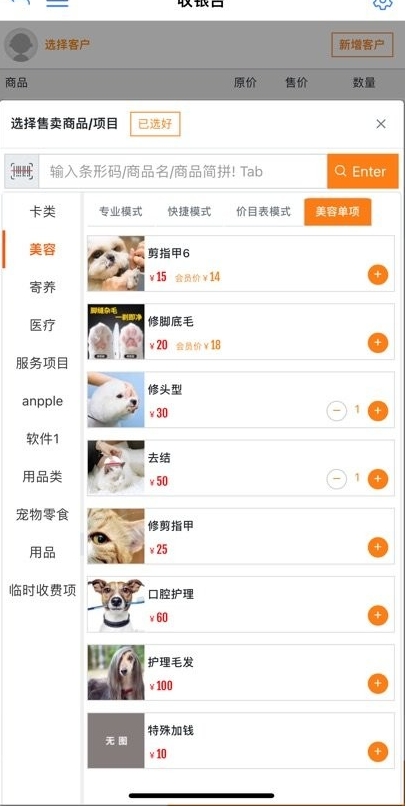
Pet store daily operations: quickly handle product sales, foster care registration, and increase repurchase rates through the membership system.
Pet Clinic Management: Electronic prescription and appointment functions reduce paper records, and vaccine reminders avoid missing customers.
Online Marketing Expansion: Micro-mall + marketing tool combination to expand customer base and increase non-store revenue.
Data-driven decision-making: Revenue charts and business dashboards help merchants analyze performance and optimize service strategies.
Features of Hagong Cashier
Green, safe, simple and easy to use: no advertising plug-ins, intuitive operation interface, and novices can get started quickly.
Multi-system compatibility: Supports mainstream operating systems such as Windows and macOS, with one-click installation without complex configuration.
Interface design: simple and beautiful, with clear functional divisions and direct access to common operations in one step.
Online interaction: Built-in chat module supports real-time communication with customers, answering questions or pushing promotional information.
Flexible payment: Aggregated payment interface, compatible with WeChat, Alipay, bank cards and other payment methods to improve settlement efficiency.
Hachigong cashier function
Cashier accounting
Supports rapid product sales, cashier settlement, and is compatible with multiple methods such as cash, QR code scanning, and online payment.
Automatically generate daily/weekly/monthly income reports to display sales trends and income composition in charts.
Member Management
Member information entry, points management, consumption record tracking, and support for membership level classification and exclusive discounts.
Foster care service management: record the pet foster care time and health status, and automatically remind you of expiration or renewal.
Vaccine and deworming reminder
Set up vaccination and deworming plans based on the pet’s profile, and the system will automatically push reminders to the customer’s mobile phone or WeChat.
Supports batch import of pet information and quickly generates reminder lists.
Prescription and Appointment Management
Electronic prescription issuance records pet medical history and medication information to facilitate follow-up consultations.
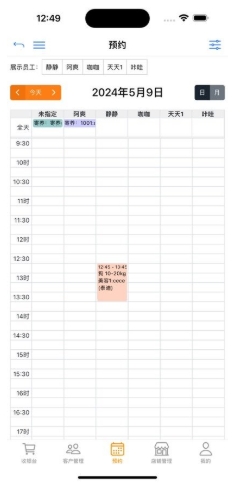
Online appointment registration allows customers to independently choose service times and doctors, reducing queues and waiting.
Micro mall function
An online mall specially created for pet merchants, supporting product display, online ordering, and logistics tracking.
Integration of marketing tools: coupons, group activities, and member-only prices to increase customer stickiness.
Store Manager (186+ functions)
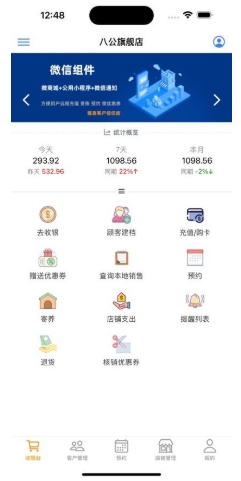
Covers the entire process of store management: inventory management, employee scheduling, financial reports, customer evaluation, etc.
The micro-mall and physical store data are synchronized to achieve integrated online and offline operations.
Exclusive tools for store managers
Mobile order processing and real-time reply to customer service messages improve service response speed.
Business data dashboard: Key indicators (such as passenger flow, conversion rate) are updated in real time to assist decision-making.
Hagong Cashier FAQ
The software cannot be opened or reports an error
Problem Description: When trying to open the Bagong Cashier APP, the software cannot be started or an error message pops up.
Possible reasons:
Network connection issues: The software may be unable to connect to the server.
Software version issues: The software version you are using may be out of date, have known bugs or compatibility issues.
System compatibility issues: The software may be incompatible with your current operating system.
Firewall or anti-virus software blocking: A firewall or anti-virus software may be preventing the software from functioning properly.
Solution:
Check your network connection to make sure it is stable and you can access the internet.
Update software to the latest version to fix known bugs and compatibility issues.
Check the operating system version to make sure it is compatible with the software.
Temporarily turn off the firewall or anti-virus software and try to run the software again. If the problem is solved, you can add the software to the trust list of the firewall or anti-virus software.
Database connection problem
Problem description: The software prompts that it cannot connect to the database.
Possible reasons:
The database server address or port configuration is incorrect.
The database service does not start or runs abnormally.
A network connection problem prevents access to the database server.
Solution:
Check whether the database server address and port configuration are correct and ensure they are consistent with the server settings.
Confirm that the database service is started and running normally.
Check your network connection to make sure you can reach the database server.
Hachigong Cashier update log:
Working day and night just so you can be happier
Mummy, Mummy, coax~all the bugs are gone!
Huajun editor recommends:
Hachigong Cashier is a very good leisure and entertainment software. I secretly tell you that I also use this software, and I don’t tell others about it! Powerful, green and safe. Huajun Software Park also provides you withHarvest Internet,Shizuishan Bank,Jiangnan Rural Commercial Bank,Zhangjiakou Bank,Everbright TrustWaiting for you to download.

















Your comment needs to be reviewed before it can be displayed