





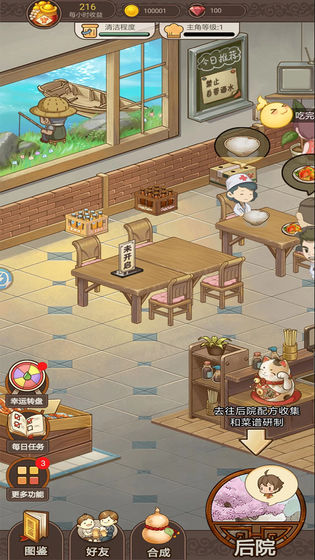
Game introduction
Happy Kitchen PC version is a cartoon-style business simulation game. In the Happy Kitchen mobile game, players can experience the fun of decorating the kitchen. After traveling the mountains and rivers as an apostle, players can collect various recipes and cook them into delicious dishes. In the Happy Kitchen game, you can customize your restaurant. You can start with tables, chairs, lighting, wallpapers, and various special appliances to make your restaurant unique.
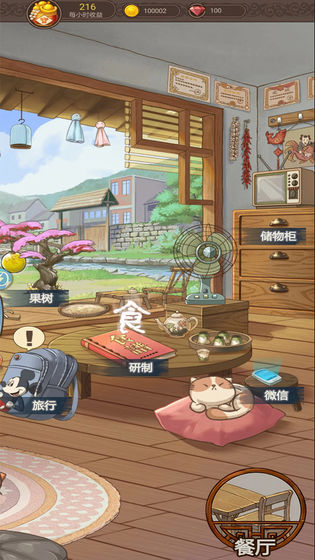
Game Highlights
1. A game with a high degree of freedom. Use clever combinations based on the characteristics of the ingredients to create more novel menus.
2. Earn money through tasks and decorate your exquisite restaurant to make it more attractive.
3. Customize the decoration of the restaurant. You can start with tables, chairs, lighting, wallpapers and various special appliances to make the restaurant unique.

Game features
1. Exchange and purchase ingredients to unlock more popular recipes and expand the restaurant’s popularity.
2. Easy-to-use placement simulation management gameplay. You don’t need to have exquisite control to get started quickly and cook delicious dishes.
3. Meet the food needs of different customers, prepare a variety of recipes, and attract more diners
Installation steps
Special note: The installation package provided by Huajun Software Park contains the Android emulator and software APK files. For the computer version, you need to install the emulator first and then install the APK file.
1. First download the installation package from Huajun Software Park. The software package contains an Android emulator exe installation program and an APK file and unzip it. First click on the exe program to install the lightning simulator.

2. Double-click "Lightning simulator.exe" file to enter the installation interface. Users can click "Quick Installation" to select the system's default installation address for installation, or click "Custom Installation" to choose the installation path. Custom installation is recommended here.

3. WaitingLightning simulatorAfter the installation is complete, click "Try Now" to open the emulator.

4. Enter the main interface of the lightning simulator and clickRight column APK iconSelect the "Local APK Install" button.

5. In the pop-up window, click on the decompressed APK file, and then click to open.

6. After that, the software will enter the installation process. You need to wait for a moment. After the software installation is completed, it will appear in my software list. Click the icon and double-click to open it. 
Happy Kitchen update log:
Sweep the bug out and carry it out to the end
Optimize user feedback issues and improve detailed experience
Huajun editor recommends:
What? If you haven’t used Happy Kitchen yet, do you know that all your good friends are using it? Come and download it. The editor also prepares for youParent Simulator,Little time in cow town,Bridge Constructor: Medieval Times,fantasy football world,Sprint Racing Story 2




Your comment needs to be reviewed before it can be displayed