
-
Splashtop Business
- Size: 45.9M
- Language: Simplified Chinese
- Category: remote control
- System: Win






Splashtop business is a software that can remotely control computers. Splashtop business is currently the only remote control application on the market that supports multiple platforms such as Windows 11, 10, 8, 7, Vista*, XP*, iOS, Android, and WP8. You need to install the desktop application Splashtop Streamer on your computer to use it.
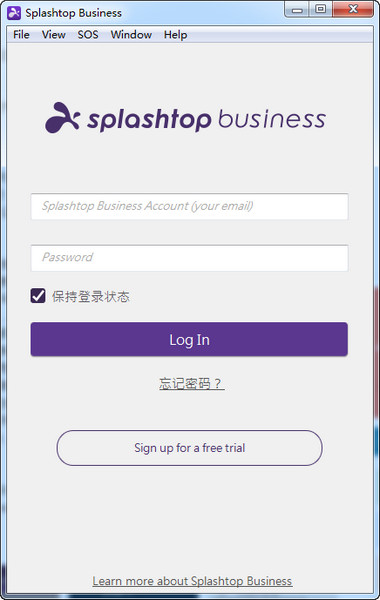
Splashtop Business software features
1· Enterprise pre-configured server: secure, easy-to-use management and monitoring center;
2· Unbreakable security strategy: Use SSL/AES encryption to issue certificates, and audit and track every record;
3· Rapid configuration: Complete the configuration within 30 minutes, without adjusting the IT infrastructure;
4· Simple operation: all existing applications can run on mobile devices;
5· Storage pool: Group desktop images for easy sharing and easy management;
6· Active Directory integration: easily add and manage users;
7· High performance: video transmission frame rate of 30 frames per second and latency of less than 30 milliseconds;
8· Intuitive operation interface: simple gesture operation specially designed for mobile devices with touch functions;
9· Self-optimizing network: Automatically optimize for different network environments such as 3G, 4G or Wifi;
10· Cross-platform support: Supports all major platforms, including Windows, Mac, iOS and Android, WP8.
Splashtop Business Software Instructions
This application is only for Splashtop Business users who have already subscribed.
Splashtop is a remote access to your Windows PC and Mac from your Android phone, tablet, and other devices anytime, anywhere The most convenient application software ever! More than 30 million users are using Splashtop's award-winning, high-performance remote desktop products.
Our Splashtop Business is easy to deploy across your entire team.
For team members:
Your team will be able to access all apps and files on their PC or Mac as if they were sitting directly in front of their computers:
- Access PowerPoint, Word, Excel, Outlook, IE, Quicken, CAD/CAM, and other enterprise legacy software
- Easily access configurable on-screen shortcuts for commonly used apps on your Android device. Use pre-created shortcuts or recreate your own shortcuts.
- Annotate live remote desktop on your Android device. The best way to deliver presentations and classroom instruction.
- Easily accessible from anywhere via Splashtop’s secure, efficient server network deployed globally
- Supports end-to-end SSL and 256-bit AES full encryption
- Performance optimization for different network conditions, such as Wi-Fi or 3G/4G networks
For team administrators:
As a team admin, you can manage and control access to:
- Request, activate and cancel users
- View usage history and device list
-Reset user account and others
Splashtop Business configuration requirements
*Windows 11, 10, 8, 7,Vista*, XP(including Home Premium), or Mac OS X 10.6+ (Snow Leopard, Lion or Mountain Lion), or Linux (Ubuntu 12.04).
* *Dual-core CPU computers are highly recommended for optimal performance.
* An internet connection is required to use this app
Simple to set up:
* Download Splashtop Streamer
* Install Splashtop Streamer on your computer and enter your Splashtop account
Permission Description:
1. Check network status
2. Check Wi-Fi status
3. Full Internet access
4. Modify/delete the contents of the SD card
5. Prevent the phone from sleeping
Splashtop Business update log
The developer of GG said that there are really no bugs this time~
Huajun editor recommends:
Believe me, as long as you use Splashtop Business and other remote control software, you can uninstall it and it will definitely meet all your needs. The editor has also carefully prepared Firefox, Batch Butler, and Cloud Machine Manager for you.
Version: v3.5.6.0 | Update time: 2024-12-30
Similar recommendations






Latest updates





Splashtop Business Review
-
1st floor Huajun netizen 2022-03-25 13:35:37Splashtop Business interface design is easy to use and has rich functions. I highly recommend it!
-
2nd floor Huajun netizen 2021-02-09 18:13:40The overall feeling of Splashtop Business is good and I am quite satisfied with it. The installation and operation are very smooth! It went very smoothly following the installation step-by-step guide!
-
3rd floor Huajun netizen 2021-04-16 08:57:43Splashtop Business is convenient, practical and powerful. The software is very easy to use!
Recommended products









- Diablo game tool collection
- Group purchasing software collection area
- p2p seed search artifact download-P2P seed search artifact special topic
- adobe software encyclopedia - adobe full range of software downloads - adobe software downloads
- Safe Internet Encyclopedia
- Browser PC version download-browser download collection
- Diablo 3 game collection
- Anxin Quote Software
- Which Key Wizard software is better? Key Wizard software collection




