
-
KeepFitness
- Size: 127.7M
- Language: Simplified Chinese
- Category: Utility tools
- System: WinAll







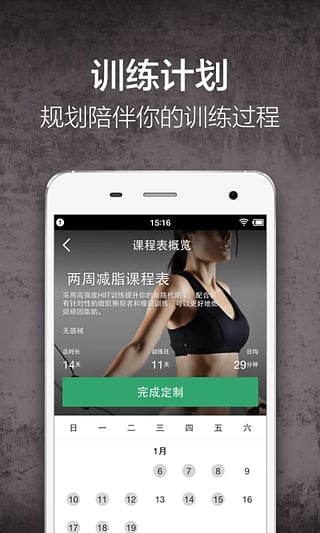
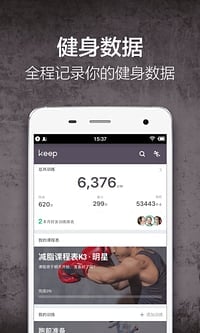


Keep fitness computer versionIt is a professional used by many fitness enthusiasts and expertsfitnessApp, the software provides a one-stop sports solution, covering multiple scene services such as fitness teaching, running, cycling, yoga, dietary guidance and equipment purchase. Achieve a perfect body anytime, anywhere! Keep fitness computer version provides fitness enthusiasts with running, yoga video teaching and daily training plans. Users can use fragmented time to choose fitness courses that suit them anytime, anywhere for real-person synchronous training. Don’t eat meat at home, keep your immunity! Huajun Software Park provides you with a free download of Keep Fitness 2025. Friends who like Keep fitness, come to Huajun Software Park to download and experience it!
-
5.2.0 PC versionView
-
4.0.3 PC versionView
-
6.5.8 PC versionView

Keep fitness function introduction
Core functions
Course training: Provides diverse choices from 7-minute fragmented training to 30-minute systematic courses, and supports offline downloading.
Sports records: Accurately record running, cycling, strength training and other data, including distance, speed, calories burned, etc.
Diet management: Built-in calorie calculator, provides nutritional meal matching suggestions, supports taking photos to record diet.
Extended functions
Mall shopping: Integrate sports equipment, meal replacement foods and other products, cooperate with KeepKit smart hardware (such as fitness mirrors, body fat scales) and offline Keepland venues to form a full-chain service.
Offline experience: Provide face-to-face fitness guidance through Keepland, combined with online data synchronization, to achieve online and offline linkage.
AI action correction: Use AI technology to analyze user movements in real time, correct posture errors, and avoid sports injuries.
Special services
Fragmented training: Design short and efficient courses for busy users, such as 7-minute morning stretching and 15-minute office shoulder and neck relaxation.
Menstrual period management: Provide menstrual exercise suggestions, adjust training intensity, and avoid excessive fatigue.
Keep fitness software features
Rich course options
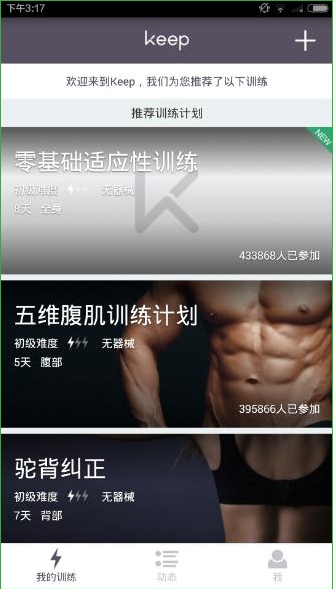
Provides a variety of fitness classes, including strength training, aerobics, yoga, stretching, etc., suitable for different goals such as fat loss, muscle gain, and body shaping.
The course is demonstrated by a professional coach with real-life demonstrations and voice guidance to ensure the standardization of movements and training effect.
Personalized training plan
Tailor-made training programs based on the user's physical condition, fitness goals and time schedule. For example, HIIT courses are recommended for users who lose fat, and strength training programs are designed for users who gain muscle.
Supports DIY fitness content, and advanced users can adjust training plans independently.
Intelligent hardware and data support
Combined with heart rate belts, smart bracelets and other devices, it can monitor exercise data (such as pace, calorie consumption) in real time and generate visual reports.
Built-in GPS positioning accurately records running and cycling trajectories, and supports sports data analysis and optimization.
Social interaction and community atmosphere
Users can share fitness results, diet check-ins, participate in online challenges, and compete or cooperate with friends in the community.
The platform regularly holds themed events, combined with a medal reward mechanism, to enhance user stickiness.
AI coaching assistance
Based on the Kinetic.ai model, the AI coach "Kaka" can guide movements, supervise training, and provide dietary advice in real time. For example, identify food calories by taking a photo, or generate a personalized meal plan.
Keep fitness tutorial

Keep fitness related questions
keeCan p be connected to Xiaomi bracelet?
Taking Xiaomi mobile phone as an example, open settings on the phone - third-party applications - find Xiaomi bracelet.
Log in to your Xiaomi account, bind your keep account to your Xiaomi account, and you can automatically synchronize your Xiaomi bracelet.
How to cast keep to TV?
1. Keep itself does not have a screen projection function, but we can use the screen projection function that comes with the phone to realize keep's screen projection.

2. To listen to the voice, you need to first ensure that the mobile phone and the TV are in the same network environment, then open the standby page of the mobile phone, slide down the menu bar, you can see the wireless screen casting function, click to open, then connect the device to cast the screen, and then open the keepapp to cast the screen to the TV.
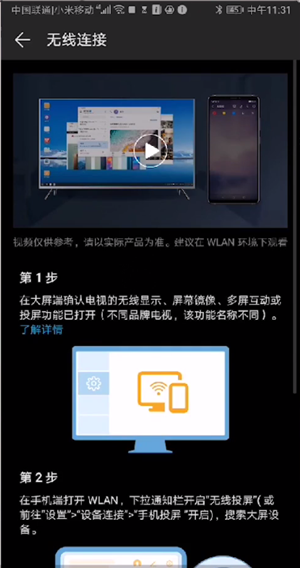
Note: This step uses Huawei mate 10 pro mobile phone screencasting as an example.
Cancel automatic renewal
Open the Keep app and click the "My" tab below to enter the personal settings page.
Find and click the "My Member" option to enter the member service page.
Click "Manage automatic renewal", select "Turn off" the automatic renewal service, and confirm the shutdown.
If the automatic renewal is activated through WeChat payment, you need to cancel it in WeChat. Open WeChat, click "Me" - "Service" - "Wallet" - "Payment Settings" - "Automatic Renewal", select Keep and close the service.
If paying with Alipay, open Alipay, click "My" - Settings in the upper right corner - "Payment Settings" - "Password-free Payment/Automatic Deduction", find the Keep item and close the service.
Apple phone users can click on the Apple ID at the top of the phone settings - "Subscription", find the Keep item and cancel the subscription.
Record running kilometers
Open the Keep app, click the personal avatar icon in the upper left corner to enter the personal center page.
Select the "Today's Exercise" function and click "Start Running".
Click the "Start" button and Keep will automatically record your running kilometers and other related data.
After completing the run, click the "End" button and the app will calculate the total running distance and save the record.
Generate motion trajectory
In the running interface, click the settings icon in the upper right corner to enter the running settings page.
Find and click the "Automatically generate exercise records" option to turn on this feature.
After you start running, Keep will automatically record your movement trajectory.
On the Keep homepage, click the "Me" tab, find the exercise record you just saved, click the three dots in the upper right corner, select "Generate Track Video", set the video options and click "Generate Video".
Installation steps
Special note: The installation package provided by Huajun Software Park contains Android emulator and softwareAPK file, the computer version needs to install the emulator first, and then install the APK file.
1. First download the installation package from Huajun Software Park. The software package contains an emulator exe installation program and an APK file and unzip them. First click on the exe program to install the emulator.

2. Double-click the "Tencent Mobile Game Assistant.exe" file to enter the installation interface. Users can click "Install" to select the system's default installation address for installation, or click "Custom Installation" to select the installation path. Custom installation is recommended here.

3. Wait for the Tencent Mobile Game Assistant emulator to be installed, and then click "Start Now" to open the emulator.

4. Enter the main interface of the simulator, click the icon in the upper right corner and select the "Local APK Installation" button.

5. In the pop-up window, click the decompressed APK file, and then click Open.

6. Afterwards, the software will enter the installation process. You need to wait for a moment. After the software installation is completed, it will appear in my software list. Click the icon and double-click to open it.

Comparison between Keep fitness and Fittime fitness
Keep is a fitness app with balanced performance in all aspects. It is the best choice for all types of fitness people. If you don’t know what to choose, just choose Keep.
1. The course content is user-friendly and the course analysis is detailed
2. It is easy to formulate a fitness plan and the sparring experience is better
3. The user base is large, there are many experts stationed there, and the community communication atmosphere is good
FittimeThe social atmosphere is good, you can supplement professional knowledge, and it is suitable for people with fitness experience. If you are a fitness practitioner who has already started, want to gain some professional experience, and like to exercise and socialize, you can choose Fittime
1. The course is professional and safe, with more knowledge around fitness
2. The fitness plan is easy to use
3. Excellent community operation and outstanding social functions
Fittime download address:https://softwaredownload4.com/soft/10029186.htm
Keep fitness update log
- Fix known issues and optimize product experience
Huajun editor recommends:
Keep Fitness is very simple to use. The optimized operation interface allows you to easily find the functions you want. Come and download it. The editor has also carefully prepared for youMint Healthy,Xiaomi sportsWaiting for software for you to download.
Version: 8.6.10 | Update time: 2025-10-29
Similar recommendations







Latest updates


Body mass index bmi calculation - how to calculate body fat percentage
How to automatically fill in account and password in KeePass
How to appeal and report Keep Fitness-How to appeal and report Keep Fitness
How to pin fitness updates on Keep - How to pin fitness updates on Keep
How to report users in Keep Fitness - How to report users in Keep Fitness
How to clear exercise records in Keep Fitness - How to clear exercise records in Keep Fitness
How to bind a treadmill with Keep Fitness - How to bind a treadmill with Keep Fitness
How to bind Keep Fitness to WeChat-How to bind Keep Fitness to WeChat
Keep Fitness Review
-
1st floor Huajun netizen 2022-02-28 19:08:19Keep fitness is very useful, thank you! !
-
2nd floor Huajun netizen 2022-03-21 11:46:48The Keep fitness interface design is easy to use and has rich functions. I highly recommend it!
-
3rd floor Huajun netizen 2022-03-31 04:57:53Keep fitness is awesome! 100 million likes! ! !
Recommended products




- Diablo game tool collection
- Group purchasing software collection area
- p2p seed search artifact download-P2P seed search artifact special topic
- adobe software encyclopedia - adobe full range of software downloads - adobe software downloads
- Safe Internet Encyclopedia
- Browser PC version download-browser download collection
- Diablo 3 game collection
- Anxin Quote Software
- Which Key Wizard software is better? Key Wizard software collection




