
-
Ghost wizard one-click backup and restore
- Size: 3.2M
- Language: Simplified Chinese
- Category: Backup software
- System: WinAll






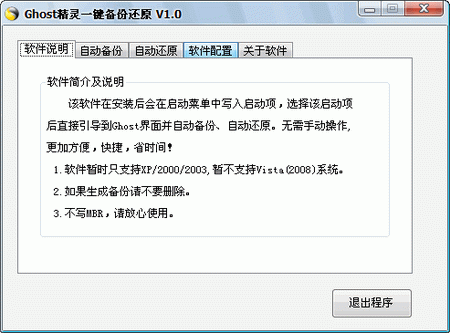
One-click restore wizard is a system backup and restore tool developed based on the GHOST kernel. It is specially designed to solve problems such as system failures and data loss. It supports operating systems from Windows 2000 to Windows 10, stores backup files through hidden partitions or folders, and uses the F11 hotkey to achieve one-click backup/restore operations.
Software features
Ease of operation:
Adopting a fool-like design, no complicated installation process is required. Just press the F11 key on startup to restore the system.
Support custom hotkeys (such as F11) and flexibly choose the timing of operation.
High compatibility:
Supports FAT/FAT32/NTFS partition format and is compatible with multiple hard disk environments.
Adapted to Windows 2000 to Windows 10 systems, including 32-bit and 64-bit versions.
Security protection:
Backup files are stored in hidden partitions or deeply hidden folders by default to prevent accidental deletion and virus intrusion.
Supports secondary password protection to ensure safe use of the software.
Efficient backup and restore:
Provide high compression rate backup to save storage space.
It only runs during restore or backup, does not occupy system resources, and does not affect daily use.
Intelligent partition management:
Automatically select backup partition, no need to worry about running out of space.
Supports manual selection of backup partition size and flexible allocation of storage space.
Core functions
One-click backup system:
Click the "Backup System" button and the computer will restart and automatically complete the backup.
By default, backup files are stored in a malformed directory (such as GGHOST..) in the last partition of the boot hard disk and cannot be viewed directly in the resource manager.
One-click system restoration:
When booting, press the F11 key to enter the main interface of the one-click restore wizard, and select "Restore System" to automatically restore.
Supports importing GHO image files from hidden partitions or external storage devices (such as USB flash drives) for restoration.
Multi-partition backup and restore:
Supports backing up two partitions at the same time to meet the needs of multi-system users.
You can customize the backup of any partition through "Chinese Wizard" → "Backup Wizard".
Boot media creation:
Supports one-click creation of bootable CDs and bootable USB flash drives to facilitate emergency repairs when the system crashes.
PE system supports:
Adapted to the WinPE environment, the software can be directly run under the PE system for backup and restoration.
Frequently asked questions and solutions
Backup file storage location and advantages:
Location: The default backup is to the malformed directory of the last partition of the boot hard disk (such as GGHOST..).
Advantages: This directory cannot be directly viewed or deleted in the resource manager to prevent misoperation; the NTFS partition can prevent viruses or users from accidentally deleting it.
How to modify the backup path:
Use "Chinese Wizard" → "Backup Wizard" to modify the partition value. However, it should be noted that backups made through the "Backup Wizard" can only be restored using the "Restore Wizard" and cannot be restored using the "One-Click System Restore".
Ghost wizard one-click backup and restore update log:
Sweep the bug out and carry it out to the end
Optimize user feedback issues and improve detailed experience
Huajun editor recommends:
After you use Ghost Elf to back up and restore with one click, I think you may also need Ghost Elf, Batch Butler, Batch Butler and other software. Come to Huajun Software Park to download and use it!
Version: 1.0 Chinese version | Update time: 2025-10-23
Similar recommendations







Latest updates


Pixel Naruto online play entrance-Pixel Naruto web version online play-Huajun Software Park
How to add background music in python-How to add background music in python
How to configure environment variables in python - How to configure environment variables in python
How to run python - How to run python
How to create a project in python - How to create a project in python
How to make a blue sky background with scratch-How to make a blue sky background with scratch
How to create a linked list in scratch-How to create a linked list in scratch
How to add local programs to scratch-How to add local programs to scratch
How to input Chinese in scratch-How to input Chinese in scratch
Ghost wizard one-click backup and restore review
-
1st floor Huajun netizen 2018-05-29 19:42:23Ghost wizard’s one-click backup and restore is awesome! 100 million likes! ! !
-
2nd floor Huajun netizen 2019-12-21 05:18:42The one-click backup and restore of the Ghost wizard feels good overall, and I am quite satisfied. The installation and operation are very smooth! Followed the installation step-by-step instructions and it went very smoothly!
-
3rd floor Huajun netizen 2017-03-16 22:38:44The one-click backup and restore function of Ghost Elf is quite comprehensive. It is the latest version. It is free to download. Keep up the good work!
Recommended products









- Diablo game tool collection
- Group purchasing software collection area
- p2p seed search artifact download-P2P seed search artifact special topic
- adobe software encyclopedia - adobe full range of software downloads - adobe software downloads
- Safe Internet Encyclopedia
- Browser PC version download-browser download collection
- Diablo 3 game collection
- Anxin Quote Software
- Which Key Wizard software is better? Key Wizard software collection




