
-
One-click GHOST
- Size: 687M
- Language: Simplified Chinese
- Category: Backup software
- System: WinAll







One-click GHOSTThe official version is built for computer systemsghost tool. One-click GHOST provides users with powerful system upgrades,backupand recovery, PC porting, etc.One-click GHOSTAlso helps you with system upgrades, backups andrestore, to avoid loss or damage of data on your computer. Huajun Software Park provides one-click GHOST software download service. To download other versions of one-click GHOST software, please go to Huajun Software Park!
One-click GHOST software features
Kernel and interface optimization:
It adopts GHOST kernel 11.2/11.5 and supports arbitrary switching of IDE/SATA hard disk interface.
Automatically recognize partition format, no manual adjustment required.
Unattended operation:
Supports fully automatic backup and recovery, users only need to press one button to complete the operation.
Provides a variety of startup solutions, including mouse operation under Windows, startup menu direction key selection, startup hotkey (K key), etc.
Data security and compression:
Backup files are highly compressed to save hard disk space.
If the installation program is accidentally deleted, it can be restored to ensure that data is not lost.

One-click GHOST software function
One-click backup and recovery system:
Supports one-click backup of the current system to the specified partition (default saved in the last partition of the first hard disk, file name ~1C_PAN.GHO).
The backup files are completely hidden under the FAT partition and can be prevented from being deleted under the NTFS partition, effectively preventing viruses or misoperation.
Restore the system to its backup state with one click, no complicated operations required.
Chinese wizard and advanced operations:
Provides "Backup Wizard" and "Restore Wizard" to support custom backup paths and file names.
Supports the import, export, movement and deletion of image files, making it easy to manage multiple backups.
Comes with GHOST browser, which can open GHO image files and add, delete or extract files in it at will.
Multi-system and multi-hard drive support:
Supports new systems such as WIN7/WIN8/WIN10, as well as GRUB4DOS menu booting local Windows or ISO images.
Compatible with IDE/SATA hard disk interface, automatically recognizes FAT/NTFS partition format.
Supports backup and restoration of multiple hard drives and multiple partitions, adapting to complex storage environments.
Security and Password Protection:
Supports setting backup password to prevent unauthorized recovery operations.
Allow the installer to restrict functionality, such as only allowing users to "restore" but not "backup".
One-click GHOST installation steps
1. Download One-Click GHOST in Huajun Software Park and unzip it to the current folder. Click on the .exe application to enter the installation wizard interface, then click Next, and then come to the license agreement interface. We read the agreement carefully, agree and click Next.

2. One-click GHOST is being installed, users need to wait patiently for a while.

3. One-click GHOST installation is completed, click Finish.

How to use GHOST with one click
One-click automatic backup/restore system
1. Download the program and install it under Windows Build 050706" to enter DOS.

2. Then select "One-click backup C drive" from the main menu that appears. If you are restoring the system, select "One-click recovery of C drive". The "One-click recovery of C drive" operation is based on the fact that C drive has been backed up.
Tip: Since it is a one-click restore, it is easy to be misoperated by other users. We can set the login password in the BIOS.

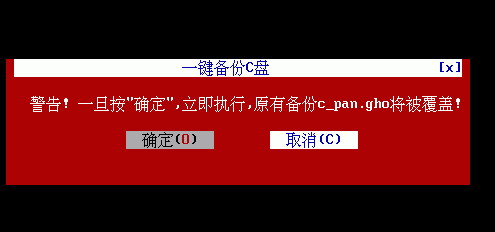
3. Press Enter on the "OK" item in the pop-up window, and the program will automatically start Ghost to back up the system C drive to "D:c_pan.gho".
Tip: Before backing up, make sure the D drive has enough space and do not change the GHO file name, otherwise one-click automatic backup/restore cannot be completed.
One-click manual backup
1. The one-click backup of the program is saved in the second partition by default. We can also manually specify the backup path and file name. Select "Ghost8.2 Chinese Wizard" in the window, and select "1. Backup Wizard" in the pop-up window (for recovery, select "Restore Wizard").
2. In the pop-up window, move the mouse to the place that needs to be modified, follow the prompts to modify, and click "OK" to start the automatic backup. After modifying the default parameters, select the correct location and file name of the backup file when restoring.


3. For system security, check the password protection option. Before starting the backup, the program will pop up a password setting window, just follow the prompts to set it. In this way, you will need to enter the password set here the next time you restore the system.

One-click GHOST FAQ
Question: Where is the image of One-Click GHOST "One-Click Backup System" saved? What are its advantages? How to open it?
Answer: (1) Save location: the last partition of the first hard disk: ~1C_PAN.GHO
(2) Advantages: This folder is completely hidden in the resource manager under the FAT partition and is not visible even if "Show All Files" is turned on. It can be prevented from being deleted under the NTFS partition to prevent the malicious behavior of viruses or user misoperation.
(3) Advanced operations: Image → Open/Protect/Manage/Export/Import/Move/Delete.
Question: Can One-Click GHOST "One-Click Backup System" only back up to the last partition of the first hard disk? Can it back up to other partitions?
Answer: Of course you can, just use "Chinese Wizard" → "Backup Wizard" to modify the partition value.
But please note: the backup made by the "Backup Wizard" can only be restored using the "Restore Wizard", not the "One-click System Restore".
Question: How can one-click GHOST operate the entire hard disk?
Answer: The backup wizard, recovery wizard, and copy wizard can all operate on the entire hard disk: you only need to clear the default value of the partition.
Comparison of similar software
GGhost one-click recoveryIt is a free system backup and restoration tool based on ghost (v11.02) and grub4dos. It has good compatibility, ease of use and rich customization functions. Supports both 32-bit and 64-bit Windows 2000, XP, 2003, Vista, 2008 and Windows 7, Windows 10 and other mainstream operating systems. Systems supporting Simplified Chinese, Traditional Chinese and other languages.
Symantec GhostIt is a very easy-to-use hard disk backup tool, Symantec Ghost11 can copy all the contents on one disk to another disk, or copy the disk contents into a disk image file. Symantec Ghost supports Restoring image files in NFTS can minimize system installation time and provide powerful solutions for system upgrades, backup and recovery, software distribution, PC transplantation, etc.
One-click GHOST update log
Solve the problem of being unable to verify the publisher during installation
Provides 9 toolbar styles (menu bar->skin), including: XP, Vista, Win7,
Doraemon, pink memories, Sherlock Holmes, black and white world, blue lake, age of innocence
Update DiskGenius to 5.1.2
Update UMBPCI to 3.88
Added two frequently asked questions to the help document
This version is made to commemorate the 15th anniversary of the release of the one-click GHOST hard disk version
Huajun editor recommends:
One-click GHOSTIt provides users with powerful system upgrades, backup and recovery, PC transplantation, etc. One-click GHOST is so easy to use. It is one of the best among backup software. I believe friends who have used it will say it is easy to use.
Version: 12.1.405.701 Official version | Update time: 2025-10-23
Similar recommendations






Latest updates


How to use one-click ghost - How to use one-click ghost
How to install one-click GHOST? One-click GHOST installation steps
How to set a password for ghost with one click? How to set a password for ghost with one click
How to reinstall the system with one-click ghost - How to reinstall the system with one-click ghost
How to recover data after one-click GHOST? How to recover data after one-click GHOST
One-click GHOST review
-
1st floor Huajun netizen 2021-12-19 15:25:31The one-click GHOST software is very easy to use, the download speed is very fast, and it is very convenient!
-
2nd floor Huajun netizen 2021-08-08 20:03:58One-click GHOST is awesome! 100 million likes! ! !
-
3rd floor Huajun netizen 2021-10-11 12:44:30The overall feeling of one-click GHOST is good, I am quite satisfied, the installation and operation are very smooth! Followed the installation step-by-step instructions and it went very smoothly!
Recommended products







- Diablo game tool collection
- Group purchasing software collection area
- p2p seed search artifact download-P2P seed search artifact special topic
- adobe software encyclopedia - adobe full range of software downloads - adobe software downloads
- Safe Internet Encyclopedia
- Browser PC version download-browser download collection
- Diablo 3 game collection
- Anxin Quote Software
- Which Key Wizard software is better? Key Wizard software collection




