
-
Yuanqi desktop
- Size: 41.06M
- Language: Simplified Chinese
- Category: desktop wallpaper
- System: winall







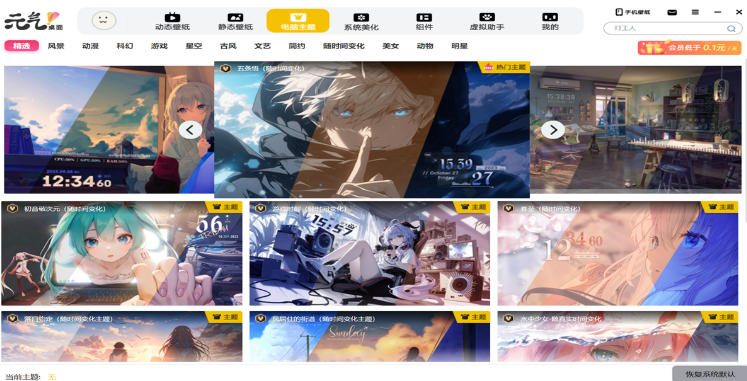

Yuanqi Desktop is a powerful and resource-rich desktop beautification and management software designed to provide users with a personalized and diverse desktop experience. Provides 4K ultra-clear dynamic wallpapers, covering natural, science fiction, two-dimensional and other styles, supports custom import of video/webpage animated wallpapers, and synchronizes themes, icons, cursors, and sound effects with one click to quickly unify the visual style. It is suitable for players and efficient office workers who pursue personalized desktops, making the computer desktop both beautiful and practical. Friends who like Yuanqi Desktop, come to Huajun Software Park to download and experience it!
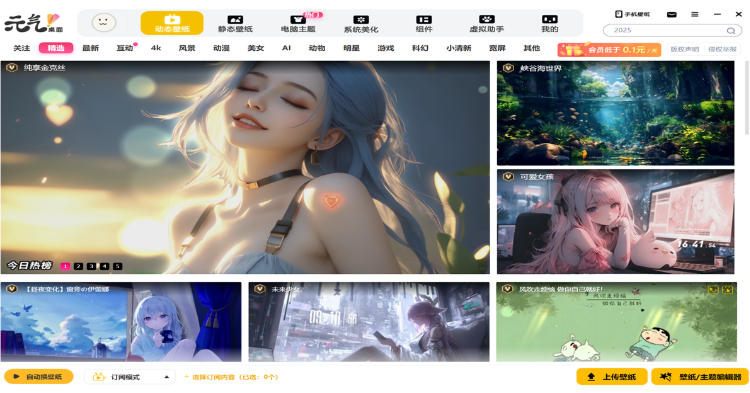
Highlights of Yuanqi Desktop
One-click beautification package: themes, icons, cursors, and sound effects can be changed simultaneously with one click to quickly unify the visual style
Intelligent organization system: automatically categorizes desktop icons, supports partition layout and transparency adjustment, and says goodbye to cluttered desktops
Low resource usage: dynamic wallpaper memory optimization technology, smooth operation without lag
Creative workshop: Built-in user community can share original works and obtain exclusive beautification resources
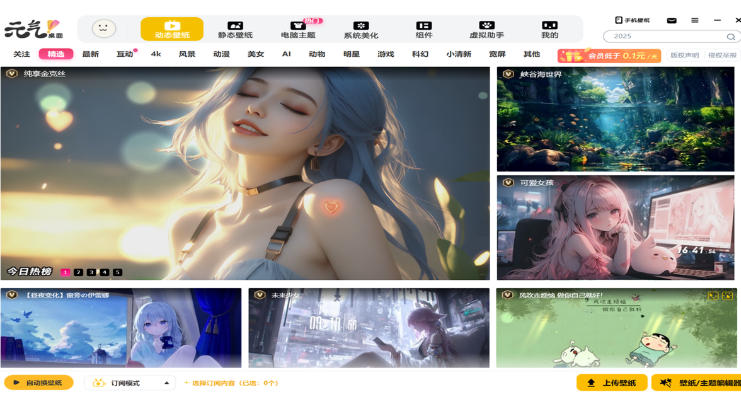
Yuanqi desktop features
Personalized customization:
Supports user-customized wallpapers, including adjusting wallpaper size, transparency, color, etc., to meet personalized needs.
Offering a variety of themes and skin options, users can customize the appearance of the desktop according to personal preferences.
Supports custom shortcut keys to facilitate users to quickly access frequently used functions and applications.
Smart recommendations:
Based on the user's preferences and historical selections, wallpapers that match the user's taste are intelligently recommended.
Provides a powerful search function to quickly find files and applications on the desktop, saving search time.
Low resource usage:
The software runs stably, takes up less system resources, and will not affect the normal use of the computer.
The exclusive self-developed dynamic wallpaper engine uses image algorithms and particle effects to make static wallpapers move, showing cool effects while ensuring that performance consumption is negligible.
Multi-platform support:
Supports multiple operating systems such as Windows, Mac OS, Android and iOS to meet the needs of more users.
Supporting multi-platform synchronization function, users can synchronize their collection of wallpapers to the cloud for easy viewing and use on different devices.
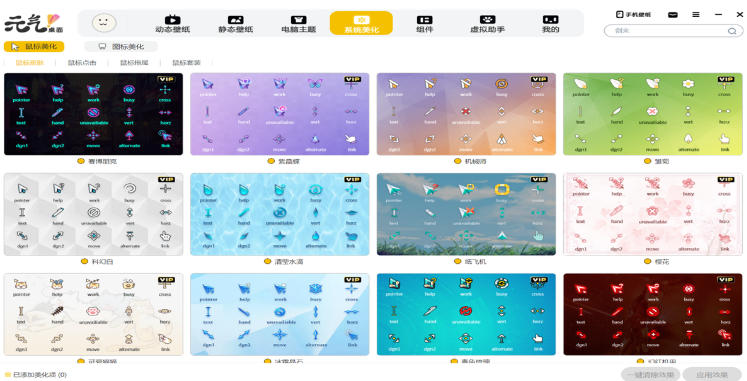
Yuanqi desktop function
Wallpaper resources:
Massive high-definition wallpapers: covering natural scenery, animation and games, celebrity idols, abstract art and other types to meet the aesthetic needs of different users.
Dynamic wallpapers: A variety of built-in dynamic wallpapers, such as flowing water, starry sky, falling petals, etc., make the desktop more vivid.
Interactive wallpapers: Some wallpapers support mouse interaction, such as clicking to display special effects, dragging to change shapes, etc., to increase interest.
Custom wallpaper: Users can set their favorite pictures as desktop wallpaper to create a unique desktop style.
Wallpaper management: Provides convenient wallpaper management tools so that users can easily view, collect and delete wallpapers.
Wallpaper preview and search: Before setting the wallpaper, users can preview the wallpaper effect; a wallpaper search function is also provided, so users can quickly find their favorite wallpapers through keywords.
Wallpaper sharing: Support sharing your favorite wallpapers to social media platforms, such as WeChat, Weibo, etc.
Desktop organization:
Organize the desktop with one click: Automatically organize desktop icons to make the desktop look more tidy and orderly.
Customizable desktop organization grid: Users can customize the desktop organization grid according to their own needs to achieve a personalized desktop layout.
Quick tools:
Desktop widgets: Provides a variety of practical desktop widgets, such as weather forecast, calendar, to-do items, etc., to facilitate users to quickly view important information.
Desktop Notes: Users can quickly create notes to take notes on the go.
Desktop clock: Add various clocks to the desktop to make the time more eye-catching and the desktop cooler.
Other features:
Change wallpaper regularly: Users can set the time interval for automatic wallpaper change, so that the desktop will have new changes every day.
Wallpaper editor: The software has a built-in wallpaper editor. Users can create dynamic wallpapers by themselves and upload and share them with others.
Virtual assistant: Provides a virtual assistant function. Users can choose cute animals or characters as assistants to interact with the desktop.
Multi-screen interconnection: Supports multi-screen interconnection, allowing multiple screens to be linked to create a wider desktop space.
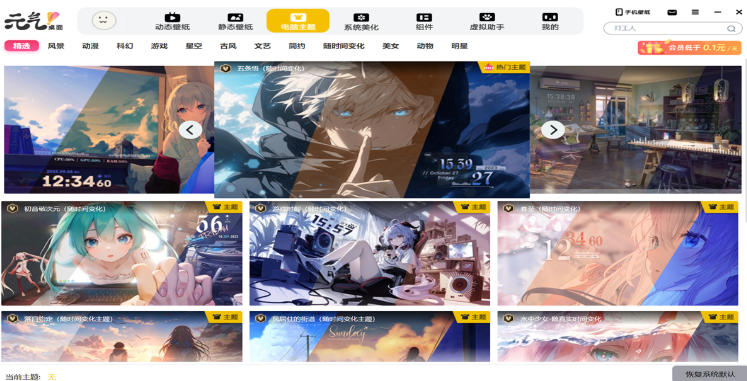
Yuanqi Desktop FAQ
Dynamic wallpaper setting and playback issues
Unable to set live wallpaper:
Online Upgrade Program: Find Yuanqi Desktop in the system's start menu list, expand it and click "Online Upgrade". Updating the software to the latest version may solve the problem.
Uninstall similar software: Check whether similar desktop organization software is installed on the computer, such as Computer Manager's desktop organization, etc. If so, uninstall it first, and then check whether the wallpaper settings are normal.
Dynamic wallpaper does not appear after booting: Check whether there is security software that disables the startup of Yuanqi wallpaper at boot. For example, if 360 Security Guard is installed, it can be viewed in the startup list of the startup acceleration item.
Wallpaper sound playback is stuck: Open the settings page, click on the playback settings of the dynamic wallpaper, and change the configuration of the last item "When other applications play audio" to "Save and run".
Dynamic wallpapers and widgets do not appear after booting: Also check whether the security software installed on the computer has disabled the automatic startup of wallpapers at boot.
There is no dynamic wallpaper page in WIN7 system: You can try to download the driver wizard, upgrade the graphics card driver, and then restart the computer.
Yuanqi desktop update log:
1. The pace of optimization never stops!
2. More little surprises are waiting for you to discover~
Huajun editor recommends:
Yuanqi desktop software is a software with excellent performance, which is obvious to all. Huajun Software Park also has PUSH Video Wallpaper, Any Logo Screensaver Creator, Cloud Machine Manager and other related software that are definitely worth downloading and using. Come and choose your favorite!
Version: v2024.11.28.6 | Update time: 2025-11-26
Similar recommendations





Latest updates





Genki Desktop Review
Recommended products
-

Fun cool live wallpaper
-

Automatically change desktop wallpaper
-

Xiaoyu wallpaper
-

Desktop wallpaper automatic changing software (Jeoe Wallpaper Changer)
-

Baidu wallpaper
-

Good table road wallpaper
-

Eye protection desktop wallpaper HD complete collection
-

3D aquarium tropical fish dynamic desktop wallpaper
-

bird wallpaper
-

Wallpaper Engine
- Diablo game tool collection
- Group purchasing software collection area
- p2p seed search artifact download-P2P seed search artifact special topic
- adobe software encyclopedia - adobe full range of software downloads - adobe software downloads
- Safe Internet Encyclopedia
- Browser PC version download-browser download collection
- Diablo 3 game collection
- Anxin Quote Software
- Which Key Wizard software is better? Key Wizard software collection




