
-
JDpaint
- Size: 29.2M
- Language: Simplified Chinese
- Category: Other industries
- System: winall






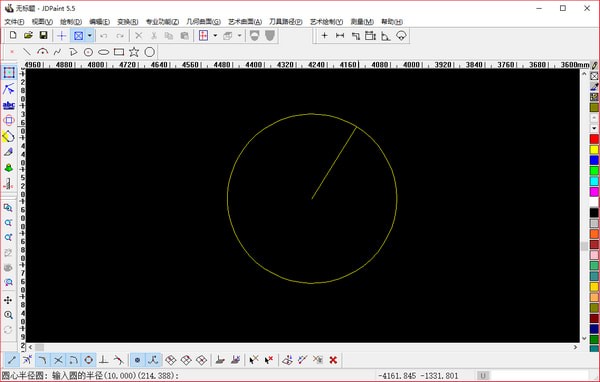
JDpaint software is a practical mechanical engraving tool developed by Beijing Jingdiao Technology Group. The JDpaint green version has powerful functions and guarantees the normal operation of Jingdiao CNC engraving system. JDpaint software is convenient and efficient, and breaks through many technical difficulties in engraving design, such as curved surface relief, isometric cutting, etc. It greatly enriches the application fields of the software and improves the efficiency of actual production.
JDpaint software features
1. Processing objects of CNC engraving
The main processing objects of CNC engraving are text, patterns, textures, small complex curved surfaces, thin-walled parts, small precision parts, irregular artistic relief surfaces, etc. The characteristics of these objects are: small size, complex shape, and fine finished product requirements.
2. Process characteristics of CNC engraving processing
CNC engraving can only and must be processed with small tools.
3.CNC engraving products have high dimensional accuracy and good product consistency
CNC engraving products have high dimensional accuracy and good consistency between the same products, which is of great significance for mold engraving and batch product processing with precise size requirements. In addition, the control system automatically controls the tool movement of the CNC engraving machine according to the processing instructions to complete the engraving task, which greatly reduces labor intensity. This highly automated process greatly reduces production's reliance on traditional manual engraving skills.
4.CNC engraving is high-speed milling
Compared with traditional CNC machining, CNC engraving is high-speed milling. High-speed milling is a processing method with high speed, small feed and fast tool movement. It is vividly called the "eat less and run faster" processing method.
JDpaint function introduction
1. Tool library function:
- Modify the error that when the taper tool angle is greater than 90 degrees, the automatically named angle is set to 89 degrees;
2.Contour cutting function:
- Added 3D curve cutting function, which can retain the height of the original curve;
- Modify the error that the "Reduce Tool Lift" parameter is invalid during layered processing;
- Fixed possible errors in modifying arc offset, resulting in missing cutting paths.
3.Single line engraving function:
- The offset distance does not need to be equal to 0 when retaining the curve height;
4. Rotary engraving function:
- Expand the rotary engraving function, the tool path can move along any angle;
- Modify the error where the direction of rotation is opposite to the direction of the axis;
5. Regional circumcision function:
- Add the "Path Smooth" parameter to improve the smoothness of the circumferential cutting path. It is only effective when "Grooving Processing" is used;
6. Surface roughing function:
- Modify the possible layer loss phenomenon;
7. Enhance Excellon’s reading function;
8. Improve the arc display accuracy under NC tools;
FAQ
Software crashes or becomes unresponsive
Problem description: During the use of JDPaint, the software suddenly crashes or becomes unresponsive.
Solution:
Try closing other programs that are hogging system resources to free up more memory and CPU resources.
Check the software's changelog and FAQ for possible solutions.
If the problem occurs frequently, you can try to uninstall and reinstall the JDPaint software, or contact the software supplier for technical support.
Problems saving or opening files
Problem description: When saving or opening a JDPaint file, an error occurs or the operation cannot be completed.
Solution:
Check the file's saving path and file name to ensure there are no illegal characters or are too long.
Try saving or opening in a different file format to troubleshoot issues with your specific format.
If the problem persists, you can try updating or reinstalling the JDPaint software, or checking the system's file association settings.
JDpaint update log
1. Fix bugs in the previous version
2. Optimize some functions
Huajun editor recommends:
The editor of JDpaint personally authenticated it, and it’s clear that no one can be deceived! This site also has similar software such as Guangdong Provincial Enterprise Income Tax Declaration System, Jinzhi, and Cloud Machine Manager. Welcome to click to download and experience it!
Version: 8.0.11 Green version | Update time: 2025-12-05
Similar recommendations






Latest updates





How to delete history in Video Pioneer? -How to delete history records by Video Pioneer
How to set the skin for Video Pioneer? -How to set skin for Video Pioneer
How to upgrade software in 360 Software Manager? -How to upgrade software in 360 Software Manager
How to draw a lottery in 360 Software Butler - How to draw a lottery in 360 Software Butler
JDpaintReview
-
1st floor Huajun netizen 2020-02-27 11:41:21The interface design of JDpaint is very easy to use and has rich functions. I highly recommend it!
-
2nd floor Huajun netizen 2019-12-16 18:57:51JDpaint software is very easy to use, the download speed is very fast and very convenient!
-
3rd floor Huajun netizen 2020-12-26 00:48:22JDpaint is not bad, the download is very fast, I give you a good review!
Recommended products
-

365 lottery software
-

FileViewPro
-

MODBUS debugging tool (modscan32)
-

Queue calling system software
-

Yida driving school examination room driving time and charge management system software
-

iFunBox
-

coord coordinate conversion software
-

Card swiping timing cashier management system software
-

Visitor registration management system software
-

Hospital queue calling system software
- Diablo game tool collection
- Group purchasing software collection area
- p2p seed search artifact download-P2P seed search artifact special topic
- adobe software encyclopedia - adobe full range of software downloads - adobe software downloads
- Safe Internet Encyclopedia
- Browser PC version download-browser download collection
- Diablo 3 game collection
- Anxin Quote Software
- Which Key Wizard software is better? Key Wizard software collection




