
-
Hanwang Tangren Pen Pressure Plate Software
- Size: 41.1M
- Language: Simplified Chinese
- Category: hardware tools
- System: WinAll







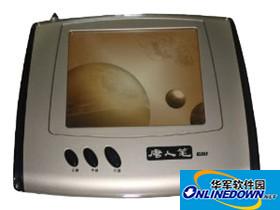
HanWang Tang RenPen pressure plate software is a Tang RenPen pressure plate software CD that supports Tang RenPen series pressure plates, including Tang RenPen Xiucai, Tanhua, 618, etc. If you still have this handwriting tablet, if your handwriting tablet cannot be connected to the computer, then try to reinstall this driver. First introduction to the use of Tangren pen: The writing feel of Tangren pen is different from the fountain pen and ballpoint pen we are familiar with. It is a bit similar to a pencil, and there is a familiar process in use.
Hanwang Tangren Pen Pressure Plate Software
Use of Tang Dynasty pen
When writing, the position of the writing board should be aligned with the gestures to avoid skewed handwriting. Don't hold the pen too tilted, and hold it slightly upright to avoid being unable to write. When holding the pen to write, do not press the button on the pen barrel. The length of pen lifting time can be adjusted according to individual writing habits. Button function left button: When the pen tip points to the surface of the handwriting board, it is the left button. Right button: The button on the pen barrel is the right mouse button. Movement: The pen moves on the writing pad to move the cursor. Double-click: After positioning the cursor, quickly touch the writing pad twice with the pen tip at the area to be double-clicked. Drag: After the cursor is positioned, use the Tangren pen to point on the component to be dragged. Without lifting the pen tip, move the pen tip to a new position on the handwriting board and then lift the pen tip. Double-click technique: After positioning the cursor, make slight contact with the pen tip and the writing pad, and then press the Tangren pen twice. The first time you use Tangren Pen, you may feel that the double-click response is slow. You can solve this problem by adjusting the double-click speed of the mouse in the Windows "Control Panel". The corresponding relationship between the handwriting pad and the screen. The Tangren Pen handwriting pad uses the principle of electromagnetic induction. The coordinate positioning method is absolute (the mouse is relative), and its surface corresponds to the screen one-to-one.
Software description
Catalog Description
---------- ------------------------------------------------------------------------
<Root directory> This description file and the Autorun file.
│
│
├ Drivers Driver installation files and drivers for each operating system.
│ │
│ │
│ ├ 2K-XP Driver FOR 2K/XP/2003.
│ │
│ ├ 98-ME Driver FOR 98/ME.
│ │
│ ├ Vista-X64 Driver FOR Vista-X64.
│ │
│ └ Vista-X86 Driver FOR Vista-X86.
│
│
├ HWPEN Install handwriting software
│
└ Manual User manual.
Version: V1.0 official version | Update time: 2024-12-30
Similar recommendations




Latest updates




Hanwang Tangren Pen Pressure Plate Software Review
-
1st floor Huajun netizen 2018-11-30 20:56:34The interface design of Hanwang Tangren Pen Pressure Plate software is easy to use and has rich functions. I highly recommend it!
-
2nd floor Huajun netizen 2018-05-24 13:25:25The Hanwang Tangren Pen pressure plate software is awesome! 100 million likes! ! !
-
3rd floor Huajun netizen 2018-02-25 15:56:19The overall feeling of Hanwang Tangren Pen pressure plate software is good, I am quite satisfied with it, the installation and operation are very smooth! It went very smoothly following the installation step-by-step guide!
Recommended products







- Diablo game tool collection
- Group purchasing software collection area
- p2p seed search artifact download-P2P seed search artifact special topic
- adobe software encyclopedia - adobe full range of software downloads - adobe software downloads
- Safe Internet Encyclopedia
- Browser PC version download-browser download collection
- Diablo 3 game collection
- Anxin Quote Software
- Which Key Wizard software is better? Key Wizard software collection




