
-
Cloud backup client KLS IceArchiver
- Size: 14.70M
- Language: Simplified Chinese
- Category: Backup software
- System: winall






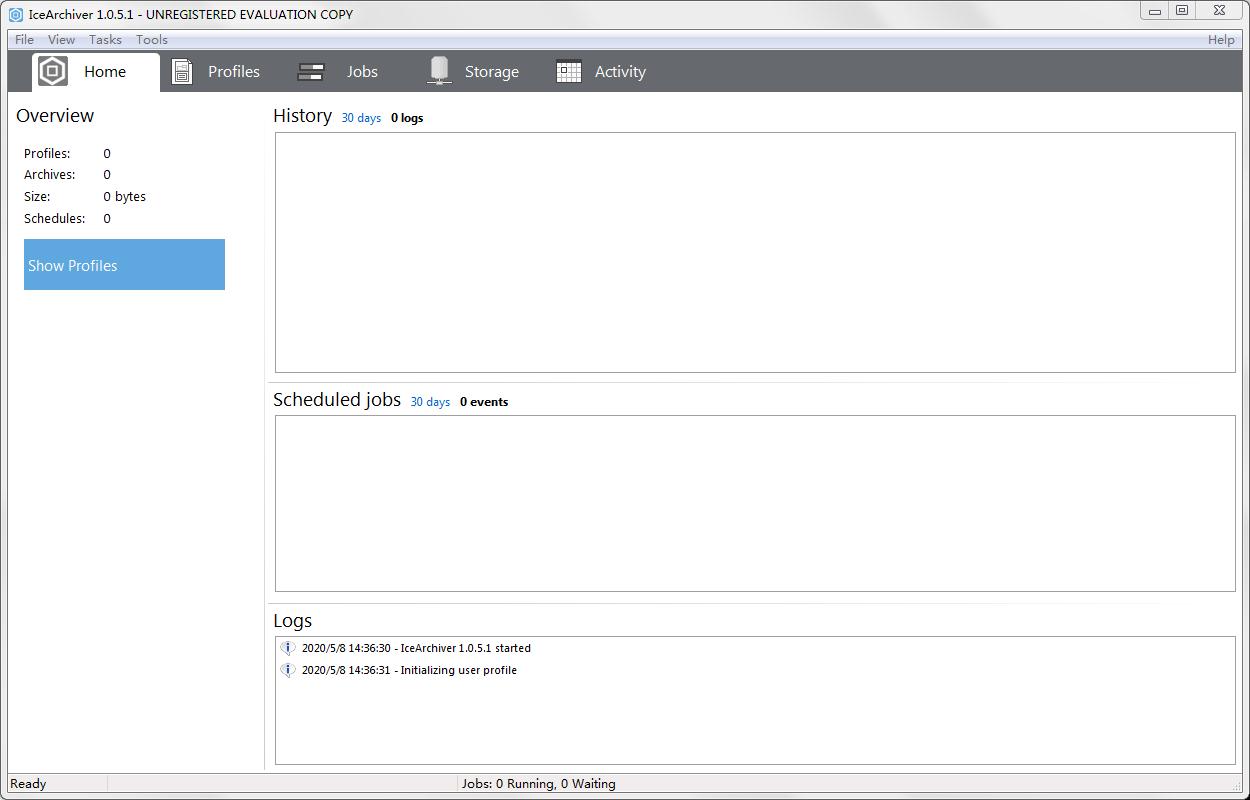
The latest version of the cloud backup client KLS IceArchiver is a cloud backup software. Cloud backup client KLS The official version of IceArchiver can efficiently back up user-specified file data and upload it to cloud storage. You can also set up an encryption program to further protect the backup data. Cloud backup client KLS IceArchiver can use the software's built-in search function to find files that need to be backed up and adjust various backup settings.
Cloud backup client KLS IceArchiver software highlights
Personal user data backup
Back up important personal data such as photos, videos, and documents to the cloud to prevent data loss caused by local device loss or damage.
Use the automatic backup function to back up data regularly without manual operations, saving time and effort.
Enterprise data protection
Back up enterprise databases and application data to ensure business continuity.
Use incremental or differential backup mode to reduce the impact of backup on business systems and reduce storage costs.
Low-cost solution for users on a budget
Dramatically reduce long-term storage costs by backing up to low-cost cloud storage services like Amazon Glacier.
Preview all actions performed over the past month, week, or day from the Activity tab to ensure backup tasks are performed within budget.
Cloud backup client KLS IceArchiver software features
Compatibility
Supports mainstream operating systems such as Windows 7/8/10/11 and Windows Server 2008R2/2012/2016/2019.
Hardware requirements are low, requiring only at least 100MB of free disk space to install and run.
Compression and archive management
Supports standard Zip, Zip64 and 7z compression formats to reduce backup file size and save storage space.
Provides powerful file management and search functions to facilitate users to quickly locate and manage backup files.
User interface and operating experience
The interface design is simple and intuitive, making it easy to browse and manage.
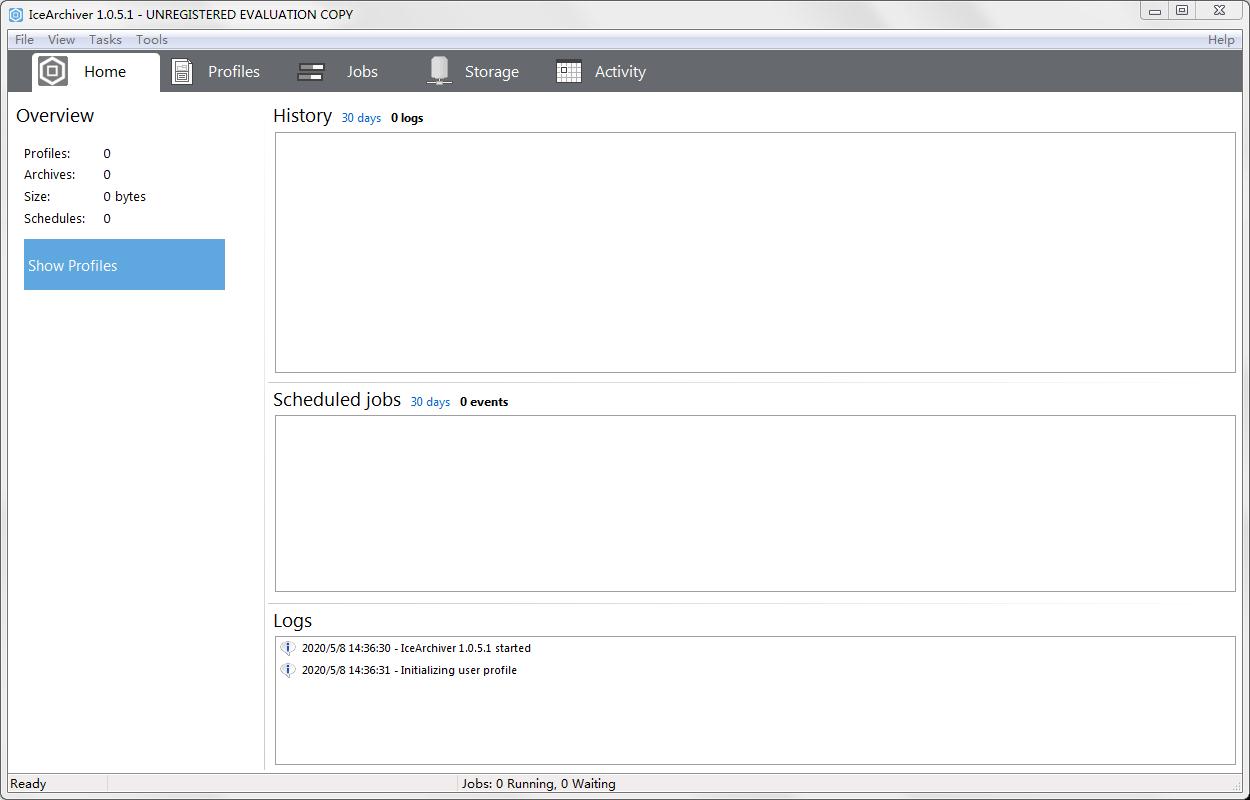
The "Home" tab displays the tasks performed in the past 30 days, backup history, and log overview, allowing users to quickly understand the backup status.
Supports the creation and management of backup tasks through the "Profile" tab, and can schedule backups to different cloud storage services through multiple configuration files.
Cloud backup client KLS IceArchiver software functions
Multi-platform backup support
Supports data backup to low-cost cloud storage services such as Amazon Glacier and Google Cloud Storage Nearline, significantly reducing long-term storage costs.
Data can be backed up from local hard drives, network drives, databases (such as Microsoft SQL Server, MySQL), and application data (such as Outlook, Thunderbird), covering common user needs.
Flexible backup mode
Full backup: Back up all selected data at once to ensure data integrity.
Incremental backup: Back up only data that has changed since the last backup, saving storage space and bandwidth.
Differential backup: Backs up data that has changed since the last full backup, balancing backup speed and recovery efficiency.
Supports backup of open files and NTFS permissions to ensure critical data is not lost.
Strong data protection
Protect archived data from unauthorized access using AES encryption.
Supports SSL/TLS encryption for remote transmission to ensure data security during transmission.
Automation and Scheduling
The built-in scheduler service can set up automatic backup tasks and execute them on daily, weekly, monthly and other cycles to reduce manual intervention.
Provides detailed backup logs and email notifications to facilitate users to monitor backup status and results.
Cloud backup client KLS IceArchiver FAQ
What backup targets are supported?
Cloud storage: Amazon Glacier, Google Cloud Storage Nearline.
Local and network drives: Supports backing up data from local hard drives or network shared folders.
Databases and applications: Can back up Microsoft SQL Server, MySQL databases, and application data such as Outlook and Thunderbird.
Cloud backup client KLS IceArchiver update log
1. Sweep the bug out and carry it out to the end
2. The most stable version ever
Huajun editor recommends:
This software is powerful and easy to operate. I hope you will like it. In addition, this site also has one-click system restore, batch mini-butler, batch mini-butler and other software. Welcome to Huajun Software Park to download!
Version: v1.1.0.3 | Update time: 2025-12-08
Similar recommendations







Latest updates


How to download movies from Video Pioneer? - How to download movies from Video Pioneer
How to search for videos on Video Pioneer? - How to search for videos by Video Pioneer
How to delete history in Video Pioneer? -How to delete history records by Video Pioneer
How to set the skin for Video Pioneer? -How to set skin for Video Pioneer
Cloud Backup Client KLS IceArchiver Review
Recommended products








- Diablo game tool collection
- Group purchasing software collection area
- p2p seed search artifact download-P2P seed search artifact special topic
- adobe software encyclopedia - adobe full range of software downloads - adobe software downloads
- Safe Internet Encyclopedia
- Browser PC version download-browser download collection
- Diablo 3 game collection
- Anxin Quote Software
- Which Key Wizard software is better? Key Wizard software collection




