Many friends like to use FileZilla Server software, so do you know how to set up an FTP server? If you don’t know yet, let’s learn the tutorial on setting up an FTP server with FileZilla Server!
Download FileZilla Server and unzip FileZilla Server to the desktop, or you can place FileZilla Server on the C drive or D drive or other drives. It is recommended to place FileZilla Server on the D drive

First double-click FileZilla server.exe. This is used to start the FileZilla Server server

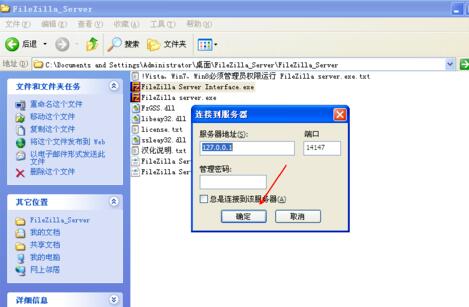
Click [Yes] to start the FileZilla Server server, and then double-click FileZilla Server Interface.exe in the directory. This is used to configure the FileZilla Server server.

Click [OK] to link to the server
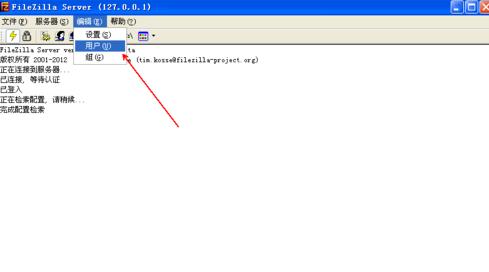
Click [Edit] [User]
Click [Add] User, [Check Enable Account] [Check Password and Set Password]

Add shared folders, [check all], and finally: click OK. In this way, you will successfully set up the FTP server.

The above is the tutorial for setting up an FTP server with FileZilla Server brought to you by the editor. Let’s learn it together. I believe it can help some new users.