Hot search terms: 360 Security Guard Office365 360 browser WPS Office iQiyi Huawei Cloud Market Tencent Cloud Store
Hot search terms: 360 Security Guard Office365 360 browser WPS Office iQiyi Huawei Cloud Market Tencent Cloud Store

Office software Storage size: 57.9MB Time: 2020-10-08
Software introduction: The official version of Edraw flowchart production software is a professional tool for drawing flowcharts. Edraw flowchart production software is also cross-platform, cloud storage,...
Many netizens are accustomed to using the old version of Edraw flowchart creation software and do not want to buy a new version. However, sometimes the software updates automatically. So how can the Edraw flowchart creation software prohibit automatic updates? Let’s take a look at the relevant tutorials below.
Open the Edraw flowchart creation software.
After entering the initial interface, click Options
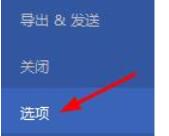
Find general settings
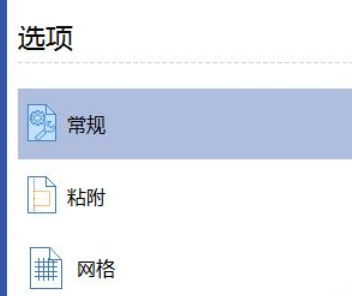
Find Automatically check for updates in General Settings and cancel Automatically check for updates.
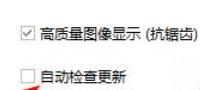
Dear friends, after reading the wonderful content above, you all know how to disable automatic updates in Edraw flowchart creation software!

 How to download, install and register the EA platform (Rotten Orange), one article will teach you
 How to register for Google Mail - understand it all in one article - Huajun Software Park
 How to connect HP wireless printer to WiFi, one article will teach you
 Steam
Steam
 Tencent Video
 WPS Office
 iQiyi
iQiyi
 Sohu video player
 Lightning simulator
 MuMu emulator
 Eggman Party
 WPS Office 2023
 Detailed steps for renaming shape layers in Image Factory
 How to exit safe mode on Xiaomi? -How to exit safe mode in Xiaomi
 How to use Xiaomi Mobile Assistant? -Xiaomi Mobile Assistant usage tutorial
 How to force restart Xiaomi phone? -How to force restart your phone in Xiaomi
 How to set the computer shutdown timer? -Tutorial on setting up computer shutdown schedule