
Hot search terms: 360 Security Guard Office365 360 browser WPS Office iQiyi Huawei Cloud Market Tencent Cloud Store
Hot search terms: 360 Security Guard Office365 360 browser WPS Office iQiyi Huawei Cloud Market Tencent Cloud Store

media management Storage size: 171.81 MB Time: 2022-12-19
Software introduction: iTunes is a free digital media playback application officially launched by Apple. The official version of iTunes is powerful and can...
When some friends tried out iPhone or iPad, they had to endure a lot of inconvenience caused by this situation because they did not know how to keep data synchronized between the mobile device and the computer. How to keep the data synchronized between the two? Let the editor tell you now!
1. Connect your phone to the computer, and the computer will automatically open iTunes.

Open iTunes
2. Click the mobile phone icon under the device on the left to enter the summary of the mobile phone.
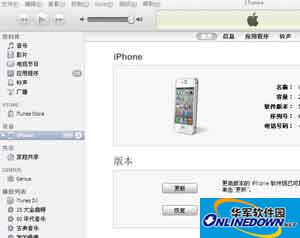
Enter your phone's summary
3. Pull down the scroll bar. In the options, you can see that the check in front of "Open iTunes when this iPhone is connected" is selected, so as long as the phone is connected to the computer, iTunes will automatically be opened for synchronization.
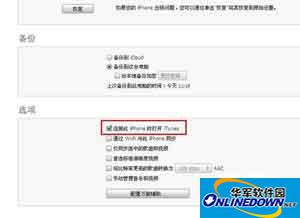
Open iTunes while this iPhone is connected
4. Sometimes when iTunes is connected to the mobile phone, iTunes does not synchronize automatically after downloading a certain software. When you click on the application, you can see that the check in front of the software is not selected.

 How to add background music in python-How to add background music in python
 How to configure environment variables in python - How to configure environment variables in python
 How to run python - How to run python
 How to create a project in python - How to create a project in python
 How to make a blue sky background with scratch-How to make a blue sky background with scratch
 Microsoft Edge browser
 Steam
Steam
 Tencent Video
 WPS Office
 iQiyi
iQiyi
 Sohu video player
 Lightning simulator
 MuMu emulator
 Eggman Party
 What to do if there is no sound after reinstalling the computer system - Driver Wizard Tutorial
 How to switch accounts in WPS Office 2019-How to switch accounts in WPS Office 2019
 How to clear the cache of Google Chrome - How to clear the cache of Google Chrome
 How to fire bullets in scratch-How to fire bullets in scratch
