
Hot search terms: 360 Security Guard Office365 360 browser WPS Office iQiyi Huawei Cloud Market Tencent Cloud Store
Hot search terms: 360 Security Guard Office365 360 browser WPS Office iQiyi Huawei Cloud Market Tencent Cloud Store
media management Storage size: 171.81 MB Time: 2022-12-19
Software introduction: iTunes is a free digital media playback application officially launched by Apple. The official version of iTunes is powerful and can...
Before learning how to use iTunes correctly, you need to understand iTunes first.
The early iTunes was a multimedia tool for playing, managing, online purchasing, downloading and burning audio and video files. It was built into Apple's Mac OS operating system and was similar to Media Center in Windows. After the birth of the iPhone, the Apple App Store also "opened" in iTunes. Users can not only purchase and download App Store applications through iTunes, but also use iTunes to transfer various data between computers and iPhones, including address books, photos, notepads, applications, music and videos, etc. Even iPhone and iPad firmware upgrades and restores must be performed in iTunes.
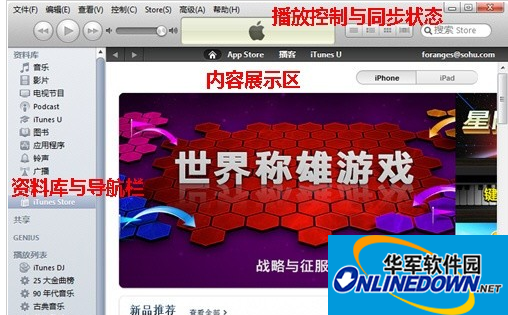
iTunes interface
What is synchronization?
The most difficult thing to master in iTunes is the "synchronization" operation. The so-called synchronization is to keep the data in the iPhone or iPad consistent with the database in the computer. What is in the computer is what is on the phone.
Wireless synchronization is one of the most anticipated new features in the upcoming iOS5. It can be used as long as the iOS device in the user's hand, including iPhone, iPad and iPod Touch, is in the same wifi network environment as the computer. This feature can already be experienced in the beta version of iOS5. When using it, you only need to connect the device to the power supply, and it will automatically start synchronizing with the computer in the same network environment. This is to prevent the device from being damaged by running out of power during the synchronization process.
iTunes is a free software that is already built-in in Mac OS. Windows systems need to be downloaded and installed manually. The installation method of iTunes is the same as other Windows software, just follow the installation wizard sequence. It should be noted that QuickTime, as the core of iTunes playback function, will be installed as an independent software at the same time as iTunes. And even if you don't use iTunes as a player, you cannot uninstall QuickTime, otherwise iTunes will not be able to be used.
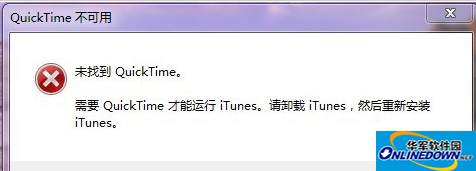
QuickTime is not available
In terms of interface design, iTunes adopts Apple's consistent simple style. The main interface is divided into three parts: the playback control and synchronization status bar at the top, the library and navigation bar on the left, and the largest content display area on the right.
Among them, the library on the left is used to store and manage iTunes-supported content such as music, videos, and applications on your computer. It should be noted here that there is no concept of "folder" in iTunes. Music or video materials can only be classified and managed through "playlist". The specific method will be explained in detail in a later tutorial.
When the iPhone is connected to the computer via a data cable, there will be an additional "Device" column on the left, where you can view and manage the content of the connected device.
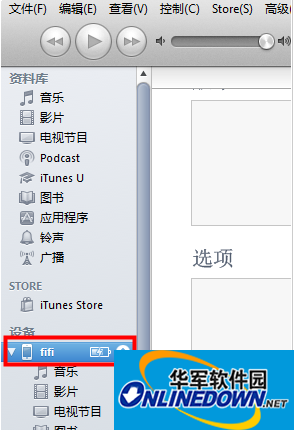
iTunes device bar
The window interface of iTunes is not much different from other software we commonly use. As long as you understand the basic concepts mentioned above, you will not have trouble using it.

 How to add background music in python-How to add background music in python
 How to configure environment variables in python - How to configure environment variables in python
 How to run python - How to run python
 How to create a project in python - How to create a project in python
 How to make a blue sky background with scratch-How to make a blue sky background with scratch
 Steam
Steam
 Tencent Video
 WPS Office
 iQiyi
iQiyi
 Sohu video player
 Lightning simulator
 MuMu emulator
 Eggman Party
 WPS Office 2023
 What to do if there is no sound after reinstalling the computer system - Driver Wizard Tutorial
 How to switch accounts in WPS Office 2019-How to switch accounts in WPS Office 2019
 How to clear the cache of Google Chrome - How to clear the cache of Google Chrome
 How to fire bullets in scratch-How to fire bullets in scratch
