Hot search terms: 360 Security Guard Office365 360 browser WPS Office iQiyi Huawei Cloud Market Tencent Cloud Store
Hot search terms: 360 Security Guard Office365 360 browser WPS Office iQiyi Huawei Cloud Market Tencent Cloud Store
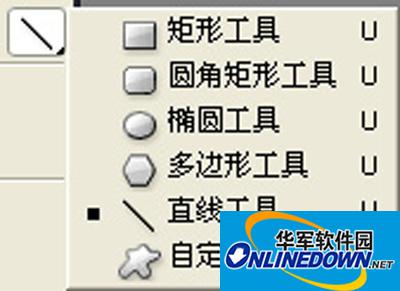
Figure 1
photoshop straight line tool
Rectangle tool
Use the Rectangle tool to easily draw a rectangle or square. Use the Rectangle Tool to draw a rectangle. Simply select the Rectangle Tool, click and drag the cursor on the canvas to draw the desired rectangle. If you hold down the shift key while dragging, a square will be drawn.

Figure 2
Create a new shape layer, create a new working path, and create a filled area: Before using the rectangle tool, we should first determine whether we need to draw a layer clipping path or a filled area.
Select the type of polygon tool: Changing the type of tool required does not require calling the toolbox, it can be replaced directly in the taskbar.
Click the small triangle and a rectangular options menu will appear (as shown in the picture), including:
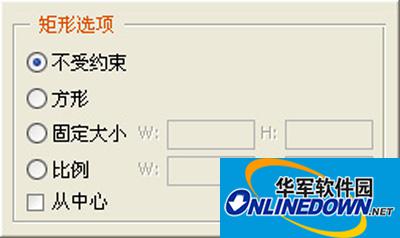
Figure 3
Unrestricted: The shape of the rectangle is determined entirely by dragging the cursor.
Square: The drawn rectangle is a square.
Fixed size: Select this option to fill in the required width and height values after W: and H:. The default unit is pixels.
Ratio: Select this option to fill in the desired integer ratio of width and height after W: and H:.
From Center: When selected, the starting point of the cursor when dragging the rectangle is the center of the rectangle.
Align Pixels: Make the edges of the rectangle automatically coincide with the edges of the pixels.
When you choose to create a filled area, the taskbar is as shown below

Figure 4

 Microsoft Edge browser
 Steam
Steam
 Tencent Video
 WPS Office
 iQiyi
iQiyi
 Sohu video player
 Lightning simulator
 MuMu emulator
 Eggman Party
 What to do if there is no sound after reinstalling the computer system - Driver Wizard Tutorial
 How to switch accounts in WPS Office 2019-How to switch accounts in WPS Office 2019
 How to clear the cache of Google Chrome - How to clear the cache of Google Chrome
 How to fire bullets in scratch-How to fire bullets in scratch