
If you are looking for software to use, go to Huajun Software Park! software release AI product list

Hello, if there is a need for software inclusion, please package the software and attach the software name, software introduction, software-related screenshots, software icon, soft copy, business license (if you do not have a business license, please provide the front and back of the corresponding developer ID card and a photo of yourself holding the ID card), and send it to email http://softwaredownload4.com/sbdm/user/login

Close >>

Send to email:news@onlinedown.net

Close >>

Location: Home pageAndroid softwareApplicationLife services Yunnan Electronic Taxation Bureau

98.02%

1.98%
QR code

Scan the QR code to access the mobile version

Permissions: View

The following important permissions need to be called
uses-permission:'android.permission.ACCESS_COARSE_LOCATION', allows the program to obtain the user's erroneous latitude and longitude information through WiFi or mobile base stations
uses-permission:'android.permission.ACCESS_FINE_LOCATION', allows the program to receive satellite positioning information through the GPS chip
uses-permission:'android.permission.ACCESS_NETWORK_STATE', allows the program to obtain network information status, such as whether the current network connection is valid
uses-permission:'android.permission.INTERNET', allows the program to access the network connection, which may generate GPRS traffic
uses-permission:'android.permission.CAMERA', allows the program to access the camera to take pictures
uses-permission:'android.permission.FLASHLIGHT', allows access to flash
uses-permission:'android.permission.READ_EXTERNAL_STORAGE', the program can read files in the device's external storage space (built-in SDcard and external SDCard)
uses-permission:'android.permission.WRITE_EXTERNAL_STORAGE', allows the program to write to external storage, such as writing files on the SD card
uses-permission:'android.permission.READ_PHONE_STATE', allows the program to access the phone state
uses-permission:'android.permission.REQUEST_INSTALL_PACKAGES', allows access to installed applications from unknown sources
uses-permission:'android.permission.RECORD_AUDIO', allows the program to record sound through the microphone of the phone or headset
uses-permission:'android.permission.WAKE_LOCK', allows the background process to still run after the phone screen is turned off
uses-permission:'android.permission.VIBRATE', allows the program to vibrate
uses-permission:'android.permission.USE_FINGERPRINT'
uses-permission:'android.permission.FOREGROUND_SERVICE'
uses-permission:'android.permission.ACCESS_BACKGROUND_LOCATION'
uses-permission:'android.permission.POST_NOTIFICATIONS'
uses-permission:'com.huawei.android.launcher.permission.CHANGE_BADGE'
uses-permission:'com.hihonor.android.launcher.permission.CHANGE_BADGE'
uses-permission:'com.dzswxt.wap.permission.MIPUSH_RECEIVE'
uses-permission:'android.permission.GET_TASKS', allows the program to obtain task information
uses-permission:'com.meizu.flyme.push.permission.RECEIVE'
uses-permission:'com.dzswxt.wap.push.permission.MESSAGE'
uses-permission:'com.meizu.c2dm.permission.RECEIVE'
uses-permission:'com.dzswxt.wap.permission.C2D_MESSAGE'
uses-permission:'com.coloros.mcs.permission.RECIEVE_MCS_MESSAGE'
uses-permission:'com.dzswxt.wap.permission.techain.RECEIVE'
uses-permission:'com.dzswxt.wap.permission.PROCESS_PUSH_MSG'
uses-permission:'com.dzswxt.wap.permission.PUSH_PROVIDER'
uses-permission:'android.permission.ACCESS_WIFI_STATE', allows the program to obtain the current WiFi access status and WLAN hotspot information
uses-permission:'com.meizu.flyme.permission.PUSH'
uses-permission:'com.hihonor.push.permission.READ_PUSH_NOTIFICATION_INFO'
uses-permission:'android.permission.CHANGE_WIFI_STATE', allows the program to change the WiFi state
uses-permission:'android.permission.MANAGE_FINGERPRINT'
uses-permission:'cn.org.ifaa.permission.USE_IFAA_MANAGER'
uses-permission:'oppo.permission.USE_FACE'
uses-permission:'android.permission.USE_FACERECOGNITION'
uses-permission:'android.permission.READ_PRIVILEGED_PHONE_STATE'

Yunnan Electronic Taxation Bureau 3.8.8

Special area
Software size:41.7 MB
software language:Simplified Chinese
Software rating:
Software type:Domestic software
Software licensing:shareware
Update time:2025-01-06
Application platform:Android
Software classification:Life services
version:3.8.8
Registration number:Dian ICP No. 19009453-6A
Software vendor:State Administration of Taxation Yunnan Provincial Taxation Bureau

Software introduction Related topics FAQ Download address

Basic introduction
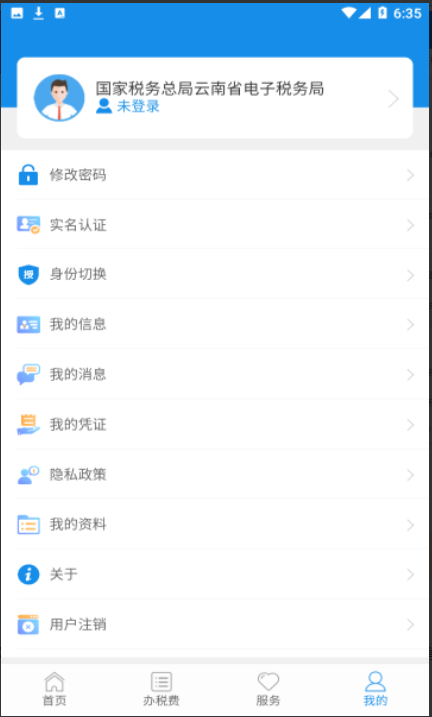
Yunnan Electronic Taxation Bureau section first LOGO
Yunnan Electronic Taxation Bureau is a service software specially designed for people in Yunnan to handle tax business. You don’t have to spend time going to the tax bureau to handle related business. You only need to do it online. There are also the latest developments for reference. Download it if you need it!

Screenshot of Yunnan Electronic Taxation Bureau

Software features


1. The latest national tax news is updated as soon as possible

2. Popular fiscal and tax policies and information updates

3. Rich and comprehensive tax knowledge special learning
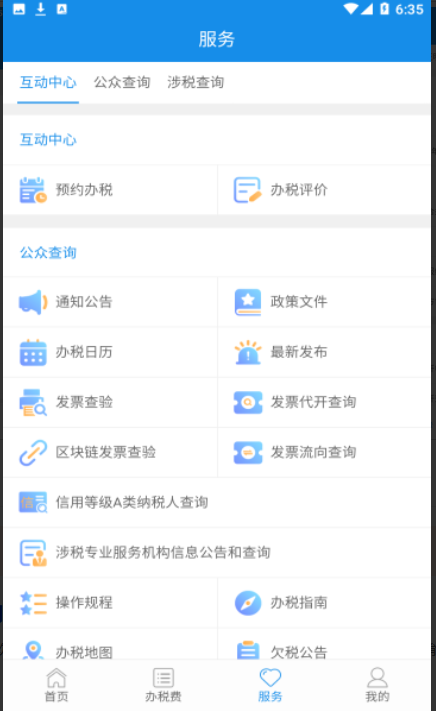
Screenshot of Yunnan Electronic Taxation Bureau

Software function


1. Tax service: You can obtain information such as invoice inquiry, tax guide, tax map, maintenance unit phone number and use tax calculation tools with one click.

2. Tax knowledge: You can use your fragmented time to check the latest policies, hot issues, business topics and other tax knowledge.

3. Public services: Breaking through the limitations of computer and other hardware conditions, you can follow the latest developments of the tax authorities in real time, understand the latest notices and announcements, use the tax calendar to obtain tax-related reminders, interact with other tax collection communication channels, and make instant consultation room appointments.
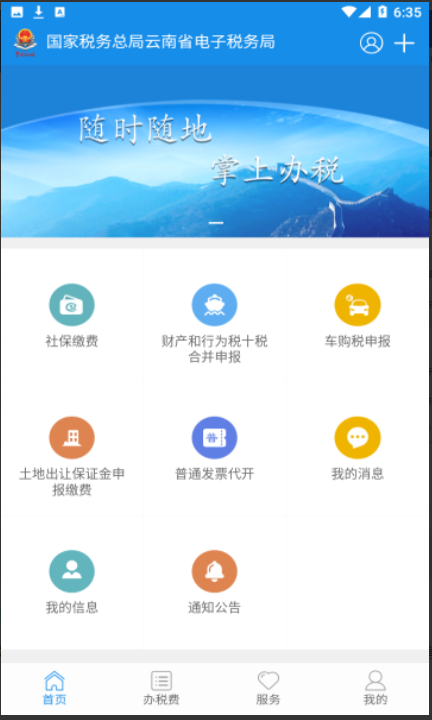
Screenshot of Yunnan Electronic Taxation Bureau

Yunnan Electronic Taxation Bureau Frequently Asked Questions


What are the login methods?

Password login: Enter the unified social credit code (taxpayer identification number), resident ID number (mobile phone number or user name), and personal user password to log in.

Scan code to log in: Use the scan function of Yunnan Tax APP or Personal Income Tax APP to scan the QR code on the screen to complete the login.

How to perform secondary verification after logging in?

After logging in, you may need to use the Yunnan Taxation APP to scan your face, Personal Income Tax APP to scan your face, or SMS for secondary verification to ensure account security.

Yunnan Electronic Taxation Bureau update log:


Sweep the bug out and carry it out to the end

Optimize user feedback issues and improve detailed experience

Huajun editor recommends:

Yunnan Electronic Taxation Bureau is one of the best software in the industry. I believe many friends will have used it. If you don’t use it anymore, you will be OUT. This site also prepares for youa village,Settlement Consultant,Blacklight Talent Network,WeChat Reading,T3 travel

Related topics

  • Natural Person Electronic Taxation Bureau

    Natural Person Electronic Taxation Bureau

FAQ