

If you are looking for software to use, go to Huajun Software Park! software release AI product list

Hello, if there is a need for software inclusion, please package the software and attach the software name, software introduction, software-related screenshots, software icon, soft copy, business license (if you do not have a business license, please provide the front and back of the corresponding developer ID card and a photo of yourself holding the ID card), and send it to email http://softwaredownload4.com/sbdm/user/login

Close >>

Send to email:news@onlinedown.net

Close >>

Location: Home pageAndroid softwareApplicationNews e company

98.85%

1.15%
QR code

Scan the QR code to access the mobile version

Permissions: View

The following important permissions need to be called
uses-permission:'android.permission.SYSTEM_ALERT_WINDOW', allows the program to display the system window
uses-permission:'android.permission.MOUNT_UNMOUNT_FILESYSTEMS', allows the program to mount and unmount external file systems
uses-permission:'android.permission.ACCESS_NETWORK_STATE', allows the program to obtain network information status, such as whether the current network connection is valid
uses-permission:'android.permission.ACCESS_WIFI_STATE', allows the program to obtain the current WiFi access status and WLAN hotspot information
uses-permission:'android.permission.READ_PHONE_STATE', allows the program to access the phone state
uses-permission:'android.permission.WRITE_EXTERNAL_STORAGE', allows the program to write to external storage, such as writing files on the SD card
uses-permission:'android.permission.INTERNET', allows the program to access the network connection, which may generate GPRS traffic
uses-permission:'android.permission.READ_EXTERNAL_STORAGE', the program can read files in the device's external storage space (built-in SDcard and external SDCard)
uses-permission:'android.permission.READ_LOGS', allows the program to read the system's underlying logs
uses-permission:'android.permission.GET_TASKS', allows the program to obtain task information
uses-permission:'android.permission.USE_CREDENTIALS', allows the program to request verification from AccountManager
uses-permission:'android.permission.MANAGE_ACCOUNTS', allows the program to manage the account list in AccountManager
uses-permission:'com.zycx.ecompany.permission.JPUSH_MESSAGE'
uses-permission:'android.permission.RECEIVE_USER_PRESENT'
uses-permission:'android.permission.WAKE_LOCK', allows the background process to still run after the phone screen is turned off
uses-permission:'android.permission.WRITE_SETTINGS', allows the program to read or write system settings
uses-permission:'android.permission.VIBRATE', allows the program to vibrate
uses-permission:'android.permission.CHANGE_WIFI_STATE', allows the program to change the WiFi state
uses-permission:'android.permission.CHANGE_NETWORK_STATE', allows the program to change the network status, such as whether it is connected to the Internet
uses-permission:'android.permission.MODIFY_AUDIO_SETTINGS', allows the program to modify the sound setting information
uses-permission:'android.permission.INTERACT_ACROSS_USERS_FULL'
uses-permission:'android.permission.GET_TOP_ACTIVITY_INFO', allowing an application to retrieve private information is the current top-level activity and is not used by third-party applications
uses-permission:'android.permission.REORDER_TASKS', allows the program to reorder the running tasks of the system Z axis
uses-permission:'android.permission.BLUETOOTH', allows the program to connect to paired Bluetooth devices
uses-permission:'android.permission.REQUEST_INSTALL_PACKAGES', allows access to installed applications from unknown sources
uses-permission:'android.permission.FOREGROUND_SERVICE'
uses-permission:'android.permission.CAMERA', allows the program to access the camera to take pictures
uses-permission:'android.permission.FLASHLIGHT', allows access to flash
uses-permission:'com.coloros.mcs.permission.RECIEVE_MCS_MESSAGE'
uses-permission:'com.heytap.mcs.permission.RECIEVE_MCS_MESSAGE'
uses-permission:'android.permission.READ_SETTINGS'
uses-permission:'com.google.android.gms.permission.AD_ID'
uses-permission:'android.permission.POST_NOTIFICATIONS'
uses-permission:'android.permission.QUERY_ALL_PACKAGES'
uses-permission:'com.zycx.ecompany.permission.PROCESS_PUSH_MSG'
uses-permission:'com.zycx.ecompany.permission.PUSH_PROVIDER'
uses-permission:'com.huawei.android.launcher.permission.CHANGE_BADGE'
uses-permission:'com.vivo.notification.permission.BADGE_ICON'
uses-permission:'com.zycx.ecompany.permission.MIPUSH_RECEIVE'
uses-permission:'com.hihonor.android.launcher.permission.CHANGE_BADGE'
uses-permission:'com.hihonor.push.permission.READ_PUSH_NOTIFICATION_INFO'

eCompany 6.0.4

Special area
Software size:62.3 MB
software language:Simplified Chinese
Software rating:
Software type:Domestic software
Software licensing:shareware
Update time:2025-07-03
Application platform:Android
Software classification:News
Version:6.0.4
Registration number:Guangdong ICP No. 09109218-21A
Software vendor:Shenzhen Securities Times Co., Ltd.

Software introduction Related topics FAQ Other versions Download address

Recommended for you:- e company

Basic introduction
e company segment first LOGO
The eCompany app is the first platform for listed company information. The eCompany Android version aims to provide the latest, fastest and most valuable listed company news. Download the eCompany app, with algorithm recommendation function, and massive first-hand information to accurately match your investment needs.

Screenshot of e company

eCompany Software Introduction

e Company, a subsidiary of Securities Times, focuses on new media products for listed companies and creates an information APP for A-share listed companies. It focuses on first-hand information of listed companies and front-line interaction, and provides standardized news on listed companies 24/7. In addition to regular announcement news, it focuses on non-announcement first-line news on listed companies and interpretation of opportunities, highlighting the characteristics of "more than just fast"; taking advantage of the coverage of foreign reporters, it truly provides front-line interactive services with listed companies based on the needs of investors.
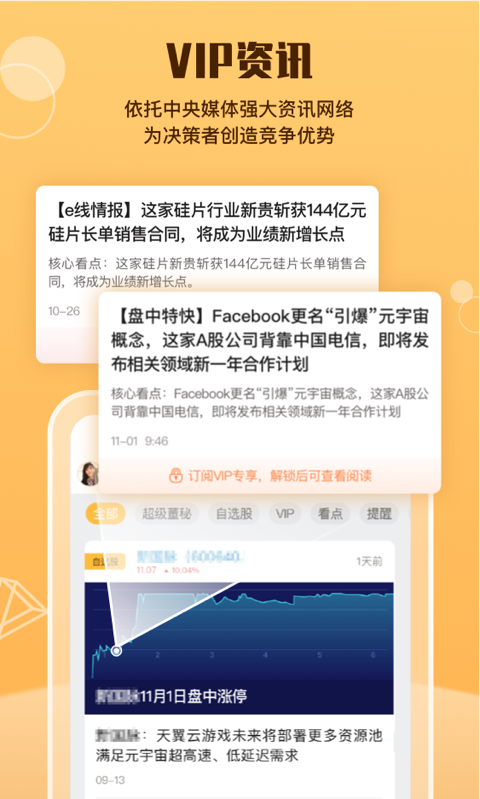
Screenshot of e company

e company function introduction

Company News: eCompany continuously releases new, fast and valuable listed company news on a rolling basis.

Opportunity Interpretation: Timely interviews and secondary interpretations of themes, concepts and industry events that may affect the stock price of listed companies.

Intelligence mining: Use data to interpret the market, use data to decipher the passwords of listed companies, and mine objective information for investors.

Interactive services: Starting from the needs of investors, we bring together listed companies to interact with investors, and live broadcast valuable activities and meetings of listed companies.
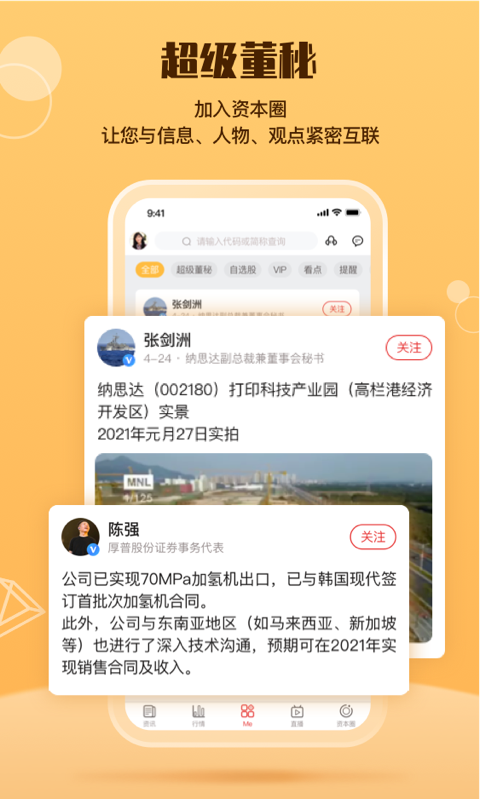
Screenshot of e company

FAQ


Account cannot be logged in

Problem description: Forgot password, account is locked or unable to receive verification code.

Solution:

Use the "Forgot Password" function to reset your password (requires binding your mobile phone number or email address).

Contact customer service to provide account information and assist in unlocking or resetting login methods.

Check the SMS blocking settings on your phone to make sure you can receive the verification code.

e company update log

1. Optimize content

2. The details are more outstanding and bugs are gone.

Huajun editor recommends:

e company is a high-performance software that meets everyone's requirements. The software is free and non-toxic, and has absolutely good reviews. Our Huajun Software Park has the most authoritative software, green and free, officially authorized, and similarPeople's Daily,Sina News,Sohu News,Today's headlines,Today's headlines, I hope everyone will come to download it!

FAQ