




CADSee Plus for iPhone software introduction
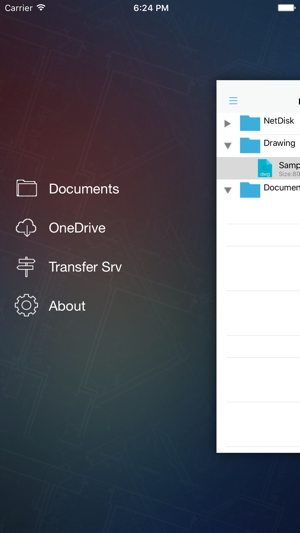
CADSee Plus for iPhone is a new type of DWG and graphics file management and browsing software. The built-in Dwg Viewer graphics browser implements ACDSee-like DWG/DXF file thumbnail preview effects; it supports management operations such as copying, pasting, cutting and deleting graphics files. It not only provides general functions such as graphic panning, full screen, and zoom, but also provides a unique dual-image synchronous browsing function, and supports full-screen mode, which is convenient for designers and reviewers to compare and view dual images. It is an essential image viewing tool for engineering designers.
CADSee Plus for iPhone basic functions
Basic functions of 2D CAD.
Plane drawing: can create basic graphic objects such as straight lines, circles, ellipses, torus polygons (regular polygons), and spline curves in a variety of ways.
Drawing auxiliary tools: Provides drawing auxiliary tools such as orthogonal, object snapping, polar tracking, and snap tracking. The orthogonal function allows users to easily draw horizontal and vertical straight lines, object snapping helps pick up special points on geometric objects, and the tracking function makes it easier to draw diagonal lines and locate points in different directions.
Edit graphics: CAD has powerful editing functions that can move, copy, rotate, array, stretch, extend, trim, scale objects, etc.
Dimensions: Various types of dimensions can be created, and the appearance of the dimensions can be set by yourself.
Writing text: You can easily write text at any position and in any direction of the graphics. You can set the text font, tilt angle, width scaling and other attributes.
Layer management function: Graphic objects are all located on a certain layer, and characteristics such as object color, line type, line width, etc. can be set.
3D drawing: 3D solid and surface models can be created, and the solids themselves can be edited.
Network function: Graphics can be published on the network, or AutoCAD resources can be accessed through the network.
Data exchange: Provides a variety of graphics and image data exchange formats and corresponding commands
CADSee Plus for iPhone function introduction
Drawing file list
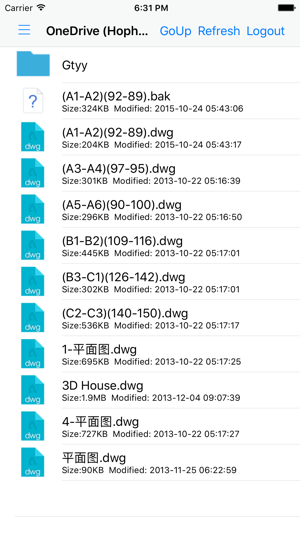
Provides a list of local map files, provides the functions of creating new folders, deleting files and folders, and realizing the management of local directories and files. Support iPhone 4/4s/5/5s, etc.
Drawing browsing
Achieve zooming, panning and full-screen operation of drawing files; realize switching between layout space and model space; provide display mode control of three-dimensional drawings.
Support SkyDrive
Implement support for Microsoft SkyDrive, access all SkyDrive document support, and download files and drawings locally.
CADSee Plus for iPhone software features
List of drawing files on memory card
Provides a list of drawing files in the CADSee directory on the memory card, and supports multi-level folders.
Drawing browsing
Achieve zooming, panning and full-screen operation of drawing files; realize switching between layout space and model space; provide display mode control of three-dimensional drawings.
Layer display controls
Realize layer display control of drawings.
Support SkyDrive
Implement support for Microsoft SkyDrive, access all SkyDrive document support, and download files and drawings locally.

CADSee Plus for iPhone update log
1: Support iOS 10
2: UI improvements
3: Graphics driver upgrade
Huajun editor recommends:
Don’t miss it when you pass by. If you miss CADSee Plus for iPhone, you will never experience such a good service again. This site also recommends to youBattle Arena,seetong,Medibang Paint,Rhinoceros,SGreen browser













Useful
Useful
Useful