
Hot search terms: 360 Security Guard Office365 360 browser WPS Office iQiyi Huawei Cloud Market Tencent Cloud Store
Hot search terms: 360 Security Guard Office365 360 browser WPS Office iQiyi Huawei Cloud Market Tencent Cloud Store

Text input Storage size: 114.1 MB Time: 2022-12-16
Software introduction: Baidu mobile phone input method supports pinyin, strokes, Wubi, handwriting, intelligent English input, and has two major functions: intelligent voice input and multimedia input...
Baidu Input Method is a popular input method product. It has won the love and praise of a large number of users for its powerful functions, convenient use experience and rich personalized settings. Baidu Input Method uses advanced natural language processing technology and deep learning algorithms to provide accurate input prediction and association, allowing users to input text more quickly. Next, let the editor of Huajun explain to you how to enable fuzzy sounds in Baidu input method and how to enable fuzzy sounds in Baidu input method!
first step
Make sure Baidu input method has been installed and activated on your device.
Step 2
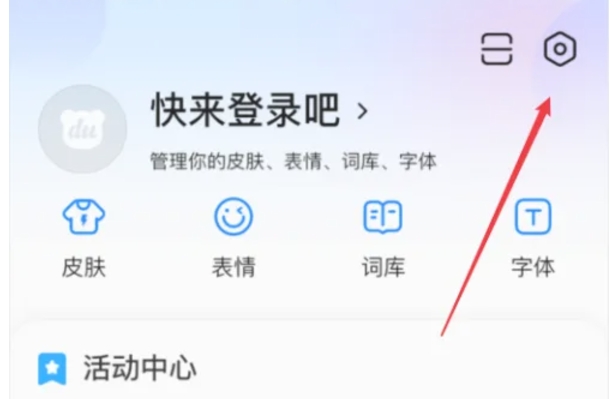
On the Baidu Input Method interface, find and click the "My" option to enter the personal center page.

Step 3
On the Personal Center page, click the "Settings" icon in the upper right corner to enter the Baidu Input Method settings page.
Step 4
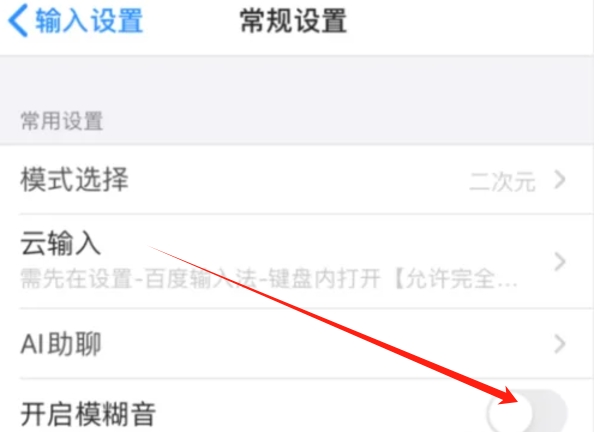
In the settings page, you need to find the settings options related to fuzz sounds. This is usually found under a menu such as "General Settings" or "Input Settings". Once found, click the sliding switch that turns on fuzzy sound.
Step 5
In some versions, first click "General Settings" or a similar option, and then find and click "Fuzzy Sound Settings" or a similar option to turn on the fuzzy sound function. The "click to open the sliding switch as shown in the picture" you mentioned may refer to the sliding switch that directly turns on the fuzzy sound, but the specific position and shape may vary depending on the version.
Step 6
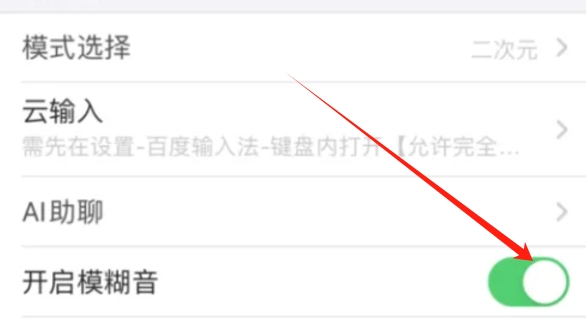
When the sliding switch switches to green (or other color indicating that it is turned on), it means that the fuzzy sound function has been successfully turned on.
The above is how to enable fuzzy sound in Baidu input method and how to enable fuzzy sound in Baidu input method compiled by Huajun editor for you. I hope it can help you!

 How to set the font for Toutiao today? -How to set font in Toutiao
 How to register for Toutiao? -How to register for Toutiao
 How does Toutiao publish news? -How to publish news in Toutiao today
 How to find the cover of Toutiao today? -How to find the cover of Toutiao today
 Quark Browser
 little red book
 Chinese University MOOC computer version
 Xiaoetong
 Traffic control 12123
 Minecraft Bedrock Edition
 KMPlayer
 watermelon video
 Meijia Market TV version
 How to use Fliggy’s student discount? List of student certification methods on Fliggy
 How to find the help center for Panzhi Sales - How to find the help center for Panzhi Sales
 How to change ID card with taptap-How to change ID card with taptap
 How to add friends on steam mobile version - How to add friends on steam mobile version
 How to Chineseize ourplay with one click - How to Chineseize ourplay with one click
