
Hot search terms: 360 Security Guard Office365 360 browser WPS Office iQiyi Huawei Cloud Market Tencent Cloud Store
Hot search terms: 360 Security Guard Office365 360 browser WPS Office iQiyi Huawei Cloud Market Tencent Cloud Store

Pinyin input Storage size: 133.83 MB Time: 2022-12-01
Software introduction: Baidu input method is a very cool input method launched by Baidu. It has fast typing speed, smooth use, and various skins and emojis...
Baidu Input Method is a powerful, easy-to-use, and richly personalized input method product that is deeply loved and praised by users. Baidu Input Method optimizes the input experience through intelligent algorithms, providing accurate input predictions and associations to speed up typing. Its interface design is simple and clear, and the operation is smooth. Users will not feel stuck or delayed during use. Next, let Huajun editor explain to you how to lock Baidu input method and how to lock Baidu input method!
first step
Baidu input method is in the status bar in the lower right corner of the computer screen (usually an icon with the word "du" or an input method icon).
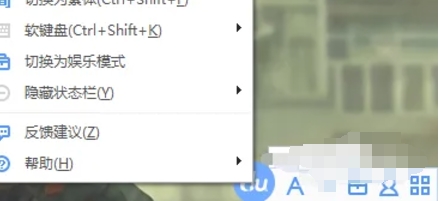
Step 2
In the pop-up menu, select the "Advanced Settings" option.
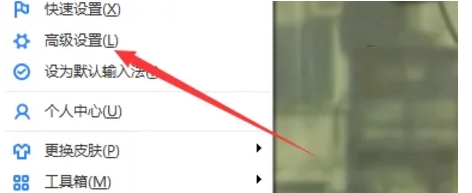
Step 3
In the advanced settings window, find and click the "Common" tab.

Step 4
At the bottom of the common settings page or in the related options, find and click the "Lock Baidu Input Method" or similar button.
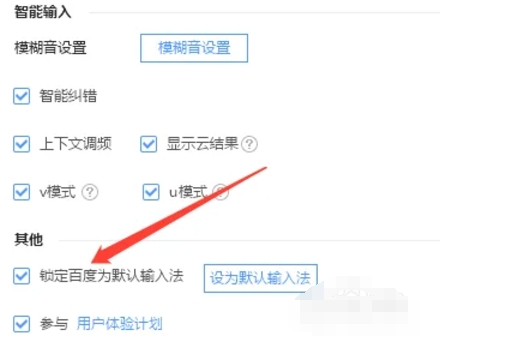
Step 5
At this time, Baidu input method will be locked as the current default input method and will not automatically switch to other input methods.
The above is how to lock Baidu input method and how to lock Baidu input method compiled by Huajun editor for you. I hope it can help you!

 How to add background music in python-How to add background music in python
 How to configure environment variables in python - How to configure environment variables in python
 How to run python - How to run python
 How to create a project in python - How to create a project in python
 How to make a blue sky background with scratch-How to make a blue sky background with scratch
 Steam
Steam
 Tencent Video
 WPS Office
 iQiyi
iQiyi
 Sohu video player
 Lightning simulator
 MuMu emulator
 Eggman Party
 WPS Office 2023
 What to do if there is no sound after reinstalling the computer system - Driver Wizard Tutorial
 How to switch accounts in WPS Office 2019-How to switch accounts in WPS Office 2019
 How to clear the cache of Google Chrome - How to clear the cache of Google Chrome
 How to fire bullets in scratch-How to fire bullets in scratch
