
Hot search terms: 360 Security Guard Office365 360 browser WPS Office iQiyi Huawei Cloud Market Tencent Cloud Store
Hot search terms: 360 Security Guard Office365 360 browser WPS Office iQiyi Huawei Cloud Market Tencent Cloud Store

Pinyin input Storage size: 133.83 MB Time: 2022-12-01
Software introduction: Baidu input method is a very cool input method launched by Baidu. It has fast typing speed, smooth use, and various skins and emojis...
Baidu Input Method is a powerful input method with diverse input methods, accurate vocabulary, convenient operation, efficient core, and rich features and personalized customization options. It has become the preferred input method in the minds of many users. Whether they are professionals who pursue efficient office work, young people who like personalized expression, or elderly people who need convenient input, they can all find functions and services that suit them in Baidu input method. Next, let Huajun editor explain to you how to set Baidu input method as the default input method and how to set Baidu input method as the default input method!
first step
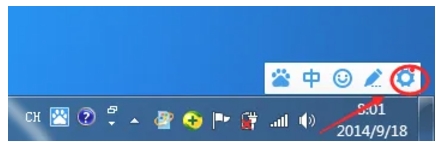
On the computer desktop, select and switch to Baidu input method by clicking the input method switching icon in the lower right corner of the taskbar.
Step 2
On the Baidu Input Method status bar, find and click the gear-shaped settings icon. This will open the Baidu Input Method settings menu.
Step 3
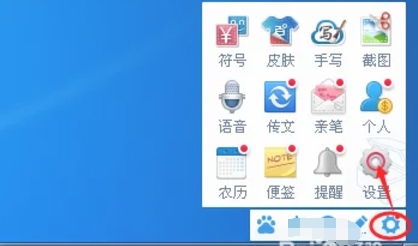
In the settings menu that pops up, select the "Settings" option, which will open the detailed settings interface of Baidu Input Method.
Step 4
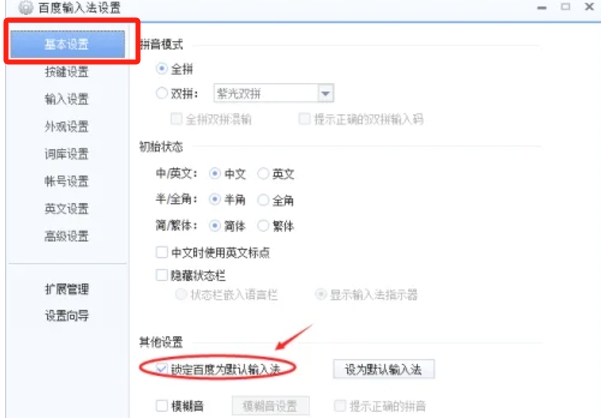
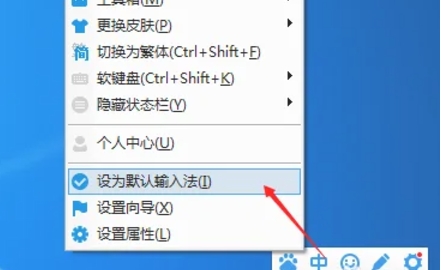
In the settings interface, find the "Basic Settings" or similar option, and make sure the check box for "Lock Baidu as the default input method" is selected. You can also find and click the "Set as Default Input Method" button in the settings interface to directly set Baidu Input Method as the default input method.
Step 5
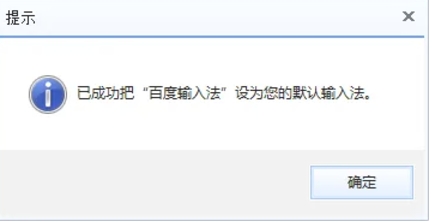
After completing the above steps, the system may pop up a prompt window to confirm that Baidu input method has been successfully set as the default input method. At this point, you can click the "OK" button to close the prompt window.
Step 6
To ensure that the settings take effect, you can try entering text in other applications or text editors to see if the Baidu input method is used by default.
The above is how to set Baidu input method as the default input method and how to set Baidu input method as the default input method compiled by Huajun editor for you. I hope it can help you!

 How to add background music in python-How to add background music in python
 How to configure environment variables in python - How to configure environment variables in python
 How to run python - How to run python
 How to create a project in python - How to create a project in python
 How to make a blue sky background with scratch-How to make a blue sky background with scratch
 Steam
Steam
 Tencent Video
 WPS Office
 iQiyi
iQiyi
 Sohu video player
 Lightning simulator
 MuMu emulator
 Eggman Party
 WPS Office 2023
 What to do if there is no sound after reinstalling the computer system - Driver Wizard Tutorial
 How to switch accounts in WPS Office 2019-How to switch accounts in WPS Office 2019
 How to clear the cache of Google Chrome - How to clear the cache of Google Chrome
 How to fire bullets in scratch-How to fire bullets in scratch
