Hot search terms: 360 Security Guard Office365 360 browser WPS Office iQiyi Huawei Cloud Market Tencent Cloud Store
Hot search terms: 360 Security Guard Office365 360 browser WPS Office iQiyi Huawei Cloud Market Tencent Cloud Store

programming tools Storage size: 63.33 MB Time: 2022-05-26
Software introduction: The official version of scratch is a graphical programming software specially created for children. In addition to Web, scratch not only provides multiple offline versions...
Scratch is a graphical programming tool developed by MIT. Users can create interactive stories, games and animations without any programming knowledge by dragging color-coded instruction blocks. With the core concept of "imagination-programming-sharing", the platform not only cultivates logical thinking and creativity, but also allows learners to display their works and inspire each other through a global online community. It has now become a programming enlightenment platform popular in more than 150 countries, opening the door to creative programming for young people. Next, let the editor of Huajun explain to you how scratch fires bullets and how scratch fires bullets!
first step
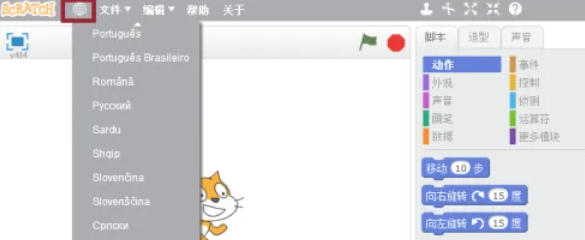
Open Scratch and click the "globe icon" in the upper right corner.
Step 2
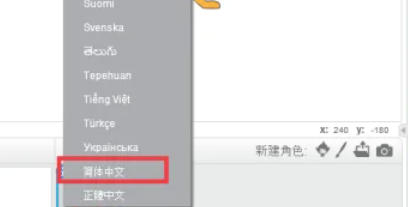
Select "Chinese" in the drop-down menu, and the interface language switching is completed.
Step 3
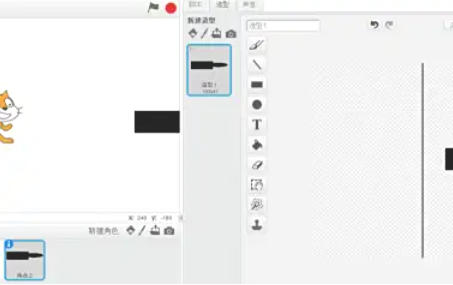
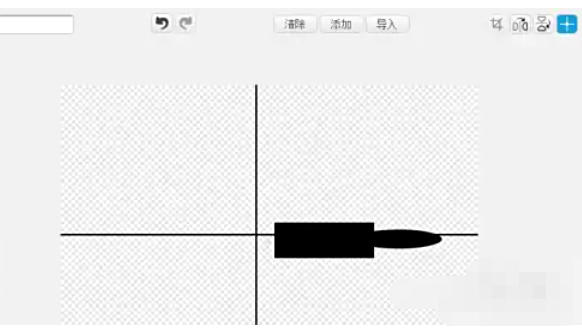
Click the "Draw" button (brush icon) in the "Character List Area". Use the Rectangle Tool to draw an elongated rectangle (for the main body of the bullet). Use the Ellipse Tool to add a small ellipse (to simulate a bullet) at the front of the rectangle.
Step 4
Click "Set Shape Center" (crosshair icon) in the upper right corner. Move the center point to the midpoint of the bullet's tail (make sure it is fired from this point).
Step 5
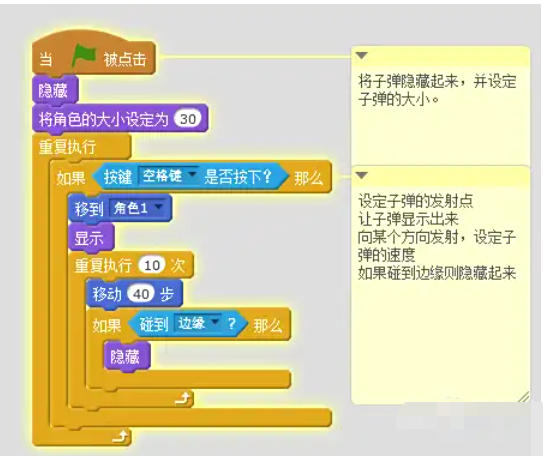
Add the launch script in the code area of the bullet character
Step 6
Add it in the code area of the spaceship character to control the launch
Step 7
Click the green flag to run the program. Press the space bar and watch the bullets shoot out from the spaceship and move forward, disappearing after hitting the edge.
The above is how the editor of Huajun compiled for you how to fire bullets with scratch and the method of firing bullets with scratch. I hope it can help you!

 How to make a blue sky background with scratch-How to make a blue sky background with scratch
 How to create a linked list in scratch-How to create a linked list in scratch
 How to add local programs to scratch-How to add local programs to scratch
 How to input Chinese in scratch-How to input Chinese in scratch
 Steam
Steam
 Tencent Video
 WPS Office
 iQiyi
iQiyi
 Sohu video player
 Lightning simulator
 MuMu emulator
 Eggman Party
 WPS Office 2023
 What to do if there is no sound after reinstalling the computer system - Driver Wizard Tutorial
 How to switch accounts in WPS Office 2019-How to switch accounts in WPS Office 2019
 How to clear the cache of Google Chrome - How to clear the cache of Google Chrome
 How to upgrade the bootcamp driver? How to upgrade the bootcamp driver