-
Sweet Home 3D
- Size: 31.27M
- Language: Simplified Chinese
- Category: Assisted design
- System: Winxp/vista/win7/2000/2003






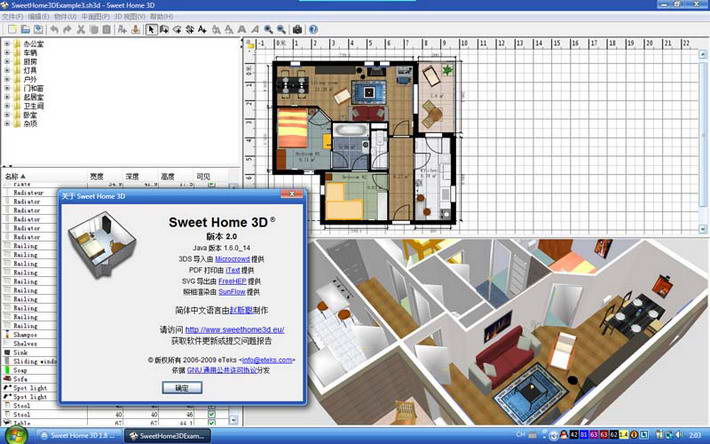
Sweet Home 3D Chinese version is a free, open source home decoration auxiliary design software. It can help you design and arrange your furniture through a two-dimensional home plan, and you can also browse the entire decoration layout from a three-dimensional perspective. If you have a ready-made floor plan on hand, you can import it as the floor plan background in the software. After setting the proportions, you can draw the walls directly based on the existing content on the drawing. Any changes you make to the floor plan will appear in real-time in the 3D view, so you can see realistic renderings at any time. Huajun Software Park provides free downloads.

Sweet Home 3D Chinese version features:
Sweet Home 3D is a set of such software, whether it is used by professional interior painters or amateur players who want to draw their own styles can rely on it. It can help you design and arrange your furniture through a two-dimensional home plan, and you can also browse the entire decoration layout from a three-dimensional perspective. If you have a ready-made floor plan on hand, you can import it as the floor plan background in the software. After setting the proportions, you can draw the walls directly based on the existing content on the drawing. Any changes you make to the floor plan will appear in real-time in the 3D view, so you can see realistic renderings at any time.
It is specially used for drawing interior drawings. It has many built-in diagram modules. There are also many official diagram modules that can be downloaded. Just drag it into the drawing area and you can easily create a professional-looking floor plan. There is also a 3D stereoscopic view area to make up for the fact that you don’t know what you are drawing after drawing the floor plan. In addition, you can use the indoor drawing to draw a three-dimensional diagram to facilitate future decoration and sales. Completed drawings can be converted into PDF files.
The entire model can be flattened to form a plan view, and can also be rotated in 3D to allow users to observe it from various angles.
The operation interface is quite simple, with only 4 areas except the drop-down menu and toolbar.
* Object library - stores all furniture, doors, windows, etc. in each area of the home.
* Floor plan editing area - displays the drawn floor plan, where walls and furniture can be created.
* Scene object list - displays all objects that appear in the scene. You can choose not to display objects individually.
* Three-dimensional preview area - displays the layout of your home in real time from a three-dimensional perspective, and can switch to different angles at any time.
Sweet Home 3D Chinese version installation method
First there is a very important issue that needs to be clarified. This software uses DirectX for 3D rendering. If your machine configuration is too low, or the version of DirectX is too low, or the version of the graphics card driver is too low, it may cause a Java 3D error when the software starts, displaying an English warning message. This software has passed the test of Windows XP and Windows Vista. The software developer claims that its kernel can support at least Windows 98. So if you can't use it after installation, don't just say that there is a problem with the software!
Other known issues:
1. Due to a problem with the JRE itself, if the menu font and message box font in your system appearance settings are set to an 8pt non-CJK font (many interface styles use 8pt Tahoma), the JRE will not automatically enlarge the Chinese part to 9pt for display, causing the Chinese characters in some places in the program (mainly menus and some buttons) to be blurred.
2. Still due to JRE issues, when using the "Microsoft Pinyin Input Method" to input Chinese anywhere in the program (including the opening and saving dialog boxes), if the "key-by-key prompt" is turned on, sometimes the pinyin and word grouping windows may disappear during the input process.
3. According to recent findings, if you use the Sogou Pinyin input method to input Chinese when using the "Add Text" tool, it may cause the software to exit with an error after the text is inserted (at least under Windows Vista systems). At this time, a JRE error record file will also appear in the software installation directory. It is currently known that Microsoft Pinyin Input Method 2007 does not have this problem under Vista; other input methods and operating systems have not been tested yet (because the software cannot run on MS VPC virtual machines).
After downloading, double-click the SweetHome3D-4.0-windows-oc.exe file to start the installation, select Simplified Chinese

View the license agreement, select Grant or Accept, and click Next

Sweet Home 3D Chinese version FAQ
First there is a very important issue that needs to be clarified. Sweet Home 3D uses directx for 3D rendering. If your machine configuration is too low, or the version of DirectX is too low, or the version of the graphics card driver is too low, it may cause a Java 3D error when the software starts, displaying an English warning message. Sweet Home 3D has passed the test of Windows XP and Windows Vista. The developer of Sweet Home 3D claims that its kernel can support at least Windows 98, so if you can't use it after installation, don't just say there is a problem with the software!
Other known issues:
1. Due to a problem with the JRE itself, if the menu font and message box font in your system appearance settings are set to an 8pt non-CJK font (many interface styles use 8pt Tahoma), the JRE will not automatically enlarge the Chinese part to 9pt for display, causing the Chinese characters in some places in the program (mainly menus and some buttons) to be blurred.
2. Still due to JRE issues, when using the "Microsoft Pinyin Input Method" to input Chinese anywhere in the program (including the opening and saving dialog boxes), if the "key-by-key prompt" is turned on, sometimes the pinyin and word grouping windows may disappear during the input process.
3. According to recent findings, if you use the Sogou Pinyin input method to input Chinese when using the "Add Text" tool, it may cause the software to exit with an error after the text is inserted (at least under Windows Vista systems). At this time, a JRE error record file will also appear in the software installation directory. It is currently known that Microsoft Pinyin Input Method 2007 does not have this problem under Vista; other input methods and operating systems have not been tested yet (because the software cannot run on MS VPC virtual machines).
Sweet Home 3D Chinese version update log:
1. Fix several bugs;
2. Optimize details;
Huajun editor recommends:
After continuous official iterations, Sweet Home 3D has become very stable and powerful, meeting all your needs. The editor has also prepared vect2000 vectorization software, Aimo Brain Map, and Cloud Machine Manager for you.
Version: 3.6 Chinese version | Update time: 2024-12-23
Similar recommendations




Latest updates





Sweet Home 3D Review
-
1st floor Huajun netizen 2015-04-12 06:59:00Sweet Home 3D is very useful, thank you! !
-
2nd floor Huajun netizen 2010-07-30 16:30:32Sweet Home 3D software is very easy to use, downloads quickly and is very convenient!
-
3rd floor Huajun netizen 2011-03-15 01:42:51Sweet Home 3D is awesome! 100 million likes! ! !
Recommended products








- Diablo game tool collection
- Group purchasing software collection area
- p2p seed search artifact download-P2P seed search artifact special topic
- adobe software encyclopedia - adobe full range of software downloads - adobe software downloads
- Safe Internet Encyclopedia
- Browser PC version download-browser download collection
- Diablo 3 game collection
- Anxin Quote Software
- Which Key Wizard software is better? Key Wizard software collection




