-
Autodesk 123D Design
- Size: 371.33M
- Language: Simplified Chinese
- Category: Assisted design
- System: winall






Autodesk 123D Chinese versionis a free3D CAD software, provided here is the official Chinese version of Autodesk 123D Design v1.8, including 32-bit and 64-bit versions! Please refer to the following method to set Chinese. Autodesk 123D Design can create 3D free models for free for users. It is3D drawingEssential software! Huajun Software Park provides you with free download of Autodesk 123D Design. Friends who like Autodesk 123D Design come to Huajun Software Park to download and experience it!
Autodesk 123D Design Highlights
Easy to use: The operation interface is intuitive and novel, even users without professional background can get started quickly.
Powerful functions: Provides a wealth of modeling tools and functions to meet users' various needs in 3D design.
Free to use: As free software, users do not need to bear licensing fees, and it is suitable for large-scale deployment by individual enthusiasts and educational institutions.
Autodesk 123D Design Features
Zero-based friendly:
The interface is minimalist and supports drag-and-drop operations, allowing you to quickly create 3D models without professional knowledge (such as 123D Design).
Provide intelligent tools (such as Boolean operations, sketch import) to lower the design threshold.
Multiple scene coverage:
Modeling: Generate complex structures through basic geometry stacking (Design).
Physical transformation: Slice the 3D model into flat drawings and support assembly (Make) of low-cost materials such as cardboard and wood.
Photo modeling: Cloud AI automatically generates 3D models from photos (Catch).
Creative design: Supports artistic creations such as sculpture (Sculpt) and biological skeleton editing (Creature).
Multi-platform collaboration:
Supports PC, Mac, iPad and web pages, with real-time data synchronization (such as Design's MyProjects library).
Compatible with STL, OBJ, SVG and other formats, it can be directly used for 3D printing or imported into other software (such as Meshmixer pre-processing).
Free and lightweight:
The entire series is free and suitable for individuals, education and start-up teams.
It's small (like Design is only 46MB), runs smoothly, and doesn't require high-end hardware.
Community & Resources:
Built-in material library, you can download shared models (such as Tinkercad's online resources).
Tutorials and examples are provided to help you get started quickly (such as Tinkercad's step-by-step guide).
Autodesk 123D Design features
Basic modeling functions:
Nine basic geometries are provided, and users can generate complex shapes by stacking and editing these basic shapes.
Supports operations such as stretching, rotating, and sweeping to convert 2D sketches into 3D models.
Provides Boolean operations that allow users to perform operations such as merging, subtracting, and intersecting between meshes and entities.
Photo modeling features:
123D Catch can use multi-angle photos to generate textured 3D models. Users only need to use a point-and-shoot camera, mobile phone or advanced DSLR camera to capture objects, people or scenes, and then use cloud computing power to convert them into vivid 3D models.
Physical production functions:
123D Make can convert digital three-dimensional models into two-dimensional cutting patterns. Users can quickly assemble these patterns into physical objects using low-cost materials such as cardboard, wood, cloth, metal, or plastic to reproduce the original digital model.
User interface and operation:
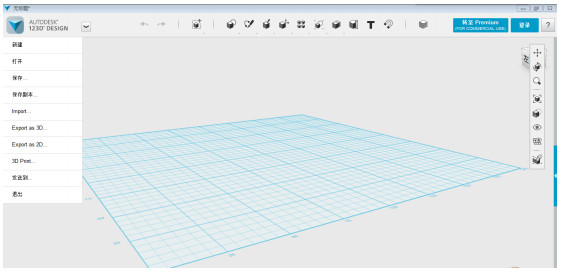
The interface design is intuitive and novel, and the main toolbar provides various tools for creating and modifying parts.
There is a small cube in the upper right corner of the window through which the user can easily view and rotate the model being created.
Equipped with practical functions such as capture and cruise, it improves the accuracy and efficiency of the design.
Compatibility and export formats:
Supports Windows XP to Windows 7 systems (the final version R2.2 provides a Simplified Chinese interface).
Supports opening, inserting and saving meshes in STL and OBJ formats for easy collaboration with other 3D printing software.
Autodesk 123D Design setup tutorial
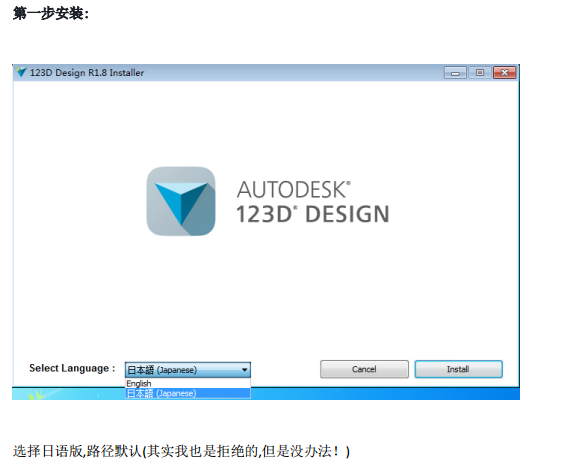
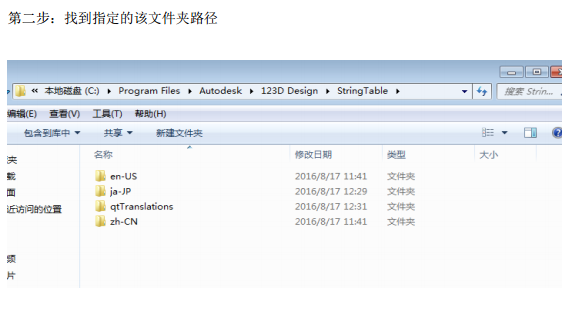
1. Click Install and select the default Japanese version path.
2. Find the specified folder path
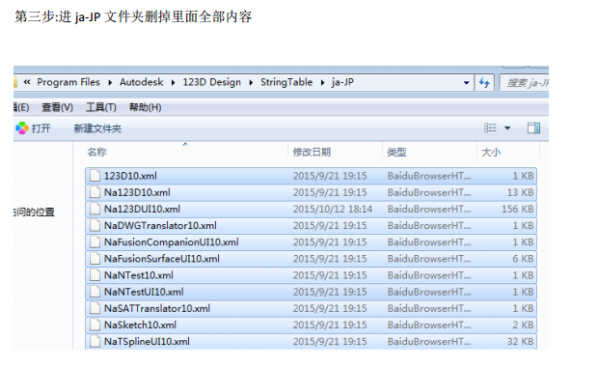
3. Enter the JA-JP folder and delete all contents inside.
4.Copy all the contents in the zh-CN folder to the ja-JP folder
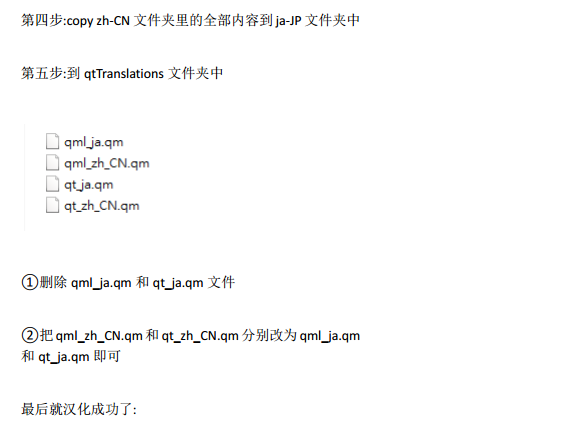
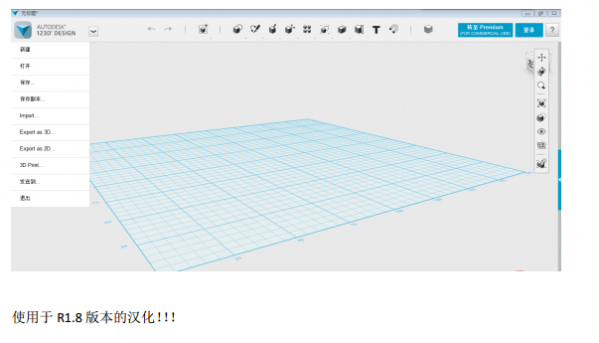
5. Go to the qtTranslations folder, delete the qml_ia.qm and qt_ia.qm files, and then change qml_zh_CN.qm to qml_ia.qm and qt_ia.qm respectively.
Autodesk 123D Design FAQ
What should I do if the software fails to start and displays "123D Design has stopped working"?
Review application error entries in the Windows logs to identify the specific module causing the failure (such as nsbase10.dll).
If you use anti-virus software such as Avast Antivirus, try uninstalling the anti-virus software and restarting the computer.
Uninstall and reinstall the 123D Design software, making sure to delete all related residual folders (such as C:Program FilesAutodesk123D Design, C:ProgramDataAutodesk123D Design, C:UsersAppDataRoamingAutodesk123D Design) during the installation process.
Autodesk 123D Design update log:
1. Modify user-submitted bugs
2.Add new features
Huajun editor recommends:
In addition to Autodesk 123D Design, a very convenient auxiliary design, there are also related software such as vect2000 vectorization software, Jingoal, and Batch Butler available for download. If you need it, please click to download and use it.
Version: 2.2.14 | Update time: 2025-12-04
Similar recommendations



Latest updates





Autodesk 123D Design Review
Recommended products







- Diablo game tool collection
- Group purchasing software collection area
- p2p seed search artifact download-P2P seed search artifact special topic
- adobe software encyclopedia - adobe full range of software downloads - adobe software downloads
- Safe Internet Encyclopedia
- Browser PC version download-browser download collection
- Diablo 3 game collection
- Anxin Quote Software
- Which Key Wizard software is better? Key Wizard software collection




