
-
Interior decoration design software (Sweet Home 3D)
- Size: 526.26M
- Language: Simplified Chinese
- Category: Assisted design
- System: winall






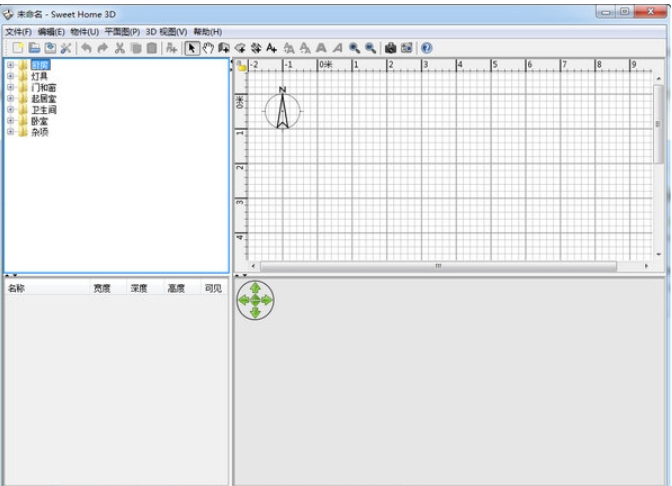
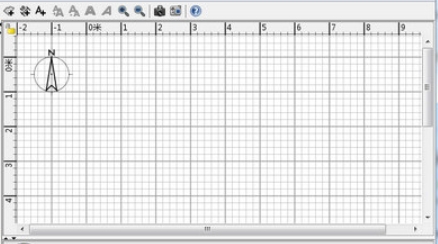
Interior decoration design software (Sweet Home 3D) is a free, open source interior decoration design software that is suitable for home decoration, office design, store layout and other scenarios.

Software features
Intuitive and easy-to-use interface
It adopts an upper and lower double-column layout. The upper part is the 2D design area (drawing walls, doors and windows, and adding furniture), and the lower part synchronizes the 3D preview effect in real time.
Supports mouse drag operation, users can drag furniture models directly from the category directory to quickly complete space layout.
Rich furniture and decoration model library
It has thousands of built-in 3D models of furniture, lamps, decorations, etc., classified by function (such as kitchen, living room, bedroom), and supports search by name.
Users can customize model color, texture, size and material (such as wood, metal, glass) and view the adjustment effects in real time.
Precise 2D/3D linkage design
Draw straight lines, arcs or inclined walls in a 2D plan, automatically generate a 3D three-dimensional model, and support setting wall thickness, height and floor parameters.
It provides a bird's-eye view and virtual roaming mode. Users can use the keyboard direction keys to simulate a real-person perspective and freely view room details.
Multi-format compatibility and scalability
Supports importing existing house plans as backgrounds and drawing walls to scale; supports importing custom 3D models (OBJ, COLLADA, etc. formats) and textures.
Provides a Java programming interface, allowing developers to extend functions through plug-ins, or develop derivative versions based on its MVC architecture.
Multi-language support and global adaptation
Supports 28 language interfaces (including Simplified Chinese) to meet the needs of global users.
Provide detailed help documents and video tutorials to lower the learning threshold.
Software function
Basic drawing and editing tools
Wall drawing: supports straight lines, arcs, and inclined walls, and the thickness, height, and color can be customized.
Adding doors and windows: Provides a variety of door and window styles, and automatically calculates the opening size after dragging and inserting into the wall.
Room division: Achieve complex apartment designs by adding partition walls or virtual lines.
Furniture arrangement and attribute adjustment
Model library management: Filter furniture by category, support multiple selection, copy and batch adjustment.
Parameter customization: modify the furniture size, rotation angle, position coordinates, and set whether to display labels (such as name, size).
Lighting simulation: Add light sources and adjust intensity and color to simulate natural light and artificial lighting effects.
3D preview and interactive functions
Perspective switching: Supports aerial bird's-eye view, first-person roaming and fixed-point observation modes.
Effect enhancement: Enable shadows, reflections and material glossiness to improve rendering realism.
Animation export: Generate house tour videos or 360° panoramas for easy sharing and display.
Annotation and output tools
Dimensioning: Add room area, wall length and furniture dimension lines.
Text Annotation: Add explanatory text or arrow guidance to the floor plan.
File export: Supports floor plans in PDF, PNG, SVG and other formats, as well as 3D model files such as OBJ and 3DS.
Advanced feature extensions
Multi-story design: Supports the creation of multi-story buildings, setting the thickness of each floor and staircase style independently.
Budget statistics: Automatically generate a bill of materials and cost estimate based on the selected furniture.
Plug-in integration: Advanced functions such as VR interaction and AI layout optimization can be achieved by installing plug-ins.

FAQ
The software runs slowly or freezes
Possible reasons: The computer configuration is insufficient and the software load is too heavy.
Solution:
Upgrade computer hardware configuration, such as increasing memory, replacing more powerful graphics cards, etc.
Clean up computer junk, close unnecessary background programs, and reduce software load.
The export file format is not supported or the export failed.
Possible reasons: The software version is too low, or the export settings are incorrect.
Solution:
Update the software to the latest version to ensure the required export file format is supported.
Check the export settings to make sure they are correct.
Interior decoration design software (Sweet Home 3D) update log:
1. Optimized some functions
2. Solved many intolerable bugs
Huajun editor recommends:
Interior decoration design software (Sweet Home 3D) is a good auxiliary design software. If you are interested, please download it and use it. I believe you will like it. Aimo Brain Map, .NET, and Batch Manager are also good software and are recommended for students to download and use.
Version: 7.5.1 | Update time: 2025-05-13
Similar recommendations




Latest updates




Interior Decoration Design Software (Sweet Home 3D) Review
-
1st floor Huajun netizen 2025-04-24 03:44:27The interior decoration design software (Sweet Home 3D) is very useful, thank you! !
-
2nd floor Huajun netizen 2025-04-22 23:21:49The interior decoration design software (Sweet Home 3D) is very easy to use, the download speed is very fast, and it is very convenient!
-
3rd floor Huajun netizen 2025-04-28 04:01:21The overall feeling of the interior decoration design software (Sweet Home 3D) is good and I am quite satisfied with it. The installation and operation are very smooth! Followed the installation step-by-step instructions and it went very smoothly!
Recommended products








- Diablo game tool collection
- Group purchasing software collection area
- p2p seed search artifact download-P2P seed search artifact special topic
- adobe software encyclopedia - adobe full range of software downloads - adobe software downloads
- Safe Internet Encyclopedia
- Browser PC version download-browser download collection
- Diablo 3 game collection
- Anxin Quote Software
- Which Key Wizard software is better? Key Wizard software collection




